


Deliver Real-Time Flight Status Updates With Adobe Journey Optimizer Live Activities
Now Enhanced With Broadcast Live Updates for Large-Scale Operational Communications
When travelers head to the airport, their biggest pain point isn’t the flight itself—it’s the uncertainty:
Has the gate changed?
When does boarding begin?
Is the flight delayed?
Where are my bags?
Airlines have the data. Travelers desperately need it. But traditional push notifications only go so far.
With Adobe Journey Optimizer (AJO) Live Activities, airlines can deliver real‑time, persistent updates directly on the lock screen through iOS Live Activities—and now, with the introduction of Broadcast Live Activities, they can scale these updates to entire airport terminals, routes, weather events, or wide operational groups simultaneously.
This blog shows how airlines can implement both 1:1 and Broadcast Live Activities to keep passengers informed throughout their journey.
What’s New: Broadcast Live Activities
Originally, Live Activities in AJO focused on personalized 1:1 updates, such as a flight delay for a specific traveler.
With the new Broadcast Live Activities capability, airlines can now:
- Start a Live Activity on devices remotely
- Update entire groups of devices subscribed to a broadcast channel
- Scale to thousands or millions of passengers
- Deliver terminal-wide or route-wide updates instantly
- Support “adhoc users” who join late or aren’t inside the targeted audience
- Use familiar AJO API‑triggered Campaigns to orchestrate broadcast updates
This opens up a completely new class of use cases.
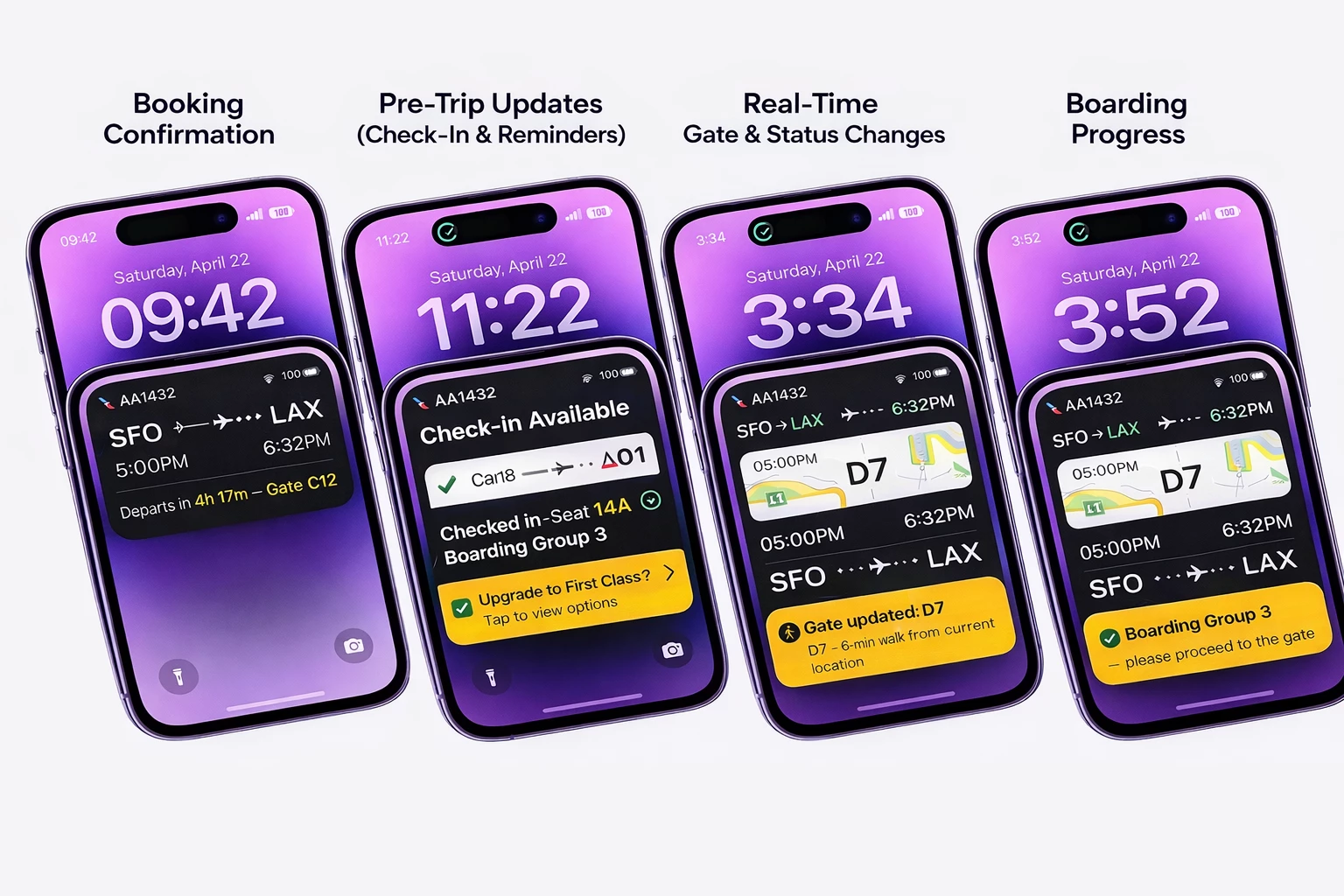

To illustrate how Broadcast Live Activities improve the passenger experience, let’s walk through a complete airline journey—from booking to baggage claim—enhanced with both 1:1 flight updates and broadcast operational alerts.
1. Booking Confirmation (1:1 Live Activity)
When a traveler books a flight:
- The airline app initiates a 1:1 Flight Live Activity.
- AJO sends an initial payload including:
- Flight number
- Departure time
- Gate (if known)
- Countdown timer
Lock screen example:
Flight AA1432 • Departs in 4h 17m • Gate C12
This Live Activity is personal to the traveler.
2. Pre‑Trip Updates (Check‑In, Reminders)
AJO triggers updates as events come in:
- Boarding group assigned
- Seat number
- Upgrade availability
- TSA/PreCheck notices
Checked in • Boarding Group 3 • Seat 14A
3. Broadcast Scenario: Terminal‑Wide Weather Advisory
Here’s where Broadcast Live Activities shine.
Situation:
A sudden weather disruption impacts all flights departing Terminal D.
What happens:
- The airline triggers an API‑Triggered Marketing Campaign in AJO.
- A “Push‑to‑Start” broadcast notification is sent to all profiles matching the audience (e.g., all currently departing Terminal D passengers).
- Passengers' devices receive:
- A “push-to-start” notification
- The device auto‑subscribes to the broadcast channelID
- A Terminal‑D Live Activity starts on the lock screen
- All subsequent updates are fanned out to the entire broadcast channel.
Example update:
Due to weather conditions, all departures from Terminal D are experiencing delays. Please remain near your gate.
This is perfect for large‑scale operations where users need the same real‑time information at the same moment.
4. Gate Change (1:1 Update)
Gate changes remain specific to the individual traveler and update the traveler’s personal Live Activity:
Gate updated to D7 — 6 minute walk from current location.
Broadcast and personal updates can co-exist.
5. Live Boarding Progress (1:1 Update)
As boarding begins, AJO sends personalized updates:
- Pre‑boarding
- Priority groups
- Boarding Groups 1–5
- Final call
Passengers see:
Boarding Group 3 — please proceed to gate.
6. Broadcast Scenario: Aircraft Swap Notification
If the airline changes the aircraft model for operational reasons:
- The airline sends a broadcast update to all affected flights via the broadcast channel.
- Every subscribed device receives the Live Activity update instantly.
Example:
Operational update: Aircraft has been changed. Expect minor seating adjustments.
7. In-Flight Status (1:1 Update)
After the plane departs:
- AJO updates the Live Activity with actual departure time
- Countdown to arrival
- Arrival gate
In Flight ✈️ | Landing in 2h 47m | Arrival Gate B22

8. Arrival & Baggage Claim
When the plane lands:
1:1 Updates
- Arrival gate
- Baggage carousel assignment
- Bag ETA
Broadcast Updates (optional)
If an entire arrival terminal is congested, the airline can broadcast message:
High traffic at Carousel Area 3. Expect delays retrieving luggage.
At the end, the Live Activity automatically ends.

How Broadcast Live Activities Work in AJO
Broadcast Live Activities use APNs Channels and rely on a publish–subscribe model.
✔ Customers create a Broadcast Channel (channelID) on their APNs account
This represents a group of devices that will receive the same updates.
✔ Devices subscribe to the channel in two ways:
1. Remote Start (via AJO campaign)
- AJO sends a Push-to-Start message to the selected audience
- Devices subscribe to the channelID automatically
- The Live Activity starts instantly
2. Local Start / Adhoc User Join
Perfect for use cases like:
- A passenger joining during an ongoing delay
- Someone who did not check in but wants updates
- Walk‑up customers in the airport
The app:
- Stores the broadcast channelID locally
- Calls the SDK to start the Live Activity locally
- Subscribes to the channel
- Automatically receives subsequent broadcast updates
✔ AJO sends updates through API-triggered Campaigns
These campaigns support:
| Event Type | Purpose |
|---|---|
| pushToStart | Starts the Live Activity for broadcast audiences |
| updateEvent | Sends bulk updates to all devices subscribed to the channel |
| endEvent | Terminates the Live Activity across all subscribers |
✔ AEP and Profile Store
Used for:
- Audience qualification
- Segmentation

Why Airlines Value This Use Case
-
Always-On Visibility – Travelers receive timely updates without needing to open or refresh an app.
-
Enhanced Customer Satisfaction – Proactive communication minimizes uncertainty and reduces passenger frustration.
-
Lower Support Costs – Fewer inbound queries such as “What gate is my flight?” significantly reduce contact center volume.
-
Improved Operational Efficiency – Instantly broadcast critical updates (e.g., weather disruptions or terminal changes) to thousands of Live Activities simultaneously.
-
Stronger Competitive Advantage – Deliver real-time, premium flight experiences that meet or exceed leading travel apps—without the need for complex custom engineering.
Start Building Your Live Activity Flight Experience
Live Activities offer airlines a powerful way to enhance customer experience during stressful, time-sensitive travel moments. Adobe Journey Optimizer brings together real-time data, cross-channel orchestration, and mobile SDK capabilities to make this vision a reality.
Whether you're enhancing loyalty engagement, elevating mobile experience, or modernizing operational communications, AJO Live Activities unlock a new frontier in customer-centric travel design.