Michael_Soprano
Level 10
September 13, 2025
해결됨

Conditions - multiple if statements while choosing email address

  • September 13, 2025
  • 2 답변들
  • 289 조회

Could somebody give me idea how to use multiple if statements in Condition Node? 
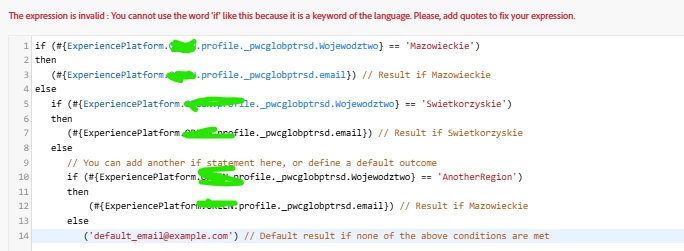
 

Additionally has anyone used Condition Node while choosing email address?

이 주제는 답변이 닫혔습니다.
최고의 답변: Mohan_Dugganab

Here is an example which can be adapted for your case.

if (#{ExperiencePlatform.ProfileFieldGroup.profile.homeAddress.city} == 'San Jose') then ( #{ExperiencePlatform.ProfileFieldGroup.profile.personalEmail.address} ) else ( if (#{ExperiencePlatform.ProfileFieldGroup.profile.homeAddress.city} == 'Seattle') then ( #{ExperiencePlatform.ProfileFieldGroup.profile.personalEmail.address} ) else ( if (#{ExperiencePlatform.ProfileFieldGroup.profile.homeAddress.city} == 'New York') then ( #{ExperiencePlatform.ProfileFieldGroup.profile.personalEmail.address} ) else ( 'default' ) ) )

2 답변

Mohan_Dugganab
Adobe Employee
Adobe Employee
September 13, 2025

Here is an example which can be adapted for your case.

if (#{ExperiencePlatform.ProfileFieldGroup.profile.homeAddress.city} == 'San Jose') then ( #{ExperiencePlatform.ProfileFieldGroup.profile.personalEmail.address} ) else ( if (#{ExperiencePlatform.ProfileFieldGroup.profile.homeAddress.city} == 'Seattle') then ( #{ExperiencePlatform.ProfileFieldGroup.profile.personalEmail.address} ) else ( if (#{ExperiencePlatform.ProfileFieldGroup.profile.homeAddress.city} == 'New York') then ( #{ExperiencePlatform.ProfileFieldGroup.profile.personalEmail.address} ) else ( 'default' ) ) )
Michael_Soprano
Level 10
September 15, 2025

Works. Thanks mate!