Business event based trigger a journey in AJO | Community
Skip to main content
Level 3
May 24, 2023
Question

Business event based trigger a journey in AJO

  • May 24, 2023
  • 5 replies
  • 4350 views

Hi Folks, 


I have a very basic question for which I seek a solution here.


I have created a business event and used that inside the journey followed by read segment and and Email channel.


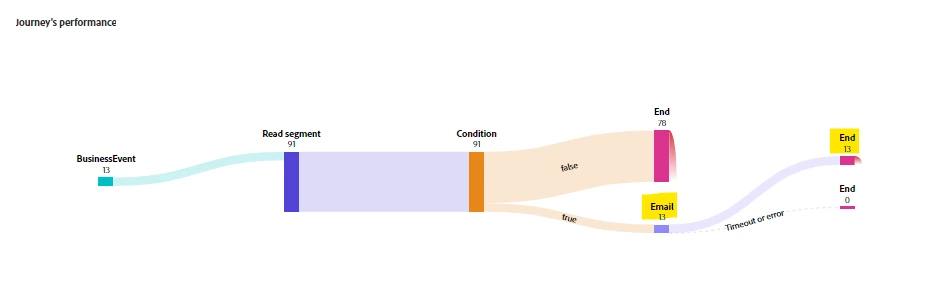
After I publish and execute(event) I got the email means everything works fine but I try to trigger the event multiple times on which I can see it looks working fine in journey report but not able to receive the email.


Am I missing something here on configuration or anything. Any suggestion would be helpful.


Thanks
 

This post is no longer active and is closed to new replies. Need help? Start a new post to ask your question.

5 replies

SatheeskannaK
Community Advisor
Community Advisor
May 24, 2023

@ikmoo Looks like it had sent 13 emails out the door.

Maybe you already did this. Did you check your junk folder? Also, did you try testing with a different email address and probably using journey test mode?

Thanks, Sathees
IkmooAuthor
Level 3
May 24, 2023

Hi @satheeskannak ,


Yeah I have checked it in other folders too but didn't receive any and while using test mode there is mo problem, I can receive as many as emails .

SatheeskannaK
Community Advisor
Community Advisor
May 24, 2023

@ikmoo Did you check on the Journey reports -> email reports -> sent metrics?

Probably check the suppression list to make sure everything looks good. One more thing to check your profile in the events section.

Thanks, Sathees
Manoj_Kumar
Community Advisor
Community Advisor
May 25, 2023

Hello @ikmoo 


What is in the condition activity? The condition activity is excluding profiles in the journey.


Manoj     Find me on LinkedIn
IkmooAuthor
Level 3
May 25, 2023

Hi @_manoj_kumar_ ,


Yup you are right, There was around 7 profiles in that segment out of which I am putting an condition to exclude other profile than mine. 


So that works and hope that is not creating this issue.

adobechat
Level 5
June 12, 2023

Hi,
​It sounds like your issue could be related to the configuration of the journey's re-entry settings or some rules in your condition activity that might be limiting the number of emails sent.

A few things to keep in mind:

1. Journey Re-Entry Policy: If your journey's re-entry policy does not allow the same profile to enter the journey multiple times while it is already in the journey or within a certain timeframe, you won't receive multiple emails even when the event is triggered multiple times. Adobe Journey Optimizer doesn't have an explicit re-entry policy setting for event-triggered journeys.
2. Condition Activity: You mentioned you have a condition activity that is excluding all profiles except yours. If the condition activity is somehow incorrectly configured or if there is some issue with the way the condition is evaluated, it could be causing the issue. Make sure the condition is set up correctly to include your profile each time the event is triggered.
3. Email Delivery Settings and Suppression: In some email systems, if multiple identical emails are sent to the same address within a short period of time, subsequent emails might be suppressed to prevent what might look like spam. Check your email delivery settings and any possible suppression lists to make sure this isn't happening.
​​4. Segment Evaluation: Ensure that the segment is being evaluated correctly each time the event is triggered. Even if your profile is part of the segment, if the segment is not re-evaluated for each event trigger, you might not be included in subsequent journey runs.

Lastly, best to try testing with a different email address as well and see if you receive all the emails.

Hope this answers your question.

Thanks
Madhan

IkmooAuthor
Level 3
June 13, 2023

Hi Madhan,


Thanks for the response. I am clear of the first three points you have mentioned. I will try checking the 4th point again.


Thanks

akshaaga
Adobe Employee
Adobe Employee
June 12, 2023

@ikmoo,

There are a few things that could still be causing you to not receive the email after triggering the event multiple times.

  • The journey may not be set to run multiple times. To check this, open the journey and click on the Schedule tab. Under the Schedule section, make sure that the Multiple runs option is selected.
  • The email channel may not be configured to send multiple emails. To check this, open the email channel and click on the Settings tab. Under the Settings section, ensure that the Maximum emails per recipient option are set to a number greater than 1.
  • The recipient may have opted out of receiving emails. To check this, open the recipient's profile and click on the Opt-out tab. If the recipient has opted out of receiving emails, they will not receive any emails from your journey.

If you have checked all of these things and you are still not receiving the email, you can contact Adobe support for help.

IkmooAuthor
Level 3
June 13, 2023

Hi @akshaaga ,


Thanks for the response. The 1st and 3rd point is checked already and clear too. Can you guide me with the second option as I couldn't able to find the settings under email channel.


Thanks

Sukrity_Wadhwa
Community Manager
Community Manager
September 25, 2023

Hi @ikmoo,

Were you able to resolve this query with the help of the given solutions or do you still need more help here? Do let us know. In case the given solutions were helpful, then kindly choose the one that helped you the most as the 'Correct Reply'.
Thanks!

Sukrity Wadhwa