Web SDK Collect calls with no post body | Community
Skip to main content
Harveer_SinghGi1
Community Advisor and Adobe Champion
February 20, 2025
Solved

Web SDK Collect calls with no post body

  • February 20, 2025
  • 3 replies
  • 1906 views

Hi Team,

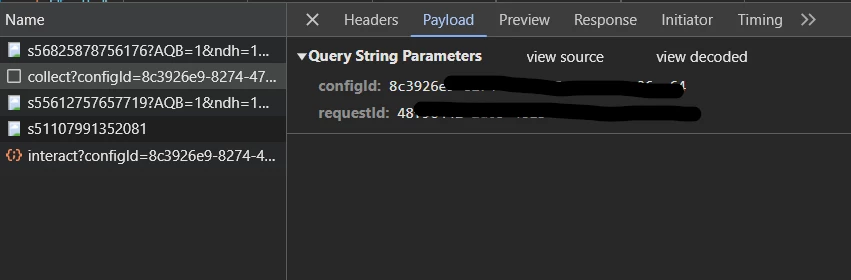
Why do I see some Web SDK collect calls triggering as ping type returning 204 status and these have no post body. I also don't see any initiator showing for these calls,

 

I'd like to understand couple of things,

What settings in Web SDK are triggering these calls?

What is the purpose of these calls? I don't see any post body so what information are they collecting and how?

Why are they sent as ping instead of xhr/fetch and why the have 204 status?

Thanks

This post is no longer active and is closed to new replies. Need help? Start a new post to ask your question.
Best answer by bjoern__koth

@harveer_singhgi1 


question: have you checked the calls with an open Assurance session? Maybe that gives more information.


We just had the same question in the newly created slack channel for community advisors.

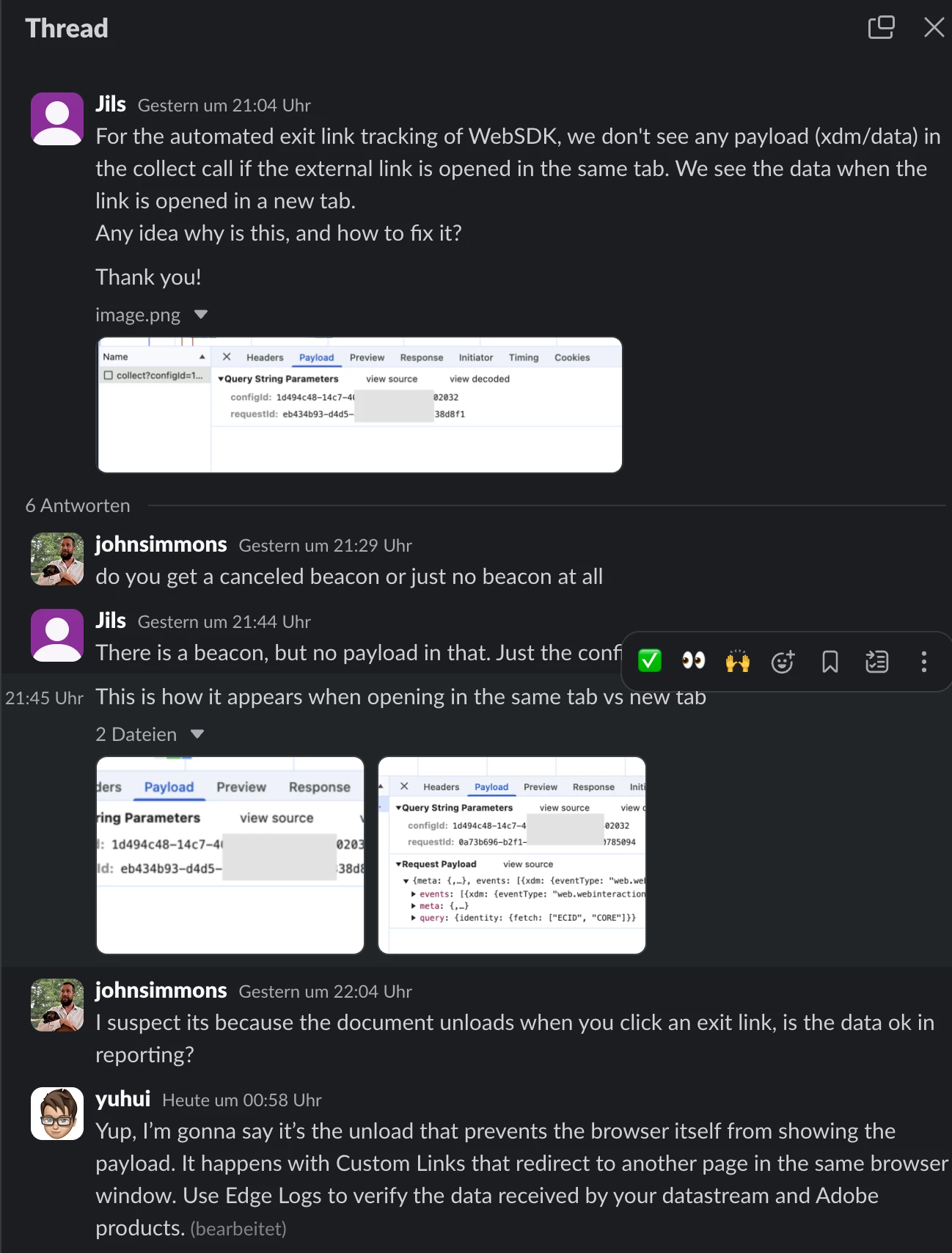
Assumption is that it is the browser that - upon navigation - is not properly presenting the information whilst still sending it as expected.

When the click opens a new tab it seems to always be included, so probably a bug in the browser when it comes to presenting the data.


One suggestion: can you maybe print out the payload in the onBeforeEventSend callback in the WebSDK config and make sure to preserve the browser logs.

My assumption would be that if you see it in the console, it should also arrive on the Edge network.


_satellite.logger.debug(">>> Web SDK Call\n", JSON.stringify(content.xdm, null, 2));


I will keep you updated on the internal discussions.


3 replies

bjoern__koth
Community Advisor and Adobe Champion
February 20, 2025

Hi @harveer_singhgi1 

when do you see the calls? Upon page load?

By any chance, do you have collect link clicks enabled?

Also, do you have any custom logic in the on before event send or click properties callback that might potentially modify the request data?

Cheers from Switzerland!
Harveer_SinghGi1
Community Advisor and Adobe Champion
February 20, 2025

Hi @bjoern__koth ,

We have download links click tracking enabled but no logic to modify or drop the request payload. I expect atleast the standard fields like timestamp to be sent on these calls but they don't have any payload at all.

Not sure about what is the purpose of these calls and if these are calls for click tracking, how are the collecting the relevant information?

Thanks,

bjoern__koth
Community Advisor and Adobe Champion
February 20, 2025

ok, but when are they triggered? alongside a download link click?

Cheers from Switzerland!
RiteshY18
Community Advisor
Community Advisor
February 21, 2025

@harveer_singhgi1 it seems to be a internal , configuration call to check the Edge config prior to loading/launch of any script.

in your case getting 204 this could be due to a null response which might be due to incomplete or zero config on the edge network- can you post a response here 

bjoern__koth
Community Advisor and Adobe Champion
bjoern__kothCommunity Advisor and Adobe ChampionAccepted solution
Community Advisor and Adobe Champion
February 27, 2025

@harveer_singhgi1 


question: have you checked the calls with an open Assurance session? Maybe that gives more information.


We just had the same question in the newly created slack channel for community advisors.

Assumption is that it is the browser that - upon navigation - is not properly presenting the information whilst still sending it as expected.

When the click opens a new tab it seems to always be included, so probably a bug in the browser when it comes to presenting the data.


One suggestion: can you maybe print out the payload in the onBeforeEventSend callback in the WebSDK config and make sure to preserve the browser logs.

My assumption would be that if you see it in the console, it should also arrive on the Edge network.


_satellite.logger.debug(">>> Web SDK Call\n", JSON.stringify(content.xdm, null, 2));


I will keep you updated on the internal discussions.


Cheers from Switzerland!
Harveer_SinghGi1
Community Advisor and Adobe Champion
February 27, 2025

Hi @bjoern__koth ,

Thanks for checking on this. I'll do some more testing using assurance and onBeforeSendEvent as suggested and share the findings here.

Thanks.