Some props writing out in a loop, others not. Why? | Community
Skip to main content
Level 2
August 20, 2019
Solved

Some props writing out in a loop, others not. Why?

  • August 20, 2019
  • 13 replies
  • 9609 views

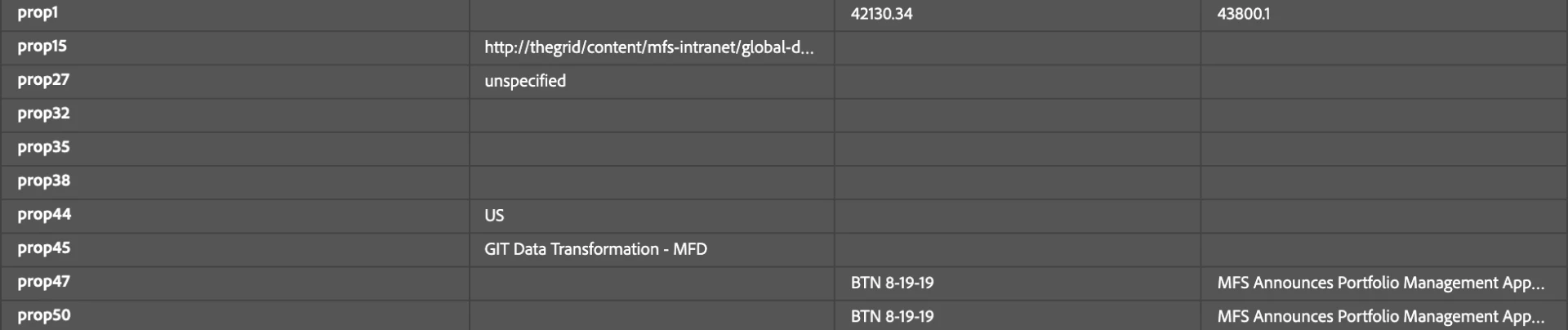
I'm manually setting and submitting an array of document titles in custom code in Launch when a user executes an action. However prop47 isn't getting stored in analytics but it looks like it's getting set in both the Adobe debugger and the console. The data is correct but it's not getting stored. Prop50 is the same value (business requirement, don't bother asking why the duplication) and it is working. Any thoughts on why?

Here's the loop:

for (var i = 0; i < docLength; i++) {

      var s=s_gi(xxxxxxxx);

      s.linkTrackVars='prop1,prop47,prop50';

      s.prop1=articleIDs[i];

      s.prop47=myDocs[i];

      s.prop50=myDocs[i]; //stores title in the all titles prop

      //console.log('in loop' + myDocs[i]);

      var interaction = myDocs[i] + ":copy links inline";

      s.tl(true,'o',interaction,null);

      s.clearVars();

      s.prop1='';

      s.prop47='';

      s.prop50='';

    }

Here's a screenshot in the debuggers showing the data;
This post is no longer active and is closed to new replies. Need help? Start a new post to ask your question.
Best answer by Andrey_Osadchuk

Since both prop47 and prop50 are sent correctly (as per the screenshot), I would double check the Processing Rules that may overwrite prop47 (similar to VISTA rules if you have them).

13 replies

Level 2
August 23, 2019

I wish I could, Andrey. Sadly, it's an internal SPA.

The main UI looks like this, the user selects from a list of docs via the checkbox and then clicks on the share and gets one of those actions. The UX on this is a mess, but I can't control that.

So as the user checks boxes (or unchecks) I have a rule that's managing these in a dynamically created data element. When they select an action (each has its own rule) it processes them out. That's where I'm struggling.

I've been thinking about trying to do this whole thing as s.products but I'd have to figure that out as I haven't implemented it before. This is essentially a shopping cart.

Level 6
August 29, 2019

How about just contatenating the values and have one tracking call and then take it apart in analytics. Or even use list vars, which are meant for this (though the limitation to only 3 makes them precious). With some limitation you could also just define an eVar to act as a list, though the size limit would still be the same and would cause problems if you need to have many documents in that variable.

jantzen_b
Adobe Employee
Adobe Employee
April 2, 2020
Do any of the answers below answer your initial question? If so, can you select one of them as the correct answer? If none of the answers already provided answer your question, can you provide additional information to better help the community solve your question?
