Some props writing out in a loop, others not. Why? | Adobe Higher Education
Skip to main content
Level 2
August 20, 2019
Respondido

Some props writing out in a loop, others not. Why?

  • August 20, 2019
  • 13 respostas
  • 9609 Visualizações

I'm manually setting and submitting an array of document titles in custom code in Launch when a user executes an action. However prop47 isn't getting stored in analytics but it looks like it's getting set in both the Adobe debugger and the console. The data is correct but it's not getting stored. Prop50 is the same value (business requirement, don't bother asking why the duplication) and it is working. Any thoughts on why?

Here's the loop:

for (var i = 0; i < docLength; i++) {

      var s=s_gi(xxxxxxxx);

      s.linkTrackVars='prop1,prop47,prop50';

      s.prop1=articleIDs[i];

      s.prop47=myDocs[i];

      s.prop50=myDocs[i]; //stores title in the all titles prop

      //console.log('in loop' + myDocs[i]);

      var interaction = myDocs[i] + ":copy links inline";

      s.tl(true,'o',interaction,null);

      s.clearVars();

      s.prop1='';

      s.prop47='';

      s.prop50='';

    }

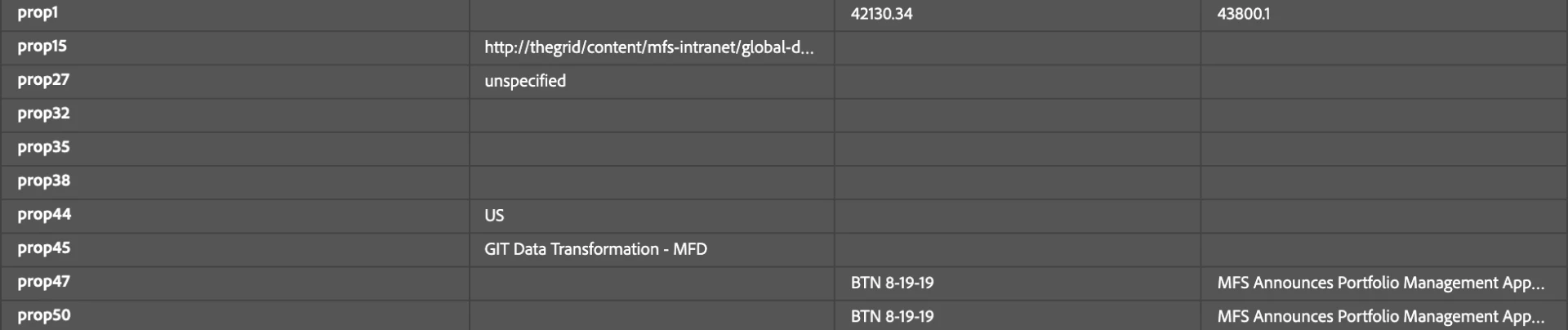
Here's a screenshot in the debuggers showing the data;
Este tópico foi fechado para respostas.
Melhor resposta por Andrey_Osadchuk

Since both prop47 and prop50 are sent correctly (as per the screenshot), I would double check the Processing Rules that may overwrite prop47 (similar to VISTA rules if you have them).

13 Respostas

Andrey_Osadchuk
Level 10
August 21, 2019

Since both prop47 and prop50 are sent correctly (as per the screenshot), I would double check the Processing Rules that may overwrite prop47 (similar to VISTA rules if you have them).

Level 2
August 21, 2019

That's a good thought but no, no processing rules.

I feel like there's a lot going on in my rule here. I'm looping through this array (a dynamically created data element) and processing that in a custom block under conditions, then after that I'm setting some other props in the set variable block and then I'm calling a fire beacon to save those. I don't know, i feel like somehow all this is stepping on each other. The set variables are getting consistently written out, but the stuff in the loop I'm not sure what's getting consistently written out and what's not at this point. Part of the issue is how the business/client wants the data, some changes to the front end of the app, etc.

Andrey_Osadchuk
Level 10
August 21, 2019

Then I would assume that the scenario you have just described does not match the initial screenshot .

Try to find out maybe there is another code in the s_doPlugins of the extension custom code, or in other Rules that may be processed  prior this rule.

Level 2
August 21, 2019

It does - the data is in the debugger but not showing in analytics. I really don't get it. Is there anything weird about my code? Should I not be doing a clearVars() after the s.tl?

Level 2
August 22, 2019

Hi, Just following up. I made some slight changes and now when I’m looping through this array of data to send out, the first item in the loop is writing into analytics, but the following items. So if the array has 3 items, only the first is working. I’m still seeing the other two in the debugger, but they aren’t getting written out. Any idea why? Here’s the code:

for (var i = 0; i < docLength; i++) {

var s=s_gi('mfs-distribution-intranets');

s.linkTrackVars='prop1,prop46,prop50';

s.prop1=articleIDs[i]; // stores compliance number

s.prop46=myDocs[i]; //stores title for this action

s.prop50=myDocs[i]; //stores title in the all titles prop

console.log('in loop ' + i + ' '+ myDocs[i]);

var interaction = myDocs[i] + ":email links";

s.tl(this,'o',interaction);

s.clearVars();

s.prop1='';

s.prop46='';

s.prop50='';

}

Level 2
August 22, 2019

What happens if you define s and s.linkTrackVars outside of the for loop?

Setting props to '' shouldn't be necessary as clearVars() will set them as undefined. And null isn't necessary as the fourth argument in s.tl(). These shouldn't affect anything, but simplifying your code could make it easier to find bugs.

Are you positive the id you're setting in s_gi() is the name of your report suite?

Level 2
August 22, 2019

Yep, positive on the report suite (since some of the data is writing out). I tried defining s and s.linkTrackVars outside of the loop but that actually prevented any data from writing out, which seemed odd to me. 

Level 2
August 22, 2019

Due to clearVars()... I didn't think that through. Very strange... The change you made using s.tl(this...) is going to apply a delay to tracking the link. Your original configuration of s.tl(true...) was best.

Where are you setting docLength? If this isn't working, it seems like there must be other code causing the bug.

Try this:

var s=s_gi('mfs-distribution-intranets');

s.linkTrackVars='prop1,prop46,prop50';

for (var i = 0; i < myDocs.length; i++) {

      s.prop1=articleIDs[i]; // stores compliance number

      s.prop46=myDocs[i]; //stores title for this action

      s.prop50=myDocs[i]; //stores title in the all titles prop

      var interaction = myDocs[i] + ":email links";

      s.tl(true,'o',interaction);

      s.prop1 = s.prop46 = s.prop50 = undefined;

}

Level 2
August 23, 2019

Thanks for the help, I'm still getting only the first item in the array written into analytics. DocLength is correct, i can see the arrays in the console, the data is correct, it's just failing somewhere...

Andrey_Osadchuk
Level 10
August 23, 2019

Morgan, can you share the page URL so that we can have a closer look?
