Set a rule for click event - but the page elements are ALL the same, except the text (help) | Adobe Higher Education
Skip to main content
Level 2
July 1, 2024
Répondu

Set a rule for click event - but the page elements are ALL the same, except the text (help)

stomped. Hoping someone can help me out here. I have to set up a rule that triggers a click event when a user selects "Buy Now." I was looking at the pages and noticed that the buttons are set up the same way across the pages, and the only difference is the text.


I had started the below but that's when I noticed that it wouldn't work since other buttons are using the same setup.


This is the HTML:

<button _ngcontent-qol-c212="" preventmultipleclicks="" class="btn btn-transition sm-text-centered btn-block margin-top-20 btn-primary ng-star-inserted" id="myEngine.footerButton.next" data-e2e="transition-button-next">Buy now</button>
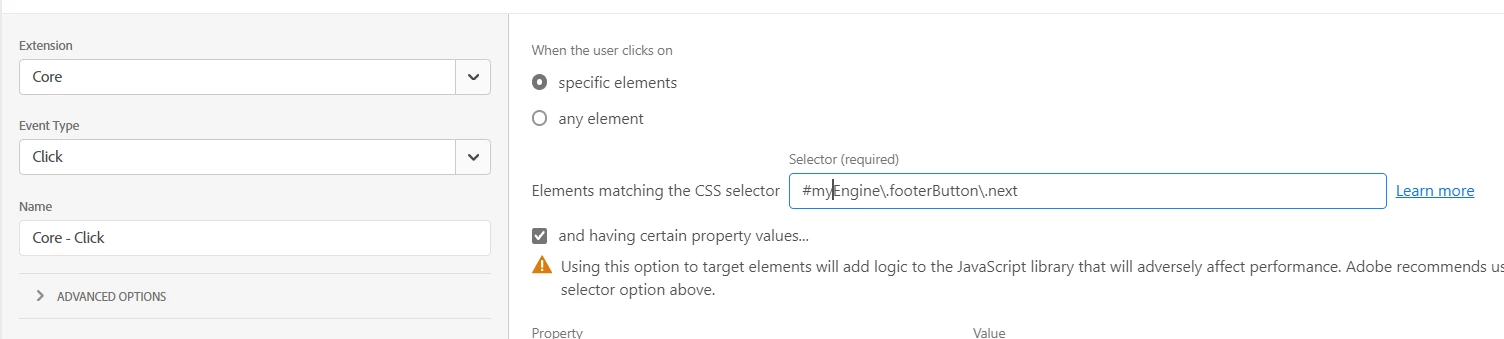


any advice?


maybe create a data element like


var buyOncomplete = document.getElementsByClassName("btn btn-transition sm-text-centered btn-block margin-top-20 btn-primary ng-star-inserted")[0].innerText;
return buyOncomplete;


then add it to the rule as a condition - could that work?

 

Ce sujet a été fermé aux réponses.
Meilleure réponse par Ankit_Chaudhary

well if jQuery is not defined then you can try JS instead

document.getElementById("myEngine.footerButton.next").innerText == "Buy Now" return true

 bottom line is you don't have to create a data element to implement the condition to check the text.

1 commentaire

Ankit_Chaudhary
Community Advisor
Community Advisor
July 2, 2024

Hi @sofidel_1984 

You can try using this keyword by adding a condition in your rule to check for the text "Buy now"

$(this).text == "Buy now" return true;
Level 2
July 2, 2024

ah boo. Way above my head now... $ is not defined reference error 

Ankit_Chaudhary
Community Advisor
Community Advisor
July 3, 2024

well if jQuery is not defined then you can try JS instead

document.getElementById("myEngine.footerButton.next").innerText == "Buy Now" return true

 bottom line is you don't have to create a data element to implement the condition to check the text.