Scroll Depth Tracking | Community
Skip to main content
srijithkumarkb
Level 2
July 19, 2019
Solved

Scroll Depth Tracking

  • July 19, 2019
  • 22 replies
  • 39853 views

I am trying to track percent page viewed on all pages using Adobe Launch. I am new to Adobe so could any one help me on how we have to implement this using Launch.Please help me with the steps on how to achieve this.

This post is no longer active and is closed to new replies. Need help? Start a new post to ask your question.
Best answer by kumararajak

Hi Srjith,

First, Update Your AppMeasurement (Javascript) Code to v1.6 (or higher) then

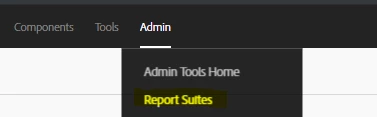
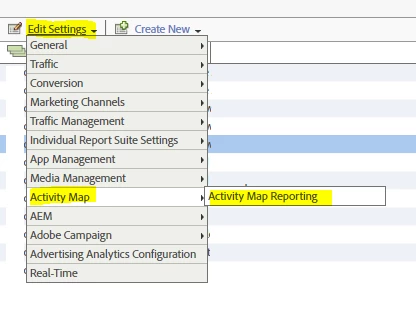
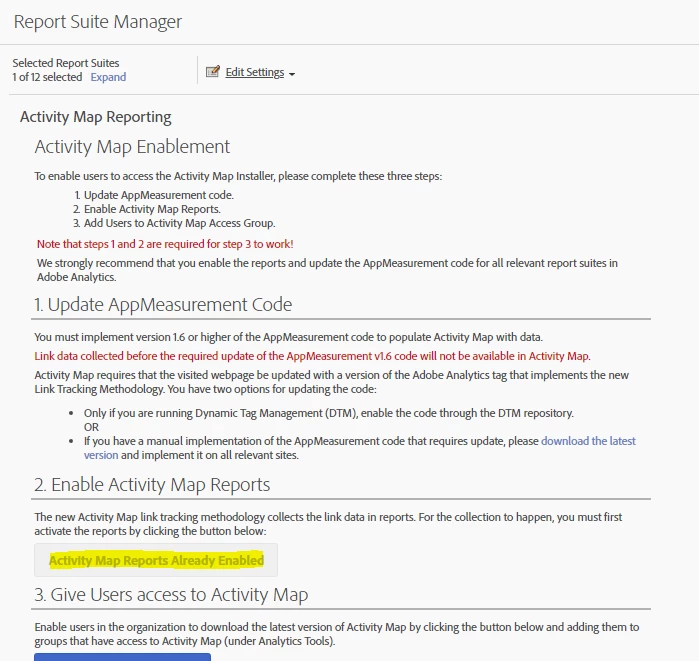
  1. Log in to Adobe Analytics and navigate to Analytics > [Admin > Report Suites > # > Edit Settings > Activity Map] > Activity Map Reporting .
  2. Activity Map collects the link data in Activity Map reports. For the activation to happen, you must first activate the variables by clicking Enable Activity Map Reports.This step adds all the Analytics dimensions that you need to collect data.
  3. After about an hour, check the Activity Map Page report, which shows all the pages where users clicked on a link.

22 replies

vinayp20414773
July 22, 2019

For this you need to add Extension name "Common Analytics Plugins" in Adobe Launch. The same way you add Adobe Analytics. Once you add this you can use any of the plugins listed there. In the configuration section of "Common Analytics Plugins", you can find the instruction that how to use these plugins. You actually need to create a new rule that fires on the library loaded event. If you have access to Launch try this on your own.

Balaji_V
Level 4
July 22, 2019

Hi Srijith Kumar,

To track the page percentage view need to use the "getPercentPageViewed" plugin to measures a visitor's scroll activity to see how much of a page the visitor viewed before moving on to another page.

Also, you can get the plugin from below link and ref; sample codes we used for our project

getPercentPageViewed

/* ******** prop38 & eVar38 Initial - Highest percentage page viewed (previous Page) ******** */

if(s.pageName) s.getPercentPageViewed();

if(s._ppvPreviousPage)

{

s.eVar38 = s._ppvHighestPercentViewed + "|" + s._ppvInitialPercentViewed;

}

if (s.eVar38) {

s.prop38 = 'D=v38';

}

Hope this helps

Thanks,

Balaji

June 14, 2023

s.prop38 = 'D=v38'; Can you please tell me what  'D=v38'; mean

December 14, 2023

D=v38 means duplicate evar38.

so:

s.prop38 = 'D=v38';

means

s.prop38 = eVar38

vinayp20414773
July 22, 2019

Hi Balaji_V,

Have  you implemented via Adobe Launch. I noticed that "Common Analytics Plugin" extension still does not have "getPercentPageViewed" plugin listed there. Are you using it via custom code in Analytics extension?

Balaji_V
Level 4
July 22, 2019

Yes, through the custom code in Launch analytics extension (Ref; Screenshot)

It should be in do plugin function (Ref; Screenshot)

Please try the above and let me know

Thanks,

Balaji

kumararajak
Level 5
July 23, 2019

Dear Srijith,

Please find the details here

How to configure % of Page viewed in Launch

Regards,

Kumararaja K

srijithkumarkb
Level 2
July 23, 2019

Thanks Very much will try and let u know if I get stuck somewhere.

srijithkumarkb
Level 2
July 23, 2019

Thank U so much

kumararajak
Level 5
July 23, 2019
srijithkumarkb
Level 2
July 23, 2019

Hi Just need one more help from you regarding Page load time tracking.

Can u guide me on how to achieve this using launch. I am new to launch any help would be appreciated.

kumararajak
Level 5
July 23, 2019

Hi Srijith,

Custom code

Refer the below thread:

What parameter captures Page Load Time in Adobe Analytics ?

function getPageLoadTime() {

if (typeof(performance) !== 'undefined' && typeof(performance.timing) == 'object') {

var timing = performance.timing;

// fall back to less accurate milestones

var startTime = performance.timing.redirectStart ||

performance.timing.fetchStart ||

performance.timing.requestStart;

var endTime = performance.timing.domContentLoadedEventEnd ||

performance.timing.domInteractive ||

performance.timing.domComplete ||

performance.timing.loadEventEnd;

if (startTime && endTime && (startTime < endTime)) {

return (endTime - startTime);

}

}

return 'data not available';

}

Let me know if you need additional details

Regards,

Kumararaja K