OneTrust configuration in Web SDK & Rules | Community
Skip to main content
Michael_Soprano
Level 10
July 10, 2025
Solved

OneTrust configuration in Web SDK & Rules

  • July 10, 2025
  • 1 reply
  • 538 views

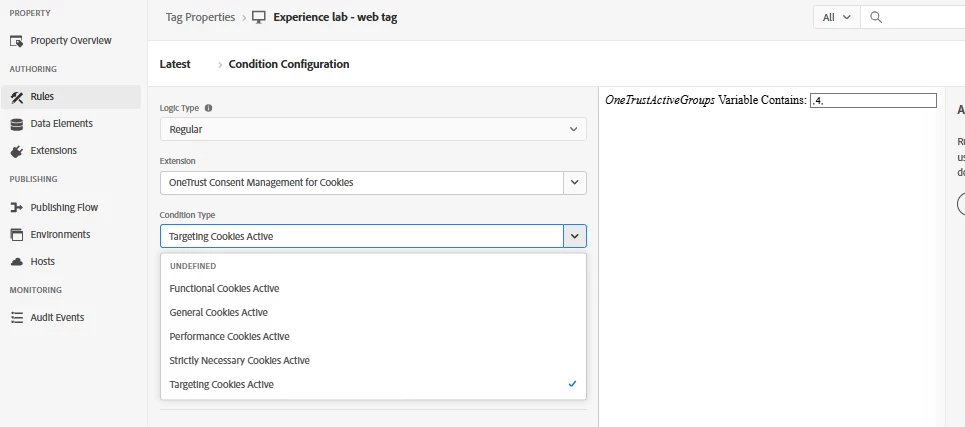
Could somebody explain me for which specific use case'es are specific Condition types?

How you deal with the case:

1. Customer clicked on the pop-up regarding consent

2. Then the Condition is checked in Rules

3. Then CDP has the consent to collect data?


This post is no longer active and is closed to new replies. Need help? Start a new post to ask your question.
Best answer by bjoern__koth

This functionality is looking at the window.OneTrustActivegroups value to check which categories are opted in
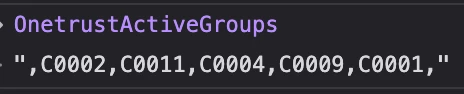
where the entries are just the default consent categories in OneTrust.

If you look at the OptanonConsent cookie, you will see them listed in there in the "groups" parameter, each active category appended with a ":1" to it, and ":0" vice versa.

C0002 is for instance the performance / analytics category consent.


So, to answer your questions


1. Consent change handling

You can register to consent change handlers in OneTrust. So, if you set up a rule that triggers when the library loads and checks when it can register the callback, it would looks something like this. 

const consentInterval = setInterval(() => { if (typeof window?.OneTrust?.OnConsentChanged === "function") { clearInterval(consentInterval); window.OneTrust.OnConsentChanged(() => { _satellite.track("consent_changed"); }); } }, 250);


2./3. Sending consent to AEP

Here it is crucial to understand that every "set consent" action will cause cookies to be sent back from the Edge network. And at the same time, it will create a profile fragment for the user, even if opted out.


It is up to you to make sure to only send the consent when consent is granted i.e.,

  • the rule handling consent changes has to implement a logic that only sends the consent information if
    • a) the user has previously consent (since he could have now opted out) OR
    • b) the user has not yet consent AND he gave consent for the Analytics/Performance consent category (assuming that your legal department sees it the same way, since the Adobe kndctr cookies are essentially identifiying the user for performance purposes). In other words, a rule with a condition that checks whether the cookie includes "C0002:1"

Personal View:
I think it's not ideal that the Web SDK is not doing this by itself, since the chances of misconfiguring this are high.

Unless your legal department is fine with AEP cookies always to be set (which typically is not the case), this can cause issues.

And you surely cannot classify AEP cookies as strictly necessary. The easiest way to check whether a cookie is necessary is ask "will the page work without it". Hint: "yes" -> not necessary


-------

Word of advise when working with OneTrust and their API functionality:


From experience I would never rely on the OneTrustActivegroups nor the extension directly, just since they are quite often not working reliably.
Seems like OneTrust's logic is quite slow and data in there may be updated late.

Instead, I would always write my own custom code data element for each category, that checks the OneTrust cookie itself and decids whether consent for category x is given.

// Analytics Consent return (_satellite.cookie.get("OptanonConsent") || "").includes("C0002:1");

 

1 reply

bjoern__koth
Community Advisor and Adobe Champion
bjoern__kothCommunity Advisor and Adobe ChampionAccepted solution
Community Advisor and Adobe Champion
July 10, 2025

This functionality is looking at the window.OneTrustActivegroups value to check which categories are opted in

where the entries are just the default consent categories in OneTrust.

If you look at the OptanonConsent cookie, you will see them listed in there in the "groups" parameter, each active category appended with a ":1" to it, and ":0" vice versa.

C0002 is for instance the performance / analytics category consent.


So, to answer your questions


1. Consent change handling

You can register to consent change handlers in OneTrust. So, if you set up a rule that triggers when the library loads and checks when it can register the callback, it would looks something like this. 

const consentInterval = setInterval(() => { if (typeof window?.OneTrust?.OnConsentChanged === "function") { clearInterval(consentInterval); window.OneTrust.OnConsentChanged(() => { _satellite.track("consent_changed"); }); } }, 250);


2./3. Sending consent to AEP

Here it is crucial to understand that every "set consent" action will cause cookies to be sent back from the Edge network. And at the same time, it will create a profile fragment for the user, even if opted out.


It is up to you to make sure to only send the consent when consent is granted i.e.,

  • the rule handling consent changes has to implement a logic that only sends the consent information if
    • a) the user has previously consent (since he could have now opted out) OR
    • b) the user has not yet consent AND he gave consent for the Analytics/Performance consent category (assuming that your legal department sees it the same way, since the Adobe kndctr cookies are essentially identifiying the user for performance purposes). In other words, a rule with a condition that checks whether the cookie includes "C0002:1"

Personal View:
I think it's not ideal that the Web SDK is not doing this by itself, since the chances of misconfiguring this are high.

Unless your legal department is fine with AEP cookies always to be set (which typically is not the case), this can cause issues.

And you surely cannot classify AEP cookies as strictly necessary. The easiest way to check whether a cookie is necessary is ask "will the page work without it". Hint: "yes" -> not necessary


-------

Word of advise when working with OneTrust and their API functionality:


From experience I would never rely on the OneTrustActivegroups nor the extension directly, just since they are quite often not working reliably.
Seems like OneTrust's logic is quite slow and data in there may be updated late.

Instead, I would always write my own custom code data element for each category, that checks the OneTrust cookie itself and decids whether consent for category x is given.

// Analytics Consent return (_satellite.cookie.get("OptanonConsent") || "").includes("C0002:1");
 

Cheers from Switzerland!
