Link tracking not tracking text of the link in Link Name | Community
Skip to main content
Level 2
May 29, 2023
Solved

Link tracking not tracking text of the link in Link Name

  • May 29, 2023
  • 3 replies
  • 1317 views

hi 


I am using Web SDK and in weblinks calls, the link name is always "Link Click" and it doesn't capture the text of the link clicked. 


Thanks

Parm

This post is no longer active and is closed to new replies. Need help? Start a new post to ask your question.
Best answer by V_Sirish_Kaushik1

Hi,


Link name maps to web.webInteraction.name in your xdm object. If you have got that part correct, then the issue seems more about how you are capturing the link name from website, are you using vanilla javaScript 'this' keyword, or jQuery $(this). Will suggest to first test this traditionally without using web sdk.


Refer to the below code for the field where you have to map link names. 

alloy("sendEvent", {
  "xdm": {
    "web": {
      "webInteraction": {
        "name": "My Custom Link",
        "URL": "https://example.com",
        "type": "other"
      }
    }
  }
});


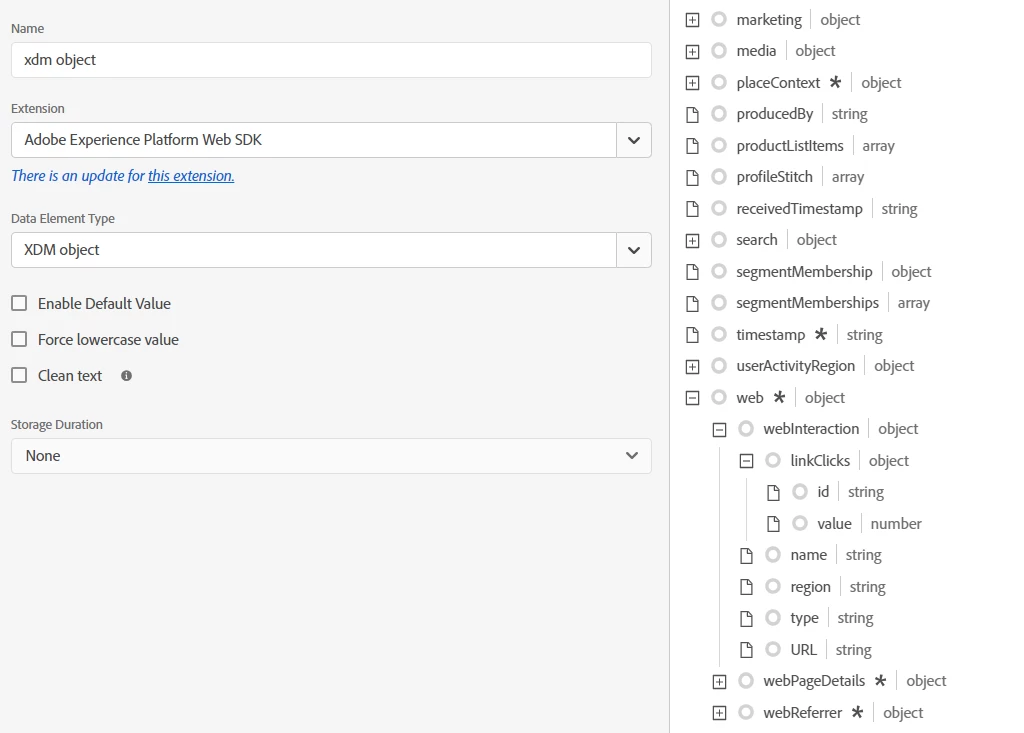
If you are using Tags (Launch) UI, go to data elements, select XDM object and map in the below field


Please refer to below documentation for more clarity 

https://experienceleague.adobe.com/docs/platform-learn/implement-web-sdk/applications-setup/setup-analytics.html?lang=en


3 replies

ranjithd
Level 4
May 30, 2023

1. Review the code responsible for capturing the link clicks and check if it needs any modifications. Make sure you are capturing the correct information from the clicked link. It's possible that the code is not correctly extracting the text from the link element.

Like, To validate the selectors (Id, class) whether all the values are expected, example code

// Add an event handler to capture link clicks
$(document).on('click', 'a', function(event) {
event.preventDefault(); // Prevent the default link behavior
var linkText = $(this).text(); // Extract the text of the clicked link
// Store the link text in a dynamic variable or use it as needed
// For example, you can send it to Adobe Analytics or display it on the page
// Here, we're just logging it to the console as an example
console.log('Clicked link text:', linkText);
});

2. Ensure that you have properly configured the Adobe Web SDK and have set up the link tracking correctly. Double-check the code and configuration settings related to link tracking to ensure they are properly implemented.


yuhuisg
Community Advisor
Community Advisor
May 30, 2023

If you're using Tags, and assuming that you're detecting the clicks from its Core extension's Click event, then here's a shortcut to get the text of the clicked link: use "this.@cleanText" in your Web SDK webInteraction field's value, i.e.

alloy("sendEvent", { "xdm": { "web": { "webInteraction": { "linkClicks": { "value": 1 }, "name": this.@cleanText, "URL": this.href, "type": "other" // values: other, download, exit } } } });
V_Sirish_Kaushik1
V_Sirish_Kaushik1Accepted solution
Level 4
June 29, 2023

Hi,


Link name maps to web.webInteraction.name in your xdm object. If you have got that part correct, then the issue seems more about how you are capturing the link name from website, are you using vanilla javaScript 'this' keyword, or jQuery $(this). Will suggest to first test this traditionally without using web sdk.


Refer to the below code for the field where you have to map link names. 

alloy("sendEvent", {
  "xdm": {
    "web": {
      "webInteraction": {
        "name": "My Custom Link",
        "URL": "https://example.com",
        "type": "other"
      }
    }
  }
});


If you are using Tags (Launch) UI, go to data elements, select XDM object and map in the below field


Please refer to below documentation for more clarity 

https://experienceleague.adobe.com/docs/platform-learn/implement-web-sdk/applications-setup/setup-analytics.html?lang=en