Launch track link page | Community
Skip to main content
This post is no longer active and is closed to new replies. Need help? Start a new post to ask your question.
Best answer by Brian_Johnson_

@luca_lattarini - If you're looking to track clicks on the <a> tags that are found in your list, you can do this with a Launch rule. Your rule, with CSS selector, may look something like this:
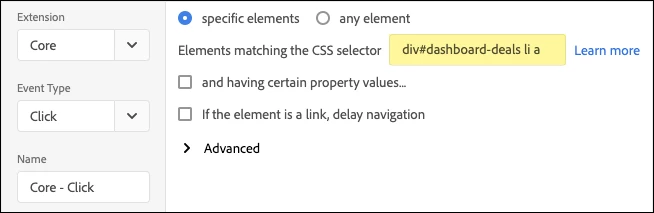
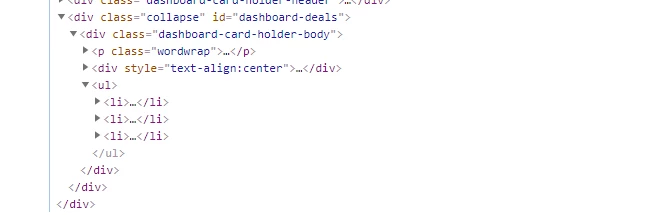
Using "div#dashboard-deals li a" will pick up any/every <a> tag that falls under a <li> inside your div. This assumes the following page structure (from your image):

... ... <div class="collapse" id="dashboard-deals"> <ul> <li><a href="/someLink1.html">some text 1</a></li> <li><a href="/someLink2.html">some text 2</a></li> <li><a href="/someLink3.html">some text 3</a></li> <li><a href="/someLink4.html">some text 4</a></li> </ul> </div> ... ...

From there, you'd set up the rest of your rule as you normally would.


4 replies

yuhuisg
Community Advisor
Community Advisor
November 16, 2020

Are you saying that inside the <li>, there is no <a> element?

Luca_Lattarini
November 16, 2020
Yes, i have this <a href="">XXX<a/>
November 16, 2020

Can you add an event listener to it?

Brian_Johnson_
Brian_Johnson_Accepted solution
November 16, 2020

@luca_lattarini - If you're looking to track clicks on the <a> tags that are found in your list, you can do this with a Launch rule. Your rule, with CSS selector, may look something like this:

Using "div#dashboard-deals li a" will pick up any/every <a> tag that falls under a <li> inside your div. This assumes the following page structure (from your image):

... ... <div class="collapse" id="dashboard-deals"> <ul> <li><a href="/someLink1.html">some text 1</a></li> <li><a href="/someLink2.html">some text 2</a></li> <li><a href="/someLink3.html">some text 3</a></li> <li><a href="/someLink4.html">some text 4</a></li> </ul> </div> ... ...

From there, you'd set up the rest of your rule as you normally would.
 

Luca_Lattarini
November 17, 2020