Issue with Multilingual Data Not Capturing Correctly During Migration from Adobe Analytics to Web SDK | Community
Skip to main content
Level 2
April 22, 2025
Solved

Issue with Multilingual Data Not Capturing Correctly During Migration from Adobe Analytics to Web SDK

  • April 22, 2025
  • 1 reply
  • 559 views

While migrating our tracking implementation from Adobe Analytics to Adobe Web SDK, we’ve encountered an issue with multilingual content tracking. Pages with content in non-English languages (such as videos, CTAs, and forms) are not capturing properly in the Web SDK implementation.
In Adobe Analytics (legacy implementation), the data appears correctly in the respective languages.

However, with Web SDK, the captured data appears corrupted or improperly encoded. For example: 【vqd vs 掃除機】“超静かなドラム” vqd106と生活音を比較してみよう!

It seems like there may be an issue related to character encoding or payload formatting in the Web SDK.
Has anyone encountered similar issues with multilingual data during migration? Are there recommended configurations or encoding settings for Web SDK to ensure non-English characters are handled correctly?

This post is no longer active and is closed to new replies. Need help? Start a new post to ask your question.
Best answer by Parvesh_Parmar

Hello @nithyagu ,


I’ve come across a similar issue before—though not specifically with Web SDK—but based on what you’re describing, it definitely sounds like a character encoding issue. The Web SDK might not be correctly handling UTF-8 encoding for multilingual content like video titles, CTAs, or form labels.


This kind of issue usually happens in one of two ways:

1. The browser or client app isn’t sending the data in UTF-8, or

2. The Web SDK (or the Adobe Edge Network) is misinterpreting the encoding, assuming it’s something like Latin1 instead of UTF-8.


Here are a few suggestions to help debug and fix this:

Steps to Check

1. Ensure the client/browser sends data in UTF-8

• Check the request payload in DevTools (Network tab) to see how the multilingual text appears before it’s sent.

• Add this meta tag in your HTML <head> if it’s missing

<meta charset="UTF-8">


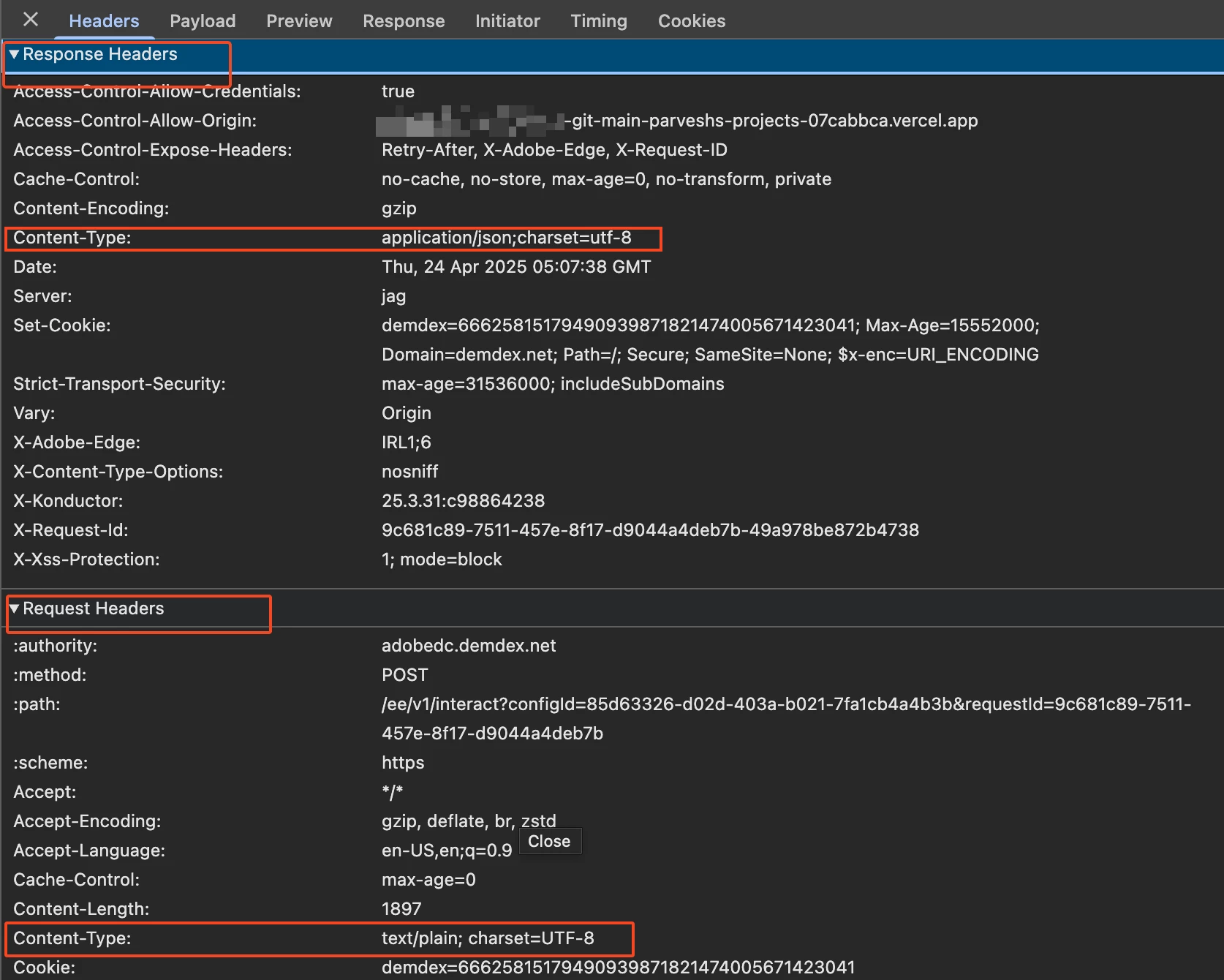
• Confirm that your request headers include:

Content-Type: application/json; charset=UTF-8


If the data isn’t properly encoded from the client side, the Adobe Edge Network won’t be able to decode it correctly.

2. Verify the response from Adobe Edge

• Also ensure that any responses from the Edge Network or AEP are encoded in UTF-8.

• You can inspect the response headers to confirm the charset.


If your client/browser is definitely sending UTF-8 encoded data and you’ve confirmed the headers are correct, but the issue still occurs, then it might be an issue on the Adobe Edge Network side.


I’m not sure if there’s a specific setting in the Data collection, when reading data  to explicitly define character encoding—but it’s worth checking the documentation or reaching out to Adobe Support if needed.


Hope this helps!


Kind regards,

Parvesh

1 reply

Parvesh_Parmar
Community Advisor
Parvesh_ParmarCommunity AdvisorAccepted solution
Community Advisor
April 24, 2025

Hello @nithyagu ,


I’ve come across a similar issue before—though not specifically with Web SDK—but based on what you’re describing, it definitely sounds like a character encoding issue. The Web SDK might not be correctly handling UTF-8 encoding for multilingual content like video titles, CTAs, or form labels.


This kind of issue usually happens in one of two ways:

1. The browser or client app isn’t sending the data in UTF-8, or

2. The Web SDK (or the Adobe Edge Network) is misinterpreting the encoding, assuming it’s something like Latin1 instead of UTF-8.


Here are a few suggestions to help debug and fix this:

Steps to Check

1. Ensure the client/browser sends data in UTF-8

• Check the request payload in DevTools (Network tab) to see how the multilingual text appears before it’s sent.

• Add this meta tag in your HTML <head> if it’s missing

<meta charset="UTF-8">


• Confirm that your request headers include:

Content-Type: application/json; charset=UTF-8


If the data isn’t properly encoded from the client side, the Adobe Edge Network won’t be able to decode it correctly.

2. Verify the response from Adobe Edge

• Also ensure that any responses from the Edge Network or AEP are encoded in UTF-8.

• You can inspect the response headers to confirm the charset.


If your client/browser is definitely sending UTF-8 encoded data and you’ve confirmed the headers are correct, but the issue still occurs, then it might be an issue on the Adobe Edge Network side.


I’m not sure if there’s a specific setting in the Data collection, when reading data  to explicitly define character encoding—but it’s worth checking the documentation or reaching out to Adobe Support if needed.


Hope this helps!


Kind regards,

Parvesh

Parvesh Parmar – Adobe Community Advisor https://www.linkedin.com/in/parvesh-parmar/
NithyaGuAuthor
Level 2
April 24, 2025

Thank you!