
I cant see page names info when I open adobe experience platform debugger | Community
Skip to main content
March 11, 2025
Solved

I cant see page names info when I open adobe experience platform debugger

  • March 11, 2025
  • 1 reply
  • 557 views

I used to be able to find the page name or page url information when I use adobe experience platform debugger for the website. But recently I can't. Tried removed it and reinstall and still no luck. Is there anyone know how to fix this?

This post is no longer active and is closed to new replies. Need help? Start a new post to ask your question.
Best answer by bjoern__koth

Hi @freda_meng 

this actually means there have not been any recorded analytics calls which may have multiple reasons / solutions

  • the AEP debugger extension was opened when the underlying page was already opened
    • reload the underlying page
  • Adobe Analytics may have not been fired due to missing cookie consent?
    • open in a private window and accept cookie consent (if applicable)
    • check the network tab in the developer console and filter for /ss
    • what you can do is execute the following code in the developer console and see if this causes any tracking calls to appear
      • adobe.optIn.approveAll()
  • Maybe Adobe Analytics has been migrated to Web SDK, meaning the AppMeasurement library that was once responsible for the tracking requests has been replaced
    • check if you can see requests in the "Experience Platform Web SDK" tab. In that case I would also contact your developers
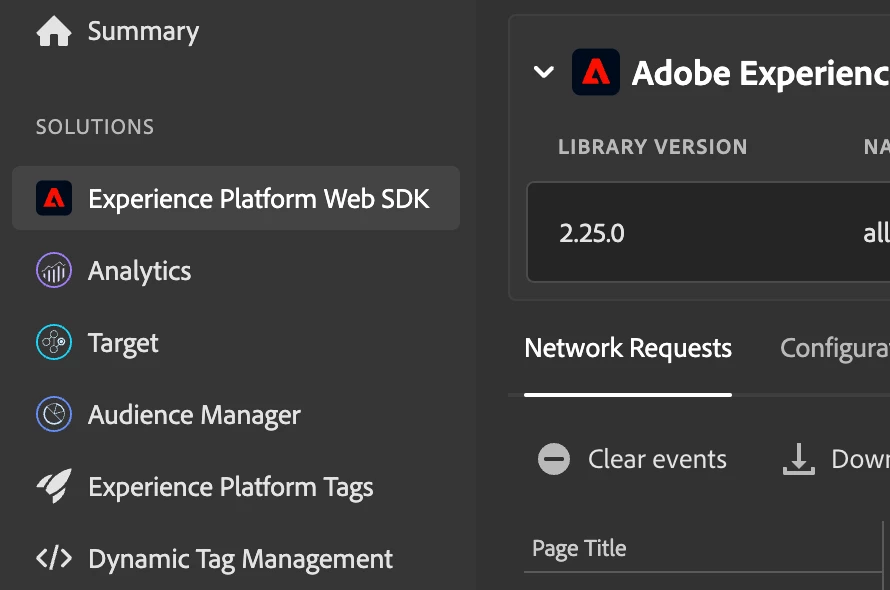
    • the Web SDK calls can be filtered for using "/ee" in your network tab

I would hope that the approaches above should hopefully indicate what's wrong and we can take it from there.

1 reply

bjoern__koth
Community Advisor and Adobe Champion
bjoern__kothCommunity Advisor and Adobe ChampionAccepted solution
Community Advisor and Adobe Champion
March 11, 2025

Hi @freda_meng 

this actually means there have not been any recorded analytics calls which may have multiple reasons / solutions

  • the AEP debugger extension was opened when the underlying page was already opened
    • reload the underlying page
  • Adobe Analytics may have not been fired due to missing cookie consent?
    • open in a private window and accept cookie consent (if applicable)
    • check the network tab in the developer console and filter for /ss
    • what you can do is execute the following code in the developer console and see if this causes any tracking calls to appear
      • adobe.optIn.approveAll()
  • Maybe Adobe Analytics has been migrated to Web SDK, meaning the AppMeasurement library that was once responsible for the tracking requests has been replaced
    • check if you can see requests in the "Experience Platform Web SDK" tab. In that case I would also contact your developers
    • the Web SDK calls can be filtered for using "/ee" in your network tab

I would hope that the approaches above should hopefully indicate what's wrong and we can take it from there.

Cheers from Switzerland!