How to populate Data Elements with values from DataLayer Array?
Hi Community,
I am having difficulty populating specific Data Elements that are meant to be grabbing values from an array in an AppEventData datalayer. When testing in Console, I can get the right value to populate there, but when pasting the same syntax into a "Javascript Variable" Data Element, it does not pass anything.
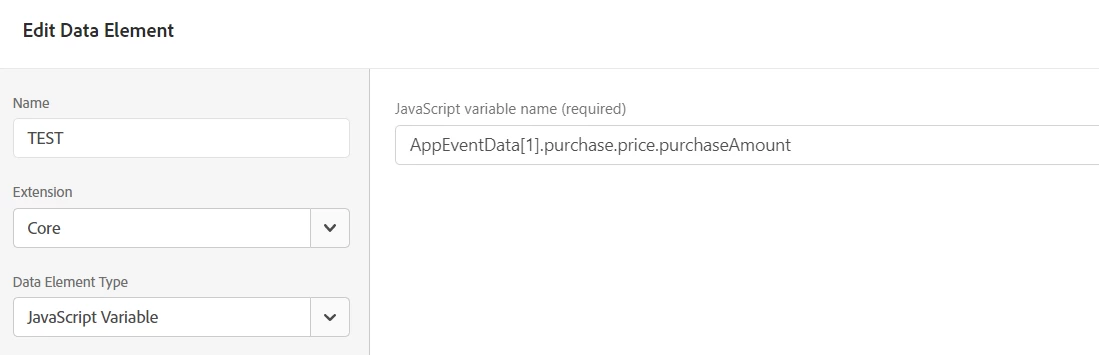
For example, this works in Console but not in a "Javascript Variable" Data Element: "AppEventData[1].purchase.price.purchaseAmount"
I have tried the following to help resolve, but to no avail:
- Doublecheck that the Data Element exists, is set up to feed data to the right eVar, and that the pageload-related Rule logic is delayed as much as possible (Window Loaded).
- Have lengthened the timeout milliseconds by a fair bit, to give it even more time to process/etc.
- Have tried swapping out the Data Element for another that is pulling from a non-array value, just to doublecheck that would populate correctly (it did).
- Tried clearing cache/etc. and testing in multiple browsers
Note: The website/company in question is very sensitive about any potential (founded or unfounded) for "data privacy leakage", so would prefer to avoid using any third-party extensions (e.g. the Search Discovery ones).
It seems weird that it works correctly in console, but not within the Data Element, especially since the non-array stuff populates correctly within the same tag. Is there something I am missing in regards to using "Javascript Variable"-informed Data Elements when trying to get values out of arrays?
Thank you, appreciate any assistance that may spring to mind!!