Getting Journey Optimizer Reporting in AEP Query Service
Hello.
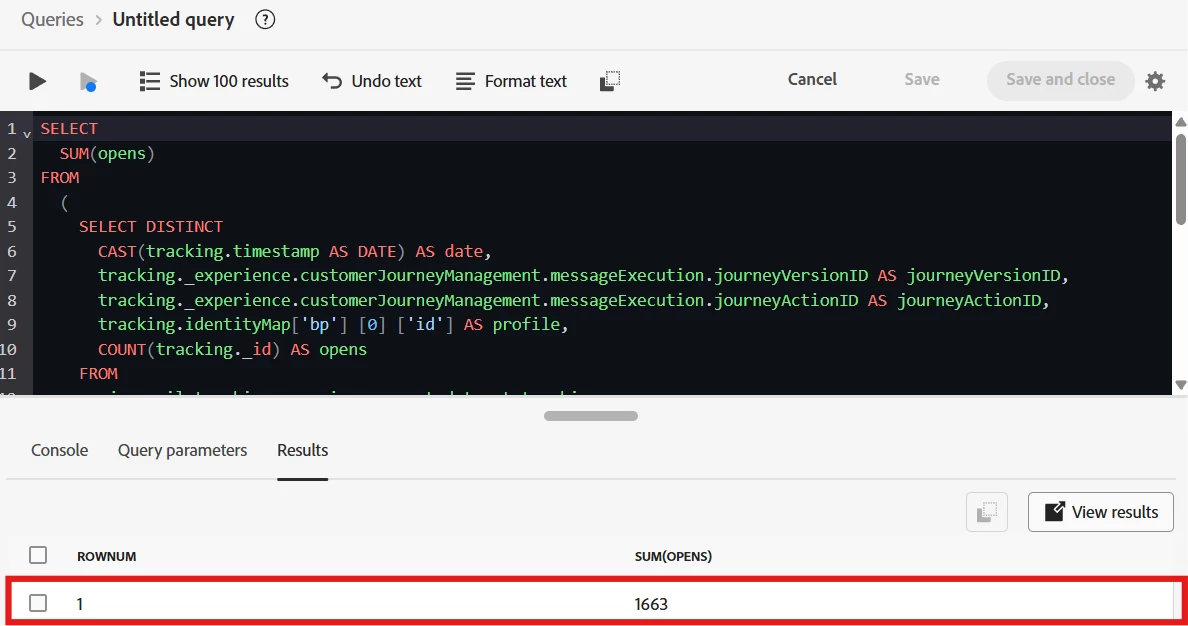
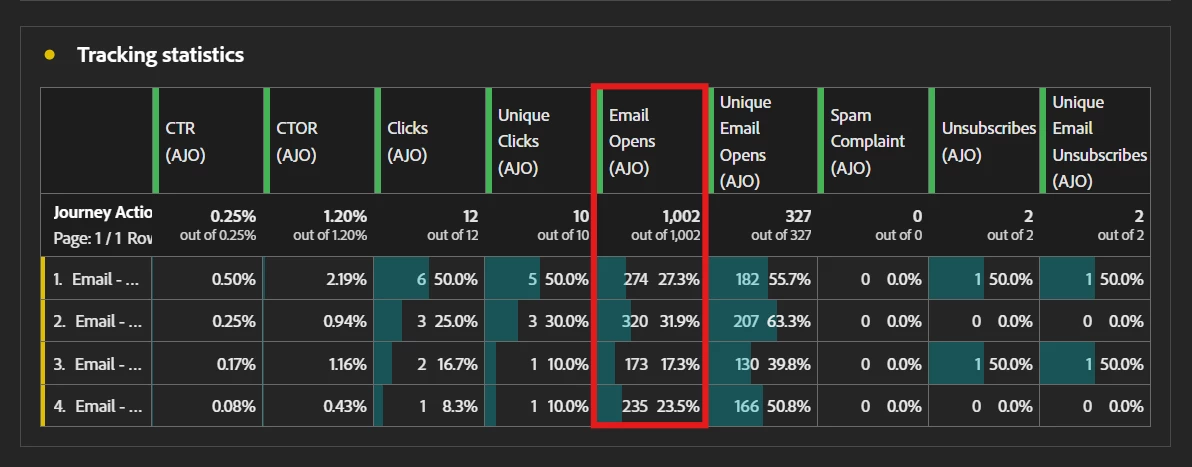
I have been trying to get the metrics that are obtained by Journeys reporting in Journey Optimizer, such as number of messages sent per messaging node, number of messages bounced per messaging node, etc, however, I get values that, in most cases, are close to what the reporting shows, but not exact. Next SQL statements tries to get number of messages opens per date, per Journey Version ID, per Journey Action ID, per profile (BP):
SELECT DISTINCT
  CAST(tracking.timestamp AS DATE) AS date,
  tracking._experience.customerJourneyManagement.messageExecution.journeyVersionID AS journeyVersionID,
  tracking._experience.customerJourneyManagement.messageExecution.journeyActionID AS journeyActionID,
  tracking.identityMap['bp'] [0] ['id'] AS profile,
  COUNT(tracking._id) AS opens
FROM
  ajo_email_tracking_experience_event_dataset tracking
WHERE
  tracking._experience.customerJourneyManagement.messageInteraction.interactionType = 'open'
  AND tracking._experience.customerJourneyManagement.messageExecution.journeyVersionID IS NOT NULL
  AND tracking._experience.customerJourneyManagement.messageExecution.journeyVersionID = '83c30c4c-af80-4bdd-b0de-054b0f00d4a8'
  AND tracking._experience.customerJourneyManagement.messageExecution.journeyActionID IS NOT NULL
  AND tracking.identityMap['bp'] [0] ['id'] IS NOT NULL
GROUP BY
  CAST(tracking.timestamp AS DATE),
  tracking._experience.customerJourneyManagement.messageExecution.journeyVersionID,
  tracking._experience.customerJourneyManagement.messageExecution.journeyActionID,
  tracking.identityMap['bp'] [0] ['id']
ORDER BY
  date,
  journeyVersionID,
  journeyActionID,
  profile
Once I execute the SQL statement, inside a SUM function to get the total value, I get this:
In the meantime, this is what I get in Journey Optimizer:
I consulted with Adobe about this topic and they gave me an example SQL statement, from which I concluded that, every time an event related to a Journey or Campaign (Journey Steps Events, AJO Email Tracking Experience Event Dataset, AJO Message Feedback Event Dataset) occurs, a record associated to a Journey Optimizer entity (AJO Entity Dataset) is generated. Next SQL statement is the one that Adobe gave me:
SELECT
  date_format (timestamp, 'y-MM-dd') as date,
  count(ev._id) as counting
FROM
  journey_step_events ev
  LEFT JOIN ajo_entity_dataset en ON ev._experience.decisioning.propositions[0].scopeDetails.correlationID = en._id
WHERE
  ev._experience.journeyOrchestration.stepEvents.instanceType = 'unitary'
  AND ev._experience.journeyOrchestration.stepEvents.nodeType = 'start'
  AND en._experience.customerJourneyManagement.entities.journey.journeyVersionId = 'JOURNEY-VERSION-ID'
  AND timestamp > '2024-06-01'
GROUP BY
  date
ORDER BY
  date
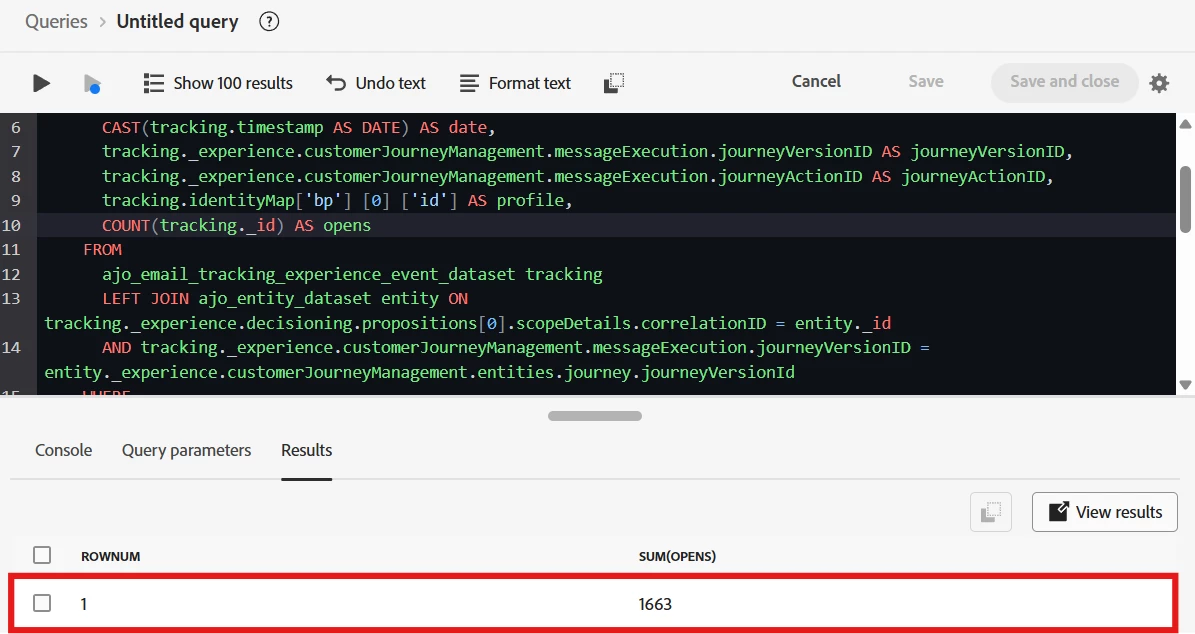
I modify the SQL statement keeping in mind Adobe SQL statement:
SELECT DISTINCT
  CAST(tracking.timestamp AS DATE) AS date,
  tracking._experience.customerJourneyManagement.messageExecution.journeyVersionID AS journeyVersionID,
  tracking._experience.customerJourneyManagement.messageExecution.journeyActionID AS journeyActionID,
  tracking.identityMap['bp'] [0] ['id'] AS profile,
  COUNT(tracking._id) AS opens
FROM
  ajo_email_tracking_experience_event_dataset tracking
  LEFT JOIN ajo_entity_dataset entity ON tracking._experience.decisioning.propositions[0].scopeDetails.correlationID = entity._id
  AND tracking._experience.customerJourneyManagement.messageExecution.journeyVersionID = entity._experience.customerJourneyManagement.entities.journey.journeyVersionId
WHERE
  tracking._experience.customerJourneyManagement.messageInteraction.interactionType = 'open'
  AND tracking._experience.customerJourneyManagement.messageExecution.journeyVersionID IS NOT NULL
  AND tracking._experience.customerJourneyManagement.messageExecution.journeyVersionID = '83c30c4c-af80-4bdd-b0de-054b0f00d4a8'
  AND tracking._experience.customerJourneyManagement.messageExecution.journeyVersionID IN (
    SELECT DISTINCT
      entity._experience.customerJourneyManagement.entities.journey.journeyVersionId
    FROM
      ajo_entity_dataset entity
  )
  AND tracking._experience.customerJourneyManagement.messageExecution.journeyActionID IS NOT NULL
  AND tracking.identityMap['bp'] [0] ['id'] IS NOT NULL
GROUP BY
  CAST(tracking.timestamp AS DATE),
  tracking._experience.customerJourneyManagement.messageExecution.journeyVersionID,
  tracking._experience.customerJourneyManagement.messageExecution.journeyActionID,
  tracking.identityMap['bp'] [0] ['id']
ORDER BY
  date,
  journeyVersionID,
  journeyActionID,
  profile
I got same values:
Strangest thing about all this is that, in some Journeys, SQL statement brings values that match with Journey Optimizer.
Do you know what I'm doing wrong? Is there a filter in that SQL statement I'm missing?