Error in creating dataset in AEP | Community
Skip to main content
Level 2
April 30, 2021
Solved

Error in creating dataset in AEP

  • April 30, 2021
  • 3 replies
  • 3465 views

Hi,


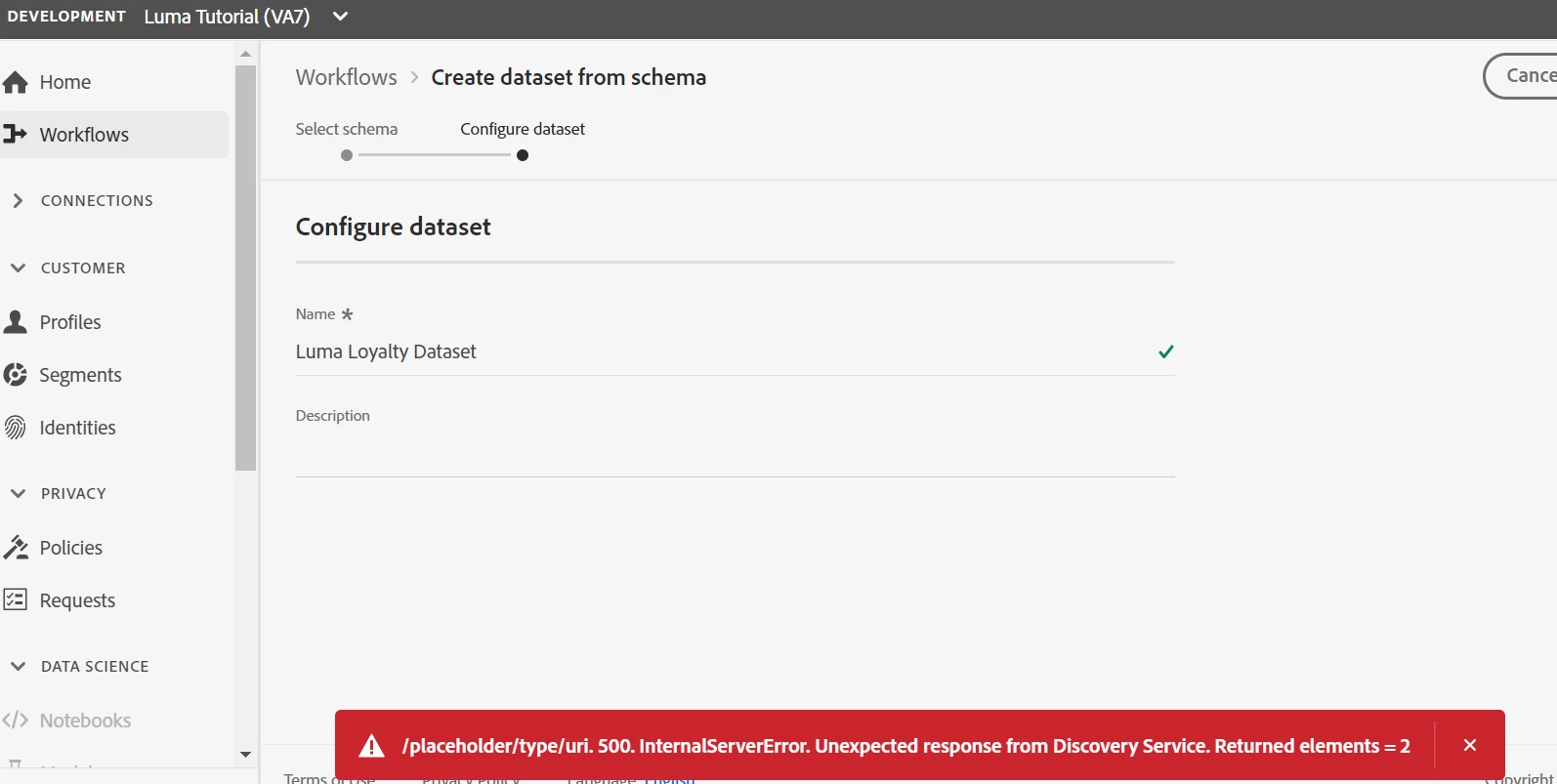
I am following the below link and at the step 6 (create dataset) am getting an error.


https://experienceleague.adobe.com/docs/platform-learn/getting-started-for-data-architects-and-data-engineers/create-datasets.html?lang=enhttps://experienceleague.adobe.com/docs/platform-learn/getting-started-for-data-architects-and-data-engineers/create-datasets.html?lang=en#permissions-required


Can someone please help, is something is missed or how do I solve it?


Many Thanks in Advance.


Vipin


This post is no longer active and is closed to new replies. Need help? Start a new post to ask your question.
Best answer by dwright-adobe

@vipinfkumar ,

Are you still stuck? Were you able to create the dataset? If you are still getting these messages, i would open a support ticket.

3 replies

AtulChavan
Community Advisor
Community Advisor
May 2, 2021

Vipin, this is due to may be a dataset already exists with same name. Try creating dataset with different name. A guess just , mark ans correct if it helps.

Level 2
May 2, 2021
Actually, I have tried with other dataset name and for other schema's as well however every time the same error message is displayed. I checked in other temporary sandbox with some other schema to create dataset and there I don't see this issue. Not sure what is missing here, any permission, mapping or something else... Any other lead pls?
Stewart_Schilling
Community Advisor
Community Advisor
May 3, 2021

It's hard to say what the cause is here.  There are a couple things that I find strange.

1) The error code is 500. This generally means that the issue is going unhandled.  Unhandled issues tend to not give very much guidance about the cause or what actions you can take to resolve.

2) The API endpoint that is producing the 500 error code (based on the message) is the "Discovery" endpoint.  It doesn't make sense to me that /discovery/me would be called in this context as (in my experience) it is part of the Analytics 2.0 API.  For the AA 2.0 API this endpoint is used when trying to determine who you are, what company you belong to, etc. 


What I would do next.  

1) Open your dev console on the browser and switch to the network tab.  

2) Reproduce the error and watch the network tab for the request/response with the 500 status code. 

3) Dig into the response body to see if there is more detailed information. (post the details of the request/ response back here). 

also, 

Check the list of datasets in this sandbox just to see if any already exist.  Avoid creating new ones with the same name as existing ones (just to rule out the dataset name conflict as the cause of error). 


Since you said that this issue does not happen in other sandboxes, you might want to check your permissions specific to this sandbox. Specifically, make sure that you have the "Manage Datasets" permission. 

Level 2
May 19, 2021
Thanks Stew for detailed feedback. I had all the permissions added already. Am not sure what was triggering those error messages, however I restarted my laptop and it worked. Could be a cache or session issue. But Many Thanks for your comments and support.
dwright-adobeAdobe EmployeeAccepted solution
Adobe Employee
May 18, 2021

@vipinfkumar ,

Are you still stuck? Were you able to create the dataset? If you are still getting these messages, i would open a support ticket.

Level 2
May 19, 2021
This issue is resolved. I didn't do anything and could be a cache or session issue. However when I create the dataset via CSV file, it creates the schema by it with some name of "Adhoc schemaxxxx" but when I tried to find this schema to change the fields I couldn't find this schema. Where can I find the schema when the dataset gets created via CSV file and how we can control the dataset, schema and profile in this case. Please advise.