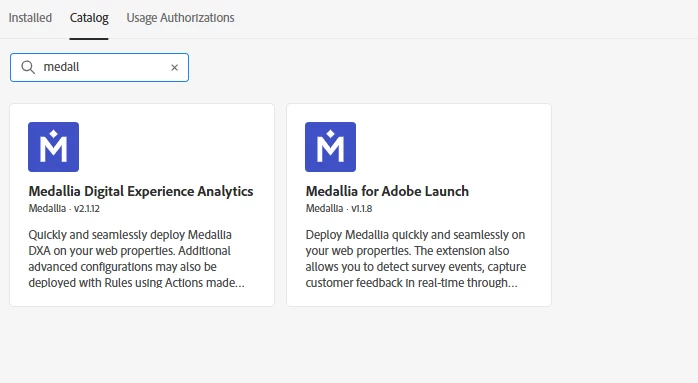
Duplicative Medallia Extensions | Adobe Tags | Community
Skip to main content
Best answer by bjoern__koth

Hi @tyrese 

Since the Version numbers indicate major version changes, it depends on your current integration. If you a starting a new implementation, I would definitely choose the 2.x one. Lower version numbers are typically indicating deprecated functionality that may be outdated and phased out in the future.


Similarly, you may see or at least saw multiple Adobe Target extensions of the legacy at.js which we a major API change between the 1.x and 2.x versions.

2 replies

bjoern__koth
Community Advisor and Adobe Champion
bjoern__kothCommunity Advisor and Adobe ChampionAccepted solution
Community Advisor and Adobe Champion
September 21, 2025

Hi @tyrese 

Since the Version numbers indicate major version changes, it depends on your current integration. If you a starting a new implementation, I would definitely choose the 2.x one. Lower version numbers are typically indicating deprecated functionality that may be outdated and phased out in the future.


Similarly, you may see or at least saw multiple Adobe Target extensions of the legacy at.js which we a major API change between the 1.x and 2.x versions.

Cheers from Switzerland!
tyreseAuthor
Level 3
September 25, 2025

Hey @bjoern__koth thanks for confirming.


-Ty

Devyendar
Level 6
October 6, 2025

@tyrese There is differences in these connectors not just the version Use the one that matches the Medallia product you actually have:

  • Medallia Digital Experience Analytics (DXA) — for behavior analytics/session replay/heatmaps (ex-Decibel). Install this if your goal is DXA capture on pages, rage-clicks, journey friction, replays, etc.
  • Medallia for Adobe Launch — for surveys/feedback (Medallia Digital Feedback). Use this to deploy survey scripts, trigger intercepts from Launch rules, and pass survey events back into Adobe tools.

They can coexist if you use both DXA and Surveys, just avoid duplicating the same script and scope each extension to the pages where it’s needed. If you’re only doing one of those use cases, install only that extension.