Calculated Field- Data Prep Function - To Convert default UTC to EST | Community
Skip to main content
Level 2
June 6, 2024
Solved

Calculated Field- Data Prep Function - To Convert default UTC to EST

  • June 6, 2024
  • 3 replies
  • 2695 views

Hi Team,

Using Calculated Attribute feature, I am trying to Convert default UTC to EST time. Ho do we do it?
zone_date_to_zone(now(), 'America/New_York')   --> this is not working

Best answer by Ankit_Chaudhary

Hi @gowtham3 

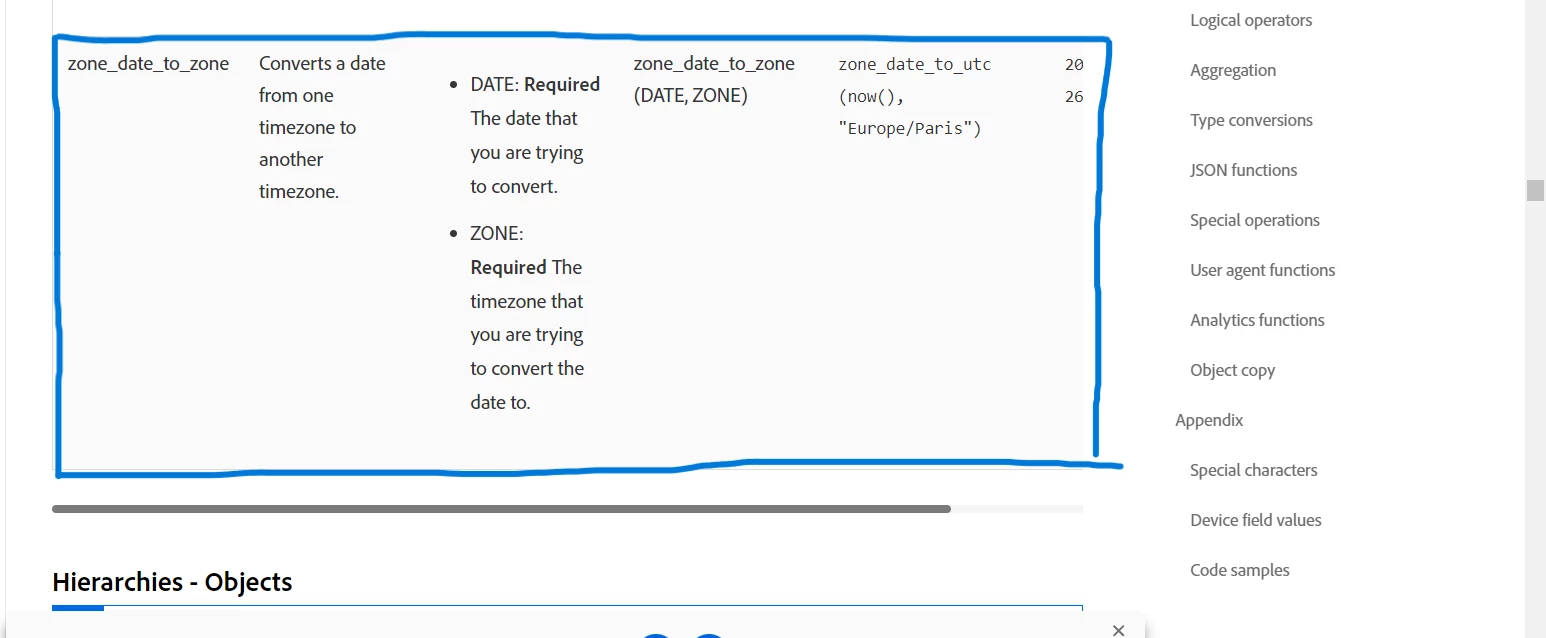
The zone_date_to_zone() function is suppose to change any date time from one time zone to another however if you check the description it says if the zone name is not valid it will return date time in UTC, In the official document for data prep functions there seems to be a mistake in the example as the function mentioned in example is incorrect check the screenshot below.

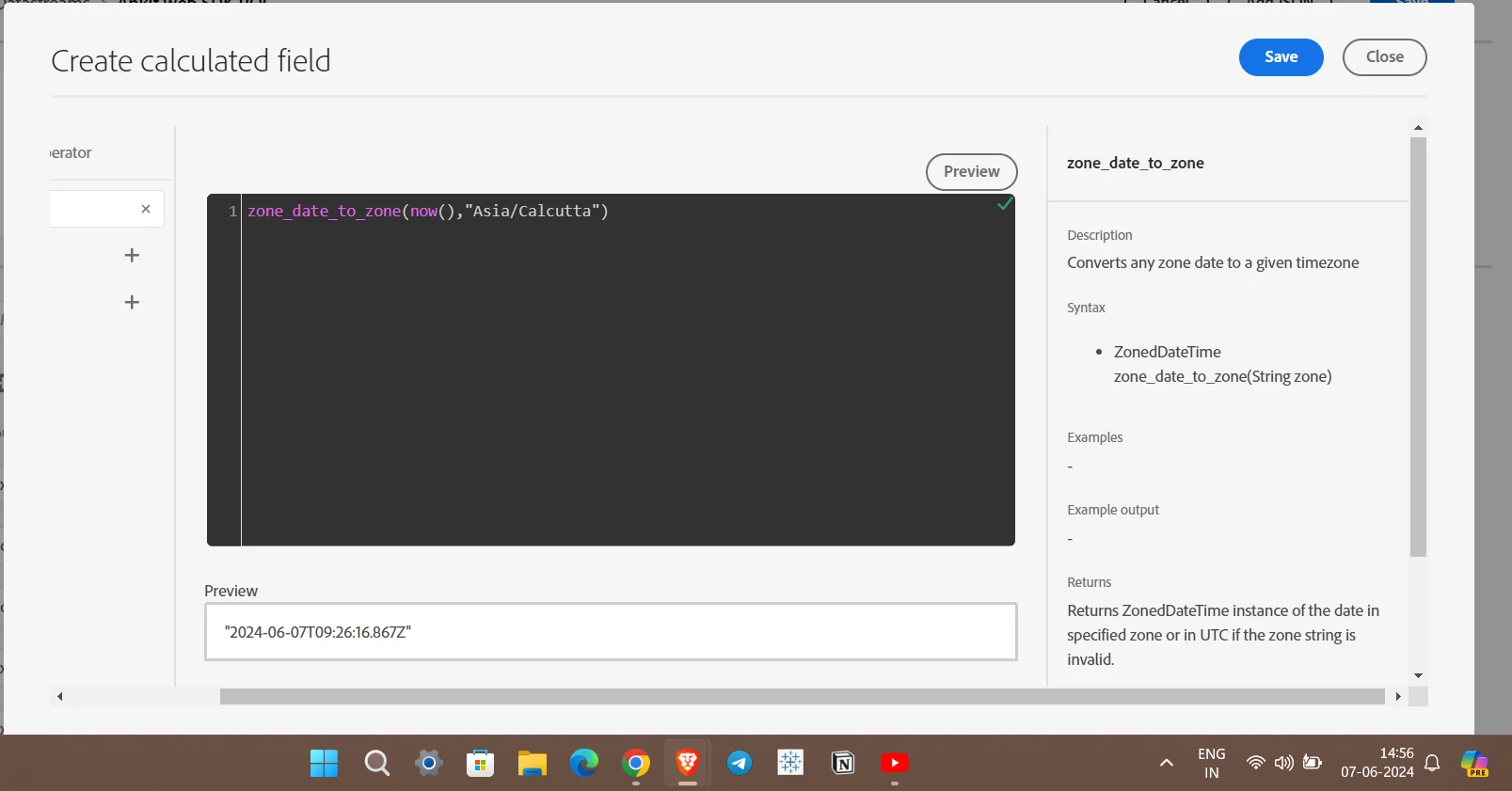
There is no example mention in the data prep calculated field editor for this function but it seems like you have to provide a specific date time for a particular zone to convert it into another time zone, the now() function will return date time in UTC time zone due to which zone_date_to_zone() is also returning the results in UTC i have tired it for Asia/Calcutta but getting incorrect results.

 

3 replies

Anil_Umachigi
Adobe Employee
Adobe Employee
June 6, 2024

@gowtham3 Could you add more details, what data type is the field you are trying to map? 

When string fields from incoming data are mapped to date fields in schemas using XDM, the date format should be explicitly mentioned. 


gowtham3Author
Level 2
June 7, 2024

Hi Anil,

As mentioned below, we are trying to use a data prep function in calculated fields, which uses a system default now() method to generate the current date in UTC but trying to apply  zone_date_to_zone funtion to convert the UTC to ET time zone. Any help on what is the right zone format to send in-order to get the ET timestamp?
 zone_date_to_zone(now(), "America/New_York") 

Ankit_Chaudhary
Community Advisor
Ankit_ChaudharyCommunity AdvisorAccepted solution
Community Advisor
June 7, 2024

Hi @gowtham3 

The zone_date_to_zone() function is suppose to change any date time from one time zone to another however if you check the description it says if the zone name is not valid it will return date time in UTC, In the official document for data prep functions there seems to be a mistake in the example as the function mentioned in example is incorrect check the screenshot below.


There is no example mention in the data prep calculated field editor for this function but it seems like you have to provide a specific date time for a particular zone to convert it into another time zone, the now() function will return date time in UTC time zone due to which zone_date_to_zone() is also returning the results in UTC i have tired it for Asia/Calcutta but getting incorrect results.


gowtham3Author
Level 2
June 7, 2024

Yes, the standard way to convert to a particular time zone is not working as expected!   In my case, I am using  "America/New_York"  --> this is generating UTC time only. Not sure what is the correct zone string to convert to ET time zone.

Level 2
August 27, 2024

Hey Gowtham, were you able to solve this issue, If yes, Please share.

Level 2
November 14, 2024

I encountered an issue when trying to adjust timestamps in Adobe Experience Platform to account for the UTC-3 timezone ("America/Sao_Paulo"). The standard approach of using ZONED_DATETIME_TO_UTC() with this timezone did not work as expected—nothing happened, and the time did not change.

After some troubleshooting, I found a workaround that achieves the correct UTC-3 offset. Here’s the solution I used:


make_date_time(
to_integer(date_part("YYYY", now())),
to_integer(date_part("MM", now())),
to_integer(date_part("DD", now())),
to_integer(date_part("HH", now())) - 6, -- Adjusting by -6 to correct offset of + 3
to_integer(date_part("MI", now())),
to_integer(date_part("SS", now())),
999,
"America/Sao_Paulo" )

In this workaround:
  • I manually subtracted 6 hours from the hour component to offset the 3 hours that were unexpectedly added by the timezone setting for "America/Sao_Paulo" (UTC-3).
  • This adjustment ensured that the correct UTC-3 time was returned.