Adobe Tags - Leverage Function() in Custom Code | Community
Skip to main content
Level 3
March 25, 2025
Solved

Adobe Tags - Leverage Function() in Custom Code

  • March 25, 2025
  • 1 reply
  • 649 views

hello!


Are we unable to leverage function() capabilities in custom code? Every script I have written in custom code with this function does not seem to capture the data element?


Is it best to use this style of logic when configuring data elements:

var x = example

return x


Thanks,
Ty

Best answer by bjoern__koth

Hey @tyrese 

are you then also returning the result of the function? Or how exactly do you want to make it usable?


You can - I just had to test it, since I have frankly never used it before xD - actually return a function as Custom Code Data Element

return function(bar) { _satellite.logger.debug(">>> BAR", bar); };


And then call it from a Custom Code action.

let func = _satellite.getVar("DE Function"); if (func) { func("foo"); func("bar"); func("hello"); }
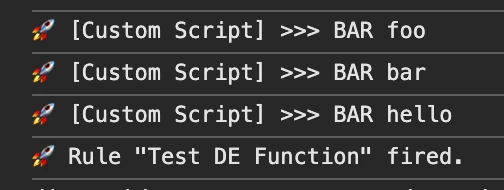
Although as a best practice, I would rather go for a dedicated rule with helper functions placed in one or more Custom Code actions to not scatter this functionality across the Launch property.

So my recommended approach is typically one of these two

a) create a "Library Loaded" rule with Order "1" with a Custom Code action that declares a dedicated window scoped library object with its own namespace and place the functions in there

window.myLib = window.myLib || { foo: function (bar) { _satellite.logger.debug(">>> foo called with", bar); }, hello: function (world) { _satellite.logger.debug(">>> hello called with", world); } }

 

b) append these helper functions to the _satellite object, bearing in mind that in the future the library may end up getting its own function with the same name, so tread lightly there

But yes, technically it's possible to have function Data Elements



1 reply

bjoern__koth
Community Advisor and Adobe Champion
March 25, 2025

Hi @tyrese ,

can you provide a concrete example of what you want to achieve and what you have unsuccessfully tried yet?
You can of course write your own custom function in a data element, call it and return the result

function foo(){ return "bar"; } return foo();


Cheers from Switzerland!
tyreseAuthor
Level 3
March 25, 2025

hey,


Here is a real example of what I tried to implement, excuse any JS errors - is there anything glaringly wrong? Are we missing the return cashorbaltitle(); at the end?


function cashorbaltitle() { var transc = document.querySelector('#tcontainer'); var baltitleElement = document.querySelector('anotherCSS'); var baltitle = baltitleElement ? baltitleElement.textContent : "Balance title not found"; if (transc) { var transctitleElement = document.querySelector('#tcontainer > example'); var transctitle = transctitleElement ? transctitleElement.textContent : null; return transctitle || baltitle; } return baltitle; }


Thanks,

Ty

bjoern__koth
Community Advisor and Adobe Champion
bjoern__kothCommunity Advisor and Adobe ChampionAccepted solution
Community Advisor and Adobe Champion
March 26, 2025

Hey @tyrese 

are you then also returning the result of the function? Or how exactly do you want to make it usable?


You can - I just had to test it, since I have frankly never used it before xD - actually return a function as Custom Code Data Element

return function(bar) { _satellite.logger.debug(">>> BAR", bar); };


And then call it from a Custom Code action.

let func = _satellite.getVar("DE Function"); if (func) { func("foo"); func("bar"); func("hello"); }

Although as a best practice, I would rather go for a dedicated rule with helper functions placed in one or more Custom Code actions to not scatter this functionality across the Launch property.

So my recommended approach is typically one of these two

a) create a "Library Loaded" rule with Order "1" with a Custom Code action that declares a dedicated window scoped library object with its own namespace and place the functions in there

window.myLib = window.myLib || { foo: function (bar) { _satellite.logger.debug(">>> foo called with", bar); }, hello: function (world) { _satellite.logger.debug(">>> hello called with", world); } }


b) append these helper functions to the _satellite object, bearing in mind that in the future the library may end up getting its own function with the same name, so tread lightly there

But yes, technically it's possible to have function Data Elements


Cheers from Switzerland!