Adobe Analytics Debugger is showing the variable name as %eVar name% instead of displaying the variable value | Community
Skip to main content
Level 2
January 10, 2024
Solved

Adobe Analytics Debugger is showing the variable name as %eVar name% instead of displaying the variable value

  • January 10, 2024
  • 2 replies
  • 1812 views

The debugger is showing variable names that were newly added to the event in the format of %eVar name%
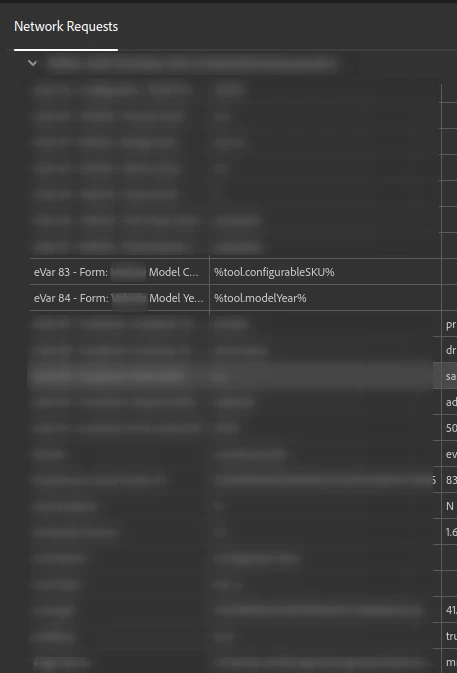
These two specific elements were newly created in the launch and added to rules and published. I am a little bit unsure why it is displaying in this format 


Any insights, suggestions, or guidance would be greatly appreciated. I'm particularly interested in hearing from anyone who has successfully navigated a similar setup.


Thank you in advance for your help!

This post is no longer active and is closed to new replies. Need help? Start a new post to ask your question.
Best answer by yuhuisg

Verify that you do indeed have those 2 data elements in your property, "tool.configurableSKU" and "tool.modelYear". The punctuation, uppercase/lowercase and spacing (including any surrounding whitespace) of the data elements' names must match what you're using in the "%...%".

Also, verify that you have included the 2 data elements in your library.

Normally, the "%...%" values appear when Tags is not able to find any data element with the name between the "%...%". So when it can't find a data element with that name, Tags uses the "%...%" as a literal string, resulting in that "%...%" being tracked.

2 replies

abhinavbalooni
Community Advisor
Community Advisor
January 10, 2024

Hey @supund 


Can you share the rule screenshot where it is mapped. Mapping irregularity can cause such an issue.


Cheers,

Abhinav

SupunDAuthor
Level 2
January 10, 2024

Thanks @abhinavbalooni!


This is how it is mapped in the rules 


yuhuisg
Community Advisor
yuhuisgCommunity AdvisorAccepted solution
Community Advisor
January 11, 2024

Verify that you do indeed have those 2 data elements in your property, "tool.configurableSKU" and "tool.modelYear". The punctuation, uppercase/lowercase and spacing (including any surrounding whitespace) of the data elements' names must match what you're using in the "%...%".

Also, verify that you have included the 2 data elements in your library.

Normally, the "%...%" values appear when Tags is not able to find any data element with the name between the "%...%". So when it can't find a data element with that name, Tags uses the "%...%" as a literal string, resulting in that "%...%" being tracked.

SupunDAuthor
Level 2
January 12, 2024

Can you please explain "verify that you have included the 2 data elements in your library"? 


I think I am missing this step 

SupunDAuthor
Level 2
January 14, 2024

Just as how you had added your Rules to a library and published that library, you need to do the same with your Data Elements.

I assume that you are familiar with Tags' publishing workflow, since you mentioned that you were able to publish your added Rules.


Thanks for the help @yuhuisg and @abhinavbalooni!


I got it working! Yes, I was missing the data element publishing workflow to the library! 


Thanks again!