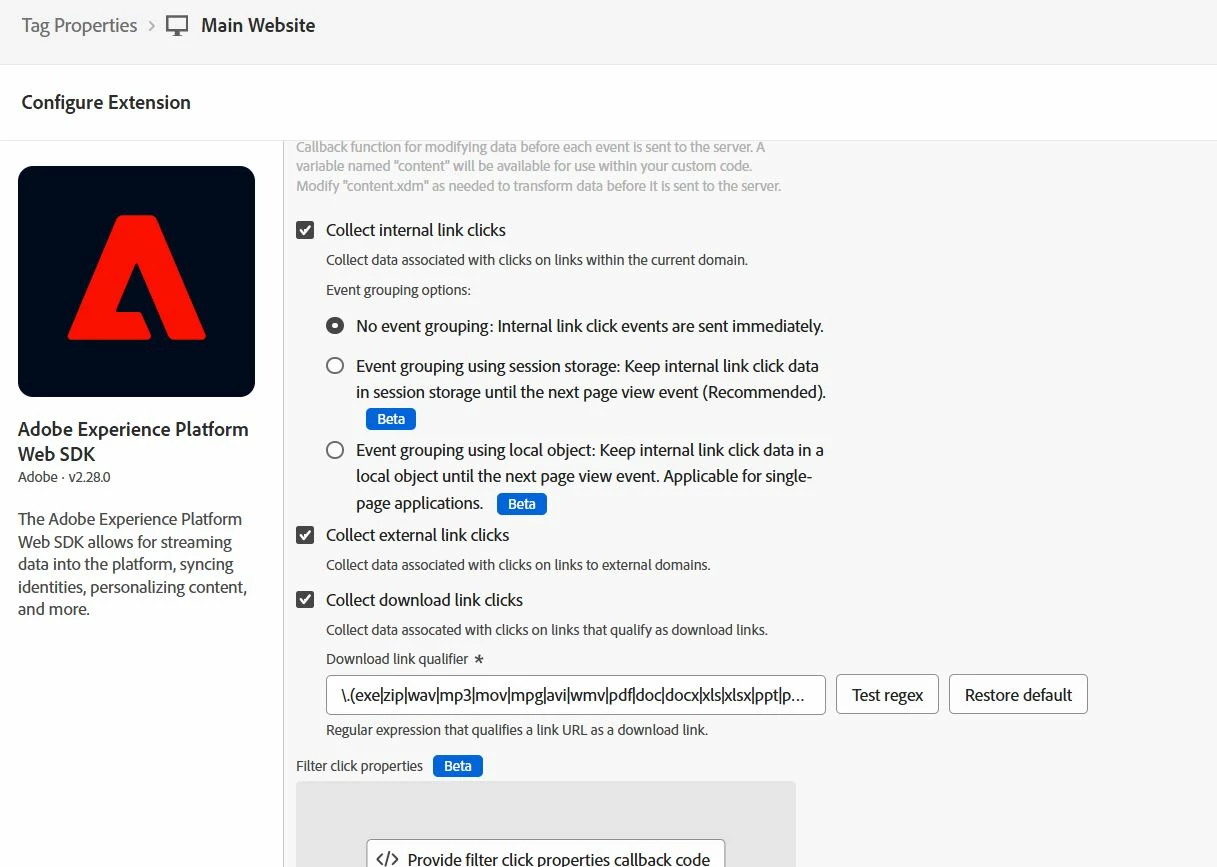
Hi @anuragsh12
same as @jennifer_kunz I have the same setup running without problems for me.
Though somethimes you may want to customize it a little.
What you can do is provide additional code in the "Provide filter click properties callback code" at the bottom of your screenshot.
This may help you understand a little bit better what's happening since this code runs before the click tracking event is sent.
For instance, when you have multiple domains that you want to treat as internal, you can use this code to make sure they are not treated as exit.
/*
 * Use this custom code block to adjust or filter click data. You can use the following variables:
 * content.clickedElement: The DOM element that was clicked
 * content.pageName: The page name when the click happened
 * content.linkName: The name of the clicked link
 * content.linkRegion: The region of the clicked link
 * content.linkType: The type of link (typically exit, download, or other)
 * content.linkUrl: The destination URL of the clicked link
 * Return false to omit link data.
 */

// rewrite exit links to be of type "other" if domains are internal
const internalDomains = ["mydomain.com"];
if (content.linkType === "exit" && internalDomains.some(domain => content.linkUrl.includes(domain))) {
    content.linkType = "other";
}
Likewise, you can add console logs in here to check whether the click is actually captured
// make sure you have enabled console logging
_satellite.setDebug(true);
_satellite.logger.debug(">>> Click captured");