[xssprotection] How to allow "transform" style for inline CSS ? | Community
Skip to main content
Level 2
April 30, 2024
Solved

[xssprotection] How to allow "transform" style for inline CSS ?

  • April 30, 2024
  • 3 replies
  • 1448 views

Hi guys ,


I am allowing SVG graphic attributes and elements ( https://developer.mozilla.org/en-US/docs/Web/SVG )  in /apps/cq/xssprotection/config.xml .

But I am not able to allow transform property for CSS . 

I have tried adding the below code in embed component as HTML but still AEM is trimming that piece of code ( Please find code and screenshots below  ) . 

<svg viewbox="0 0 420 200" xmlns="http://www.w3.org/2000/svg"> <filter id="noise1" x="0" y="0" width="100%" height="100%"> <feturbulence basefrequency="0.025" /> </filter> <filter id="noise2" x="0" y="0" width="100%" height="100%"> <feturbulence basefrequency="0.05" /> </filter> <rect x="0" y="0" width="200" height="200" style="filter: url(#noise1);" ></rect> <rect x="0" y="0" width="200" height="200" style="filter: url(#noise2); transform: translateX(220px);" ></rect> </svg>


HTML Code in browser  -- 
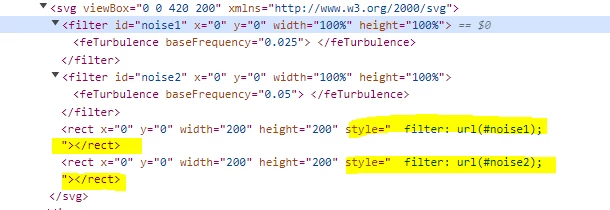


tried code under <css-rules> tag --> 


<property name="transform"> <literal-list> <literal value="translateX"/> </literal-list> <regexp-list> <regexp name="anything"/> </regexp-list> </property>


Can anyone please help regarding this issue ? 

Thank You


This post is no longer active and is closed to new replies. Need help? Start a new post to ask your question.
Best answer by newbie34

Hi @gkalyan , I can't modify server's headers and <meta> tag solution is also not resolving the issue .

So , what I understand is /libs/cq/xssprotection/config.xml ( overlayed by /apps/cq/xssprotection/config.xml ) provides XSS protection mechanism  which filters out all user-supplied content ( in my case , code is being added in embed component  as HTML ) . 

And by default there is no rule provided for "transform" property and that's why the same property is getting removed in browser .

3 replies

sravs
Community Advisor
Community Advisor
April 30, 2024

Hi @newbie34 , Can you please try by updating /apps/cq/xssprotection/config.xml as follows.


Add the regex pattern for transform property under <common-regexps> as below


<regexp name="CSStransform" value="translateX\((-|\+)?0|(-|\+)?([0-9]+(\.[0-9]+)?)(em|ex|px|in|cm|mm|pt|pc))"/>


and update <css-rules> tag  with 


<property name="transform"> <regexp-list> <regexp name="CSStransform"/> </regexp-list> </property>


newbie34Author
Level 2
May 2, 2024

Thank you @sravs  for suggestion , but still code is not reflecting in browser .

And I have also tried with translateX in CSStransform value .

gkalyan
Community Advisor and Adobe Champion
April 30, 2024

HI @newbie34 

You can try Implementing a CSP header in your web server configuration or meta tags in your HTML. You can specify a policy that allows inline styles, including the transform property.


You can configure your web server to return the Content-Security-Policy HTTP header with the rules 

Content-Security-Policy: default-src 'self'; style-src 'self' 'unsafe-inline';


If you cannot modify your server’s headers, you can use a <meta> tag in your HTML document like below:

<meta http-equiv="Content-Security-Policy" content="default-src 'self'; style-src 'self' 'unsafe-inline';">


Reference: https://developer.mozilla.org/en-US/docs/Web/HTTP/CSP

gkalyan
Community Advisor and Adobe Champion
May 2, 2024

@newbie34 Did you try this option of setting the HTTP header and meta tags?


Interesting to see if it resolved or something else is still blocking it.

newbie34AuthorAccepted solution
Level 2
May 3, 2024

Hi @gkalyan , I can't modify server's headers and <meta> tag solution is also not resolving the issue .

So , what I understand is /libs/cq/xssprotection/config.xml ( overlayed by /apps/cq/xssprotection/config.xml ) provides XSS protection mechanism  which filters out all user-supplied content ( in my case , code is being added in embed component  as HTML ) . 

And by default there is no rule provided for "transform" property and that's why the same property is getting removed in browser .

May 15, 2024

Has anyone found a solution to this?