xPath Exception about the paths with digits | Community
Skip to main content
Level 5
June 6, 2024
Solved

xPath Exception about the paths with digits

  • June 6, 2024
  • 2 replies
  • 874 views

Hi All,


We found that QueryManager throws exception about path with digits. For instance the following query will trigger the exception:

/jcr:root/content/mysite/events/2024/special-events//element(*,cq:PageContent)[@sling:resourceType='mysite/pages/event-detail' ] order by @datestamps ascending


It will automatically append an "*" to 2024, making it as /jcr:root/content/mysite/events/2024(*)/special-events//element(*,cq:PageContent)[@sling:resourceType='mysite/pages/event-detail' ] order by @datestamps ascending.

So that it will throw an exception


Is there any solution getting rid of this?


Thanks!


-kt

This post is no longer active and is closed to new replies. Need help? Start a new post to ask your question.
Best answer by arunpatidar

Hi @kevin_gta 
It seems, first character is required to be non-digit, you can switcg to SQL/SQL2 or use Query Builder query

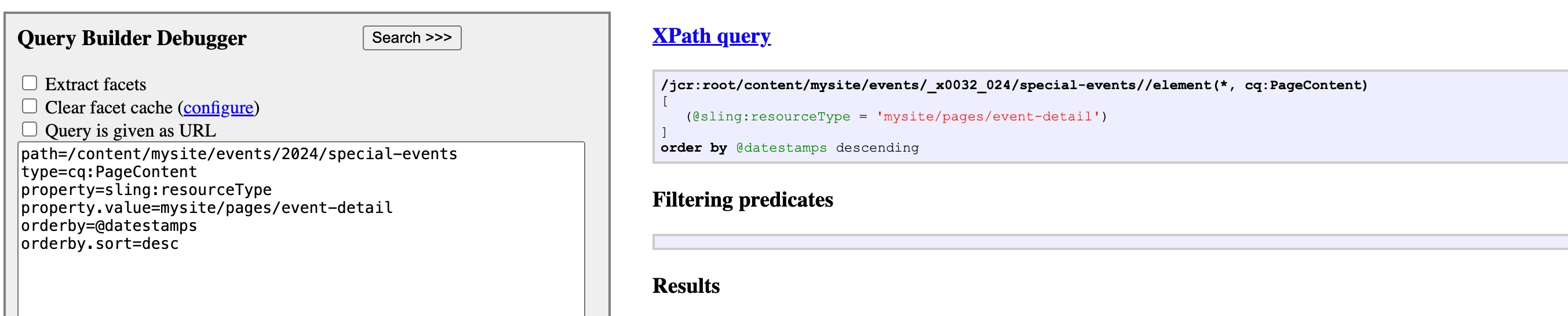
QueryBuilder Example example :


path=/content/mysite/events/2024/special-events
type=cq:PageContent
property=sling:resourceType
property.value=mysite/pages/event-detail
orderby=@datestamps
orderby.sort=desc


2 replies

arunpatidar
Community Advisor
arunpatidarCommunity AdvisorAccepted solution
Community Advisor
June 6, 2024

Hi @kevin_gta 
It seems, first character is required to be non-digit, you can switcg to SQL/SQL2 or use Query Builder query

QueryBuilder Example example :


path=/content/mysite/events/2024/special-events
type=cq:PageContent
property=sling:resourceType
property.value=mysite/pages/event-detail
orderby=@datestamps
orderby.sort=desc


Arun Patidar
Kevin_GTaAuthor
Level 5
June 7, 2024

Thanks for the suggestion. I will try that.

HrishikeshKagne
Community Advisor
Community Advisor
June 7, 2024

Hi @kevin_gta ,

The issue you are experiencing with the XPath query and paths containing digits is due to the way XPath handles paths that start with a digit. According to the XPath specification, a path step that starts with a digit is not valid syntax.

To work around this issue, you can use the `fn:name()` function in your XPath query to match the nodes based on their name instead of the path. Here's an example of how you can modify your query:

```xpath
/jcr:root/content/mysite/events//*[fn:name() = '2024']/special-events//element(*,cq:PageContent)[@sling:resourceType='mysite/pages/event-detail'] order by @datestamps ascending
```

By using the `fn:name()` function, you can match the nodes with the name "2024" without encountering the syntax issue.

Alternatively, if you have control over the node structure, you can consider prefixing the node name with a letter or a non-digit character to avoid the XPath syntax limitation.

It's important to note that the solution provided assumes you are using XPath queries in AEM. If you are using JCR-SQL2 queries, you may need to adjust the syntax accordingly.

If the issue persists or if you have further questions, it is recommended to reach out to Adobe Support or your AEM implementation partner for further assistance.

Hrishikesh Kagane