Workflow is still running even after step showing as completed. | Community
Skip to main content
Adobe Champion
December 15, 2022

Workflow is still running even after step showing as completed.

  • December 15, 2022
  • 4 replies
  • 1850 views

Workflow steps show completed. But still it is showing as 'Running' in the workflow instances?

Tried adding the step as in this post - https://experienceleaguecommunities.adobe.com/t5/adobe-experience-manager/custom-workflow-instance-are-in-running-state-even-after/td-p/326546 , added dam update workflow step as last step, still this is not fixed.
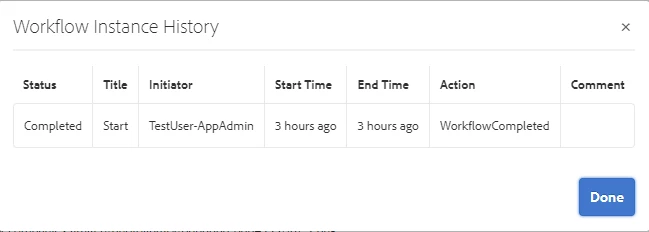
 

Please find below the code from my workflow


@8220494(name = "TestMove operation", service = WorkflowProcess.class, property = {
"process.label=Move operation" })
public class MoveOperation extends GenericWorkflowProcess {

@3214626
private ResourceResolverFactory resourceResolverFactory;

@3214626
private TestService service;

@9944223
public void execute(WorkItem workItem, WorkflowSession workflowSession, MetaDataMap metaDataMap)
throws WorkflowException {
final WorkflowData workflowData = workItem.getWorkflowData();
final String assetPath = workflowData.getPayload().toString();
try (ResourceResolver resolver = resourceResolverFactory
.getServiceResourceResolver(ServiceUser.SERVICE_USER.getAuthMap())) {
Long serialValue;
Resource resource = resolver.getResource(assetPath);
Resource metadataResource = resource.getChild(Constants.JCR_CONTENT_METADATA_WITHOUT_SLASH);
ValueMap properties = ResourceUtil.getValueMap(metadataResource);
serialValue = properties.get(Constants.ID,Long.class);
if ((Objects.nonNull(serialValue))) {
Resource rootPathResource = resolver.getResource(Constants.ROOT_PATH);
service.moveAsset(resource, serialValue, resolver, rootPathResource, Constants.ROOT_PATH);
}
resolver.commit();
this.persistData(workItem, workflowSession, Constants.OPERATION_COMPLETED, true);
} catch (LoginException | PersistenceException e) {
log.error("Unable to login or modify/add property as '{}'", ServiceUser.SERVICE_USER, e);
}
}

}


I checked inside /var path and workflowitem node shows all status as completed. But the main parent node status is showing as RUNNING.
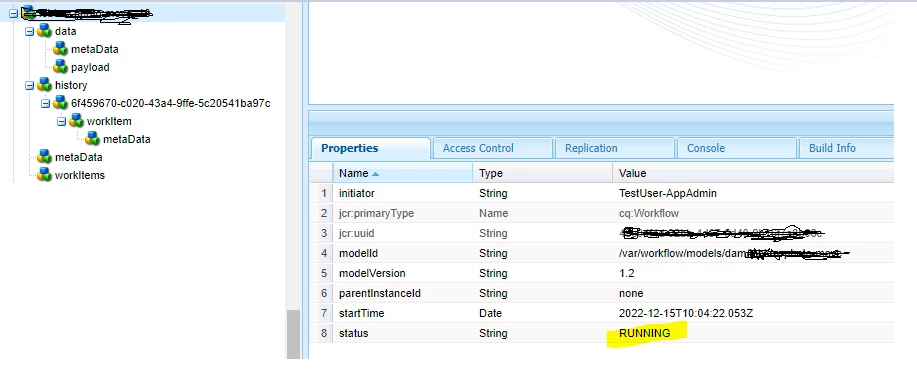


Anyone has faced this issue or have any leads?

This post is no longer active and is closed to new replies. Need help? Start a new post to ask your question.

4 replies

aanchal-sikka
Community Advisor
Community Advisor
December 15, 2022

Hello @p_v_nair 

Can you please cross-check, if Handler Advance is configured for the Workflow Step?


Then it will automatically advance to next step.


Please refer to https://experienceleague.adobe.com/docs/experience-manager-64/developing/extending-aem/extending-workflows/workflows-best-practices.html?lang=en#handler-advance

Aanchal Sikka
P_V_NairAdobe ChampionAuthor
Adobe Champion
December 15, 2022

@aanchal-sikka  Yes. Handler advanced is already checked.

Manu_Mathew_
Community Advisor
Community Advisor
December 15, 2022

@p_v_nair Anything on the error logs?

Level 3
December 15, 2022

Hi @p_v_nair ,

Did you try to complete workflow in your custom workflow process step. 


// querying work items WorkItem[] workItems = wfSession.getActiveWorkItems(); WorkItem workItem = wfSession.getWorkItem(id); // getting routes List<Route> routes = wfSession.getRoutes(workItem); // completing or advancing to the next step wfSession.complete(workItem, routes.get(0)); //optionaly terminate the current workflow programmatically wfSession.terminateWorkflow(workItem.getWorkflow());


Note: Please ensure that Handler Advance is checked and your workflow model is synced after edit. 


Reference https://experienceleague.adobe.com/docs/experience-manager-65/developing/extending-aem/extending-workflows/workflows-program-interaction.html?lang=en 
 
Thanks

P_V_NairAdobe ChampionAuthor
Adobe Champion
December 23, 2022

@aanchal-sikka @akashdeepaem @nikita___garg I could see that workflows are still in running status and one thing I noticed which is contributing to this is that, after every deployment ,the green check in the workflow is going and it is not synced.


Adobe Employee
December 16, 2022

hi @p_v_nair ,


May I know how many workflows are in running state in the existing instance?


Whether this is happening with this workflow only or others as well?


Thanks,

Nikita Garg