what is the best way to recognize the dam asset expiration date im writing one scheduler with in query but i couldnt get the result. | Community
Skip to main content
Level 3
July 14, 2020
Solved

what is the best way to recognize the dam asset expiration date im writing one scheduler with in query but i couldnt get the result.

  • July 14, 2020
  • 4 replies
  • 2354 views

I gone through 

https://docs.adobe.com/content/help/en/experience-manager-65/developing/platform/query-builder/querybuilder-predicate-reference.html#daterange


according to the url im using query as:


queryMap.put("path", assetFolderPath);
queryMap.put("type", "dam:Asset");
queryMap.put("p.limit", "-1");
queryMap.put("daterange.property", "jcr:content/metadata/" + EXPIRATION_DATE);
queryMap.put("dterange.upperBound", dateFormat.format(calenderDate.getTime()));
queryMap.put("daterange,upperOperation", "<");


Can any one share me the best query to recognize my expire assets plzzzzzzzzzzzzzzzzzzz


This post is no longer active and is closed to new replies. Need help? Start a new post to ask your question.
Best answer by Vijayalakshmi_S

Hi @keshav_goud,

To find expired assets with respect to a specific date, query predicates you have used seems to be fine. 

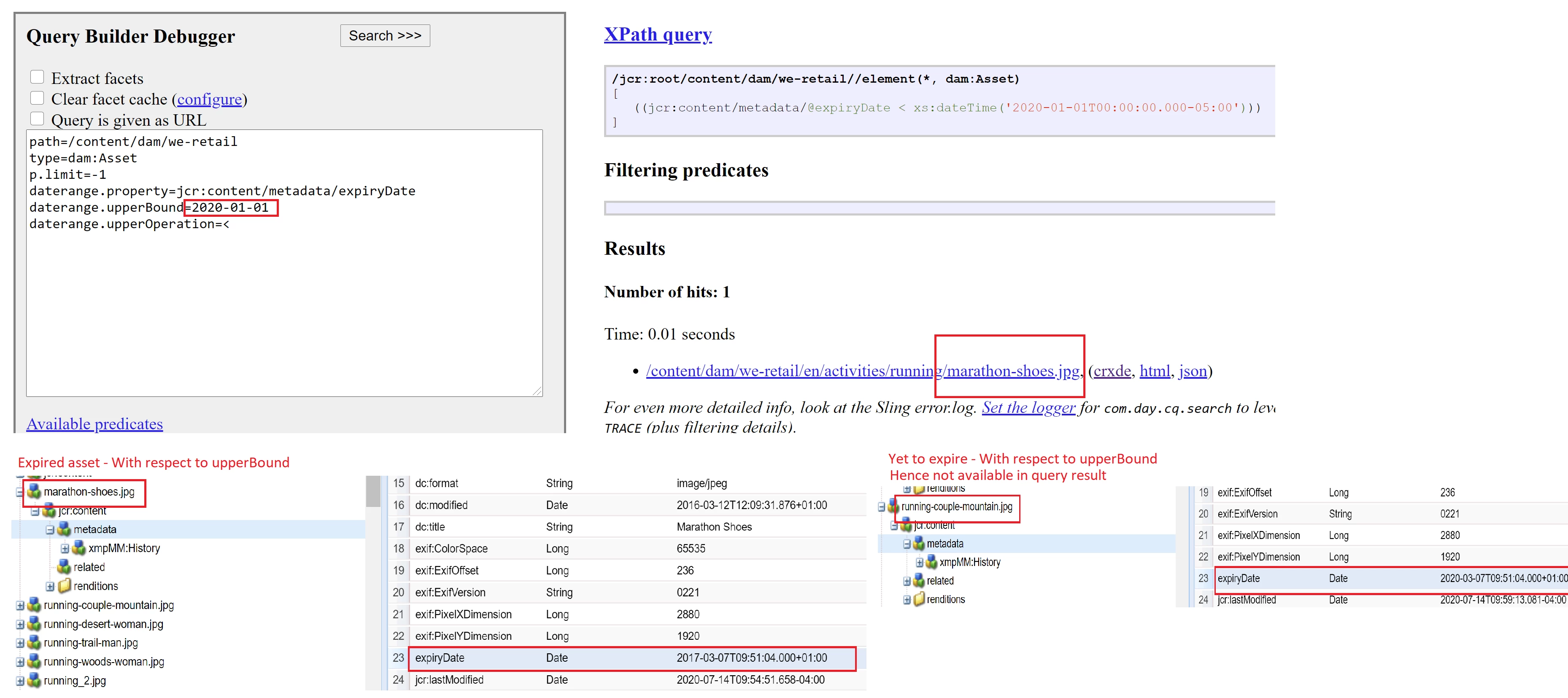
Given that you are not getting results, I suggest to execute first at querydebug.html(http://localhost:4502/libs/cq/search/content/querydebug.html) with hard coded date values targeting one or two sample assets.

Then when you see the results coming up, can write dynamically in code.

Screenshot below for reference: Expired asset with respect to specific date in upperBound.

On similar lines, based on your exact constraint on expired asset, can make use of related daterange predicates to get desired results

4 replies

Asutosh_Jena_
Community Advisor
Community Advisor
July 14, 2020

@keshav_goud Can you please confirm if you are trying to find the assets those are already expired or is going to expire in next couple of days? Are you tracking for any specific property?

Level 3
July 14, 2020
hi @asuthoshj7327906
Nitin_laad
Community Advisor
Community Advisor
July 14, 2020

Use something like as below, here prism:expirationDate represents expiration date, and using properties lower bound and upper bound you can define the date range. 

select [jcr:path], [jcr:score], * from [dam:Asset] as a where [jcr
:content/metadata/prism:expirationDate] > cast('2017-03-22T07:00:00.000Z' as date) and [jcr:content/metadata/prism:expirationDate] < cast('2017-03-23T07:00:00.001Z' as date) and isdescendantnode(a, '/content/dam')
 
Adobe Employee
July 14, 2020

You can possibly use a querry similar to:


path=/content/dam
type=dam:Asset

group.1_daterange.property=jcr:content/metadata/@prism:expirationDate
group.1_daterange.upperBound=2020-07-14T23:59:59.000-04:00
group.1_daterange.lowerBound=2020-07-13T00:00:00.000-04:00
group.p.limit=-1

Vijayalakshmi_S
Vijayalakshmi_SAccepted solution
Level 10
July 14, 2020

Hi @keshav_goud,

To find expired assets with respect to a specific date, query predicates you have used seems to be fine. 

Given that you are not getting results, I suggest to execute first at querydebug.html(http://localhost:4502/libs/cq/search/content/querydebug.html) with hard coded date values targeting one or two sample assets.

Then when you see the results coming up, can write dynamically in code.

Screenshot below for reference: Expired asset with respect to specific date in upperBound.

On similar lines, based on your exact constraint on expired asset, can make use of related daterange predicates to get desired results

Level 3
July 14, 2020

Hi vijis31358935,


thanks for your comment , I'm trying the same as mention in the picture with this query but result not showing why?