Want to add link to content in participant workitem notification | Community
Skip to main content
adivj95
Level 2
July 11, 2023
Solved

Want to add link to content in participant workitem notification

  • July 11, 2023
  • 1 reply
  • 707 views

Hi Community


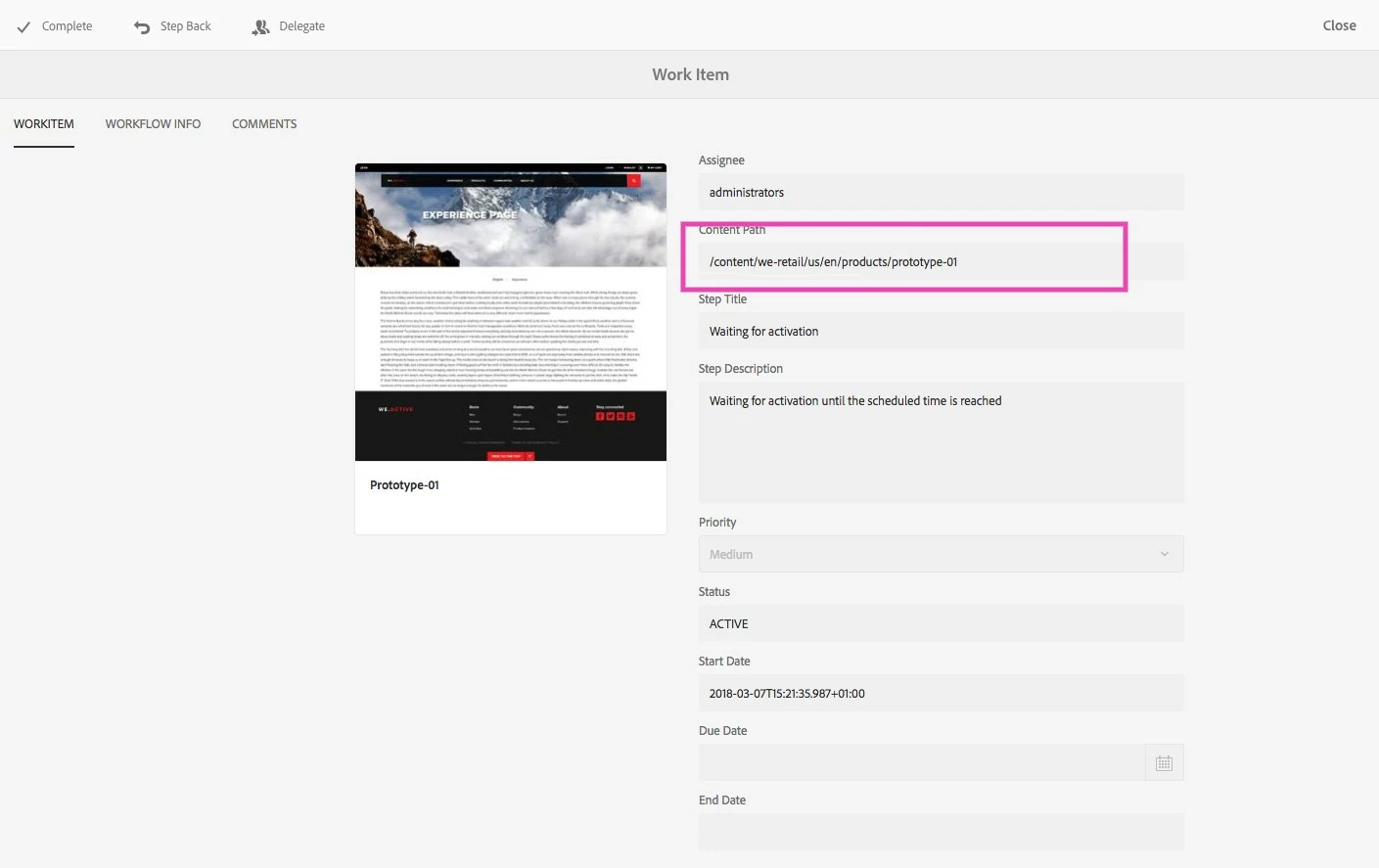
I want to add a link to content when participant got the workflow notification and open to view the work-item, as shown in below image i want link to the content,where i can click and it takes me to content in edit mode


This post is no longer active and is closed to new replies. Need help? Start a new post to ask your question.
Best answer by Sudheer_Sundalam

@adivj95 ,

Everything under /libs/cq/inbox/content/inbox is defined as jcr:mixinTypes = "granite:InternalArea", meaning these nodes should not be overlaid, inherited or used directly.

https://experienceleague.adobe.com/docs/experience-manager-65/deploying/upgrading/sustainable-upgrades.html?lang=en


This also implies that workitem menu or content page should not be modified.


Having said that, assuming if this nodes are not marked as granite:InternalArea, the below steps should help you out to create direct link to payload item from workitem page:

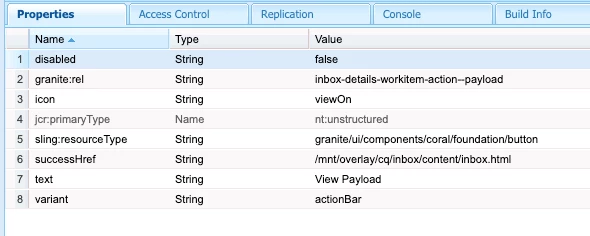
1) Overlay /libs/cq/inbox/content/inbox/details/workitem/jcr:content/actions to /apps and add a new node called "viewpayloadItem" with following properties:
 

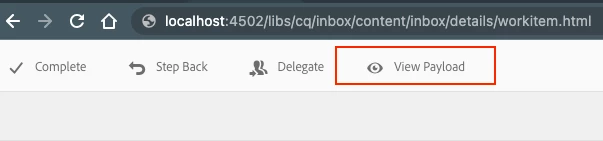
This should show a new view payload action button on the action bar:
Then add this simple jquery script in a new author clientlib and making sure it is loading on the workitem page:

$( document ).ready(function() { $(".inbox-details-workitem-action--payload").on("click", function name(params) { var url = "/editor.html" + $(".foundation-layout-panel-body input[name=contentPath]").val() + ".html"; window.open(url, '_blank'); }); });


You may further improve this script by checking type of workflow payload item. If the payload item is a page then, prepend "/editor.html" or if the payload item is a DAM asset, then preprend "/assetdetails.html".

Just a thought.



1 reply

Sudheer_Sundalam
Community Advisor
Community Advisor
July 11, 2023

@adivj95 ,


From the inbox window for the workflow user/approver, you can view the workflow payload in the edit mode using the "Payload" button. Please see the screenshot below.


adivj95
adivj95Author
Level 2
July 11, 2023

But i want to add link on workitem page as shown in screenshot

is it possible??

Sudheer_Sundalam
Community Advisor
Sudheer_SundalamCommunity AdvisorAccepted solution
Community Advisor
July 13, 2023

@adivj95 ,

Everything under /libs/cq/inbox/content/inbox is defined as jcr:mixinTypes = "granite:InternalArea", meaning these nodes should not be overlaid, inherited or used directly.

https://experienceleague.adobe.com/docs/experience-manager-65/deploying/upgrading/sustainable-upgrades.html?lang=en


This also implies that workitem menu or content page should not be modified.


Having said that, assuming if this nodes are not marked as granite:InternalArea, the below steps should help you out to create direct link to payload item from workitem page:

1) Overlay /libs/cq/inbox/content/inbox/details/workitem/jcr:content/actions to /apps and add a new node called "viewpayloadItem" with following properties:


This should show a new view payload action button on the action bar:

Then add this simple jquery script in a new author clientlib and making sure it is loading on the workitem page:

$( document ).ready(function() { $(".inbox-details-workitem-action--payload").on("click", function name(params) { var url = "/editor.html" + $(".foundation-layout-panel-body input[name=contentPath]").val() + ".html"; window.open(url, '_blank'); }); });


You may further improve this script by checking type of workflow payload item. If the payload item is a page then, prepend "/editor.html" or if the payload item is a DAM asset, then preprend "/assetdetails.html".

Just a thought.