Updating metadata via REST API in dc namespace (AEM Cloud) | Community
Skip to main content
April 1, 2022
Solved

Updating metadata via REST API in dc namespace (AEM Cloud)

  • April 1, 2022
  • 1 reply
  • 2402 views

We are trying to accomplish a simple use case of uploading an asset and settings its metadata to AEM Cloud via REST API from an external system. We have been able to upload the asset using the new Cloud Upload API successfully.


Now, I am looking for an HTTP route to call from an external system into AEM that will allow me to update metadata on the newly uploaded asset. The Assets HTTP API lists an update metadata of an asset endpoint here:

https://experienceleague.adobe.com/docs/experience-manager-cloud-service/content/assets/admin/mac-api-assets.html?lang=en#update-asset-metadata

The problem with this is it seems to update metadata only in the jcr namespace, however, we need to update metadata in the dc namespace as well (otherwise, the metadata values do not show up in the AEM UI). 


From what we understand there may be two approaches to solving this:

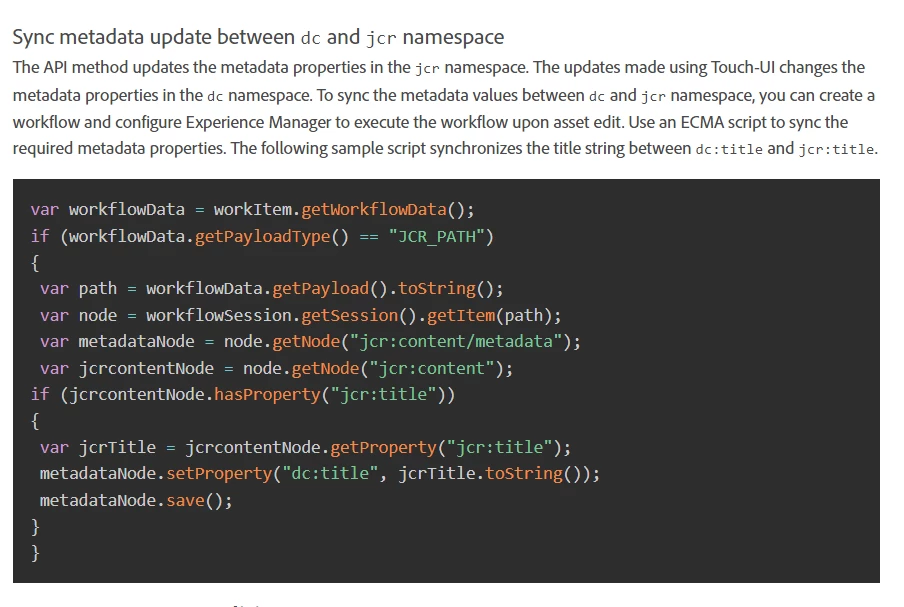
1) Using a workflow to sync values from the jcr namespace into the dc namespace that triggers when we set metadata from the Assets HTTP API - however, I have no familiarity with how to set up a workflow like this, so any documentation links or instructions would be helpful on how to do this.

2) Using a "sling API", but given previously I've only ever had to use HTTP APIs for AEM, I'm not familiar with if the sling API can be called via a REST-style HTTP request from an external system, and what the HTTP request would need to look like (and if this would require any customization deployed to AEM first).


Thank you for your help!
 

This post is no longer active and is closed to new replies. Need help? Start a new post to ask your question.
Best answer by Nitin_laad

@tarunc49511966 I believe approach (1) is only applicable if metadata update made using Touch-UI and not using API. 

Ref - https://experienceleague.adobe.com/docs/experience-manager-64/assets/extending/mac-api-assets.html?lang=en#update-asset-metadata

So, if that statement holds true, you should be able to update both dc and jcr properties in one API call. 


1 reply

Nitin_laad
Community Advisor
Nitin_laadCommunity AdvisorAccepted solution
Community Advisor
April 1, 2022

@tarunc49511966 I believe approach (1) is only applicable if metadata update made using Touch-UI and not using API. 

Ref - https://experienceleague.adobe.com/docs/experience-manager-64/assets/extending/mac-api-assets.html?lang=en#update-asset-metadata

So, if that statement holds true, you should be able to update both dc and jcr properties in one API call. 


September 19, 2023

I am having same issue.

Using the api with this payload


{ "class": "asset", "properties": { "metadata": { "dc:description": "this is added from API" } } }


only updates the "jcr:description" field but not the "dc:description" field, and so the updates do not show up in the UI.


Adobe Employee
March 11, 2024

Hi @test1fasfds5y67j  @tarunc49511966 


I am also facing the same issue, have you found the solution?