Unexpected behaviour when using com.adobe.granite.workflow.exec.Route API | Community
Skip to main content
Level 2
November 7, 2025

Unexpected behaviour when using com.adobe.granite.workflow.exec.Route API

  • November 7, 2025
  • 6 replies
  • 272 views

Greetings,


I would like to create conditional loop behavior in my AEM workflow.  I have found two possible implementations in the documentation, but am having trouble getting either to work.


The first method would be to use the built in 'GoTo' step.  However, I want the loop to execute conditionally based upon the value of a variable that must be calculated on the server.  My idea was to generate this value in a custom workflow process immediately before the 'GoTo' step and then pass the value to the 'GoTo'.  However, I have been unable to find a way to successfully pass the variable such that it will be visible in the 'GoTo' step's ECMA script.  Please let me know if there is a way to do this.


The second method is to use the com.adobe.granite.workflow.exec.Route API.  When attempting to use this however, the workflow steps do no execute in the order I expected. 


Consider the following workflow diagram:
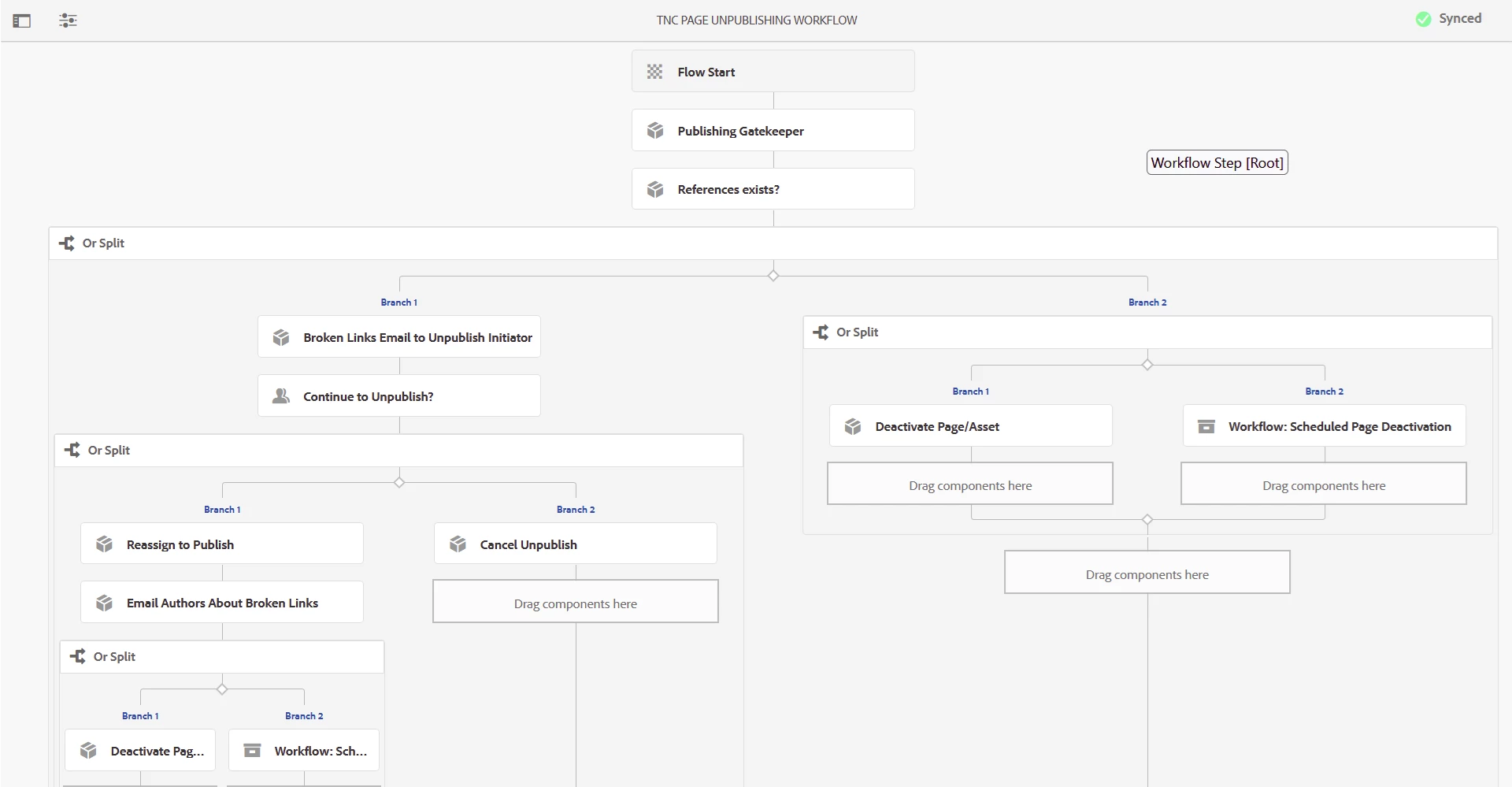


Under my test case I expect the order of execution to be:

1. Flow Start

2. Publishing Gatekeeper

3. References Exist

4. Or Split

5. Broken Links Email to Unpublish Initiator

6.Continue to Unpublish? (Participant Step: await user action)

7. Or Split

8. Reassign to Publish (initiate loop: goto 'Continue to Unpublish')

6. Continue to Unpublish?

7. Or Split

8. Reassign to Publish (now break out of loop and continue normally)

9. Email Authors About Broken Links

10. Or Split

11. Deactivate Page


The Routes API is used in the custom workflow process 'Reassign to Publish' to send the workflow back to the step 'Continue to Unpublish?' (which is a Participant Step).  In the logs I can see that the Routes API does trigger the 'Continue to Unpublish?' workflow to execute again.  However, what is odd is that the 'Email Authors About Broken Links' also executes as if the reroute never occurred.  I would have expected it to wait until 'Reassign to Publish' executed for the second time (and breaks out of the loop).  I have been sure to disable 'Handler Advance' on the 'Reassign to Publish' step.
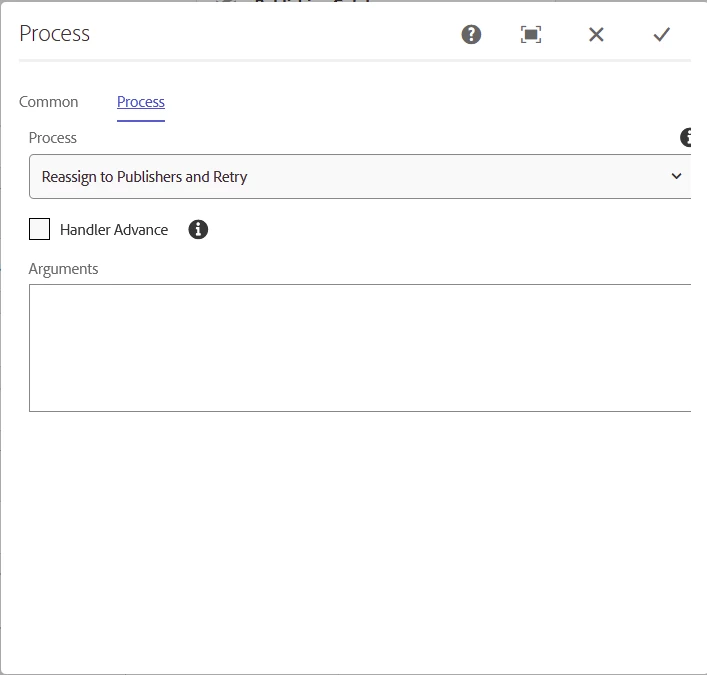
 

Here is the source code for the 'Reassign to Publish' step.  Please let me know if you have any thoughts.  Thank you.

@8220494( service=WorkflowProcess.class, immediate = true, property= { "service.description=Reassign to publishers and return to 'Continue to Unpublish?' step", "service.vendor=TNC", "process.label=Reassign to Publishers and Retry" }) public class ReassignToPublishers implements WorkflowProcess { private static final Logger LOG = LoggerFactory.getLogger(ReassignToPublishers.class); @3214626 private TNCUtilities tncUtilities; @9944223 public void execute(WorkItem workItem, WorkflowSession wfSession, MetaDataMap metaDataMap) throws WorkflowException { String contentPath = workItem.getWorkflowData().getPayload().toString(); try (ResourceResolver resolver = tncUtilities.getWriteResourceResolver()) { String initiator = workItem.getWorkflow().getInitiator(); String publisher = workItem.getWorkflow().getMetaDataMap().get("publisher", String.class); LOG.info("Immediately before initiatorCanPublish call."); LOG.info("PUBLISHER: {}, INITIATOR: {}", publisher, initiator); if (publisher == null /*&& !WorkflowHelper.initiatorCanPublish(initiator, contentPath, resolver)*/) { LOG.info("Inside initiatorCanPublish()"); //UserManager userManager = resolver.adaptTo(UserManager.class); publisher = "admin"; // WorkflowHelper.getPublisher(session, userManager, contentPath); LOG.info("Desginate publisher {} as next assignee", publisher); workItem.getWorkflow().getMetaDataMap().put("publisher", publisher); LOG.info("GoTo 'Continue To Unpublish?' step."); List<Route> routes = wfSession.getBackRoutes(workItem, false); Route specificRoute = null; for (Route route : routes) { LOG.info("ROUTE NAME: {}", route.getName()); if (route.getName().equals("Continue to Unpublish?")) { specificRoute = route; break; } } if (specificRoute != null) { LOG.info("Warping to: {}", specificRoute.getName()); wfSession.complete(workItem, specificRoute); } } else { String assignee = publisher != null ? publisher : initiator; LOG.info("Assignee: {} has publish rights for content path: {}. No reassignment needed.", assignee, contentPath); } } catch (Exception re) { LOG.error("An error occurred while reassigning to publisher: {}", contentPath, re); } LOG.info("Exiting ReassignToPublishers workflow step."); } }


6 replies

ManviSharma
Adobe Employee
Adobe Employee
November 8, 2025

Hello @johnagordon83-1 ,


your step is advancing twice.

In your custom Process step (“Reassign to Publish”) you call
wfSession.complete(workItem, specificRoute), and the step has Handler Advance = unchecked.
When Handler Advance is unchecked, AEM automatically advances the step on the default route after your execute() returns. Because you also call complete() manually, the engine:

  1. reroutes back to “Continue to Unpublish?” (your complete()), and then

  2. auto-advances along the original branch to “Email Authors About Broken Links”.

That’s why it looks like the reroute “didn’t stick”.

As a fix:

  • Open the “Reassign to Publish” step and check Handler Advance.

  • Keep your code that finds the back route and call exactly one wfSession.complete(workItem, specificRoute).

  • Do not return any additional complete() or let the engine auto-advance.

Alternatively:

If you prefer the built-in GoTo step and a server-calculated flag:

- In your process step (right before GoTo), set a workflow variable:
workItem.getWorkflowData().getMetaDataMap().put("loopBack", true);
- Then in the GoTo ECMA script:
var loop = workItem.getWorkflowData().getMetaDataMap().get("loopBack");
if (loop === true) {
route = "Continue to Unpublish?"; // the transition name to that step
} else {
route = "Next"; // whatever your forward route is called
}

- (Use the transition names as they appear in the model.)

That’s it, enable Handler Advance for manual routing, or don’t call complete() if you leave Handler Advance off.


Level 2
November 8, 2025

ManviSharma,


Thank you for taking the time to respond to my question.  However, I have attempted to implement your advice without success.


'workItem' isn't a variable that is defined in the 'GoTo' ECMA script.  I have tried workflowData.getMetaDataMap(), but this map does not contain any variables that are defined in a custom workflow process using a command like: workItem.getWorkflowData().getMetaDataMap().put("loopBack", true);


Documentation indicates that enabling 'Handler Advance' enables automatic routing not manual routing: https://experienceleague.adobe.com/en/docs/experience-manager-65/content/implementing/developing/extending-aem/extending-workflows/workflows-step-ref

I will proceed with a solution that does not require a 'loop' mechanic.  Thank you.

muskaanchandwani
Adobe Employee
Adobe Employee
November 10, 2025

Hello @johnagordon83-1 

- To share variables between steps, use:
workItem.getWorkflow().getMetaDataMap()
NOT workItem.getWorkflowData().getMetaDataMap() (which is step-local).


- In ECMA script steps (like GoTo), access variables as:
workflow.metaDataMap["yourVariableName"]


- For conditional GoTo behavior:
Set the variable in your custom process step and check it in your GoTo ECMA script.


- If using Route API (wfSession.complete(workItem, specificRoute)):
> Disable "Handler Advance" in the step; otherwise all routes may auto-advance.
> Make sure you select the exact route name you want to loop to (case sensitive).


Reference :
https://experienceleague.adobe.com/en/docs/experience-manager-65/content/implementing/developing/extending-aem/extending-workflows/workflows-step-ref

Level 2
November 10, 2025

@muskaanchandwani 


Thank you for your reply.

Unfortunately within the GoTo ECMA script the variable 'workflow' is not defined.  Attempts to use it will result in an error similar to the following:


10.11.2025 13:51:14.084 *ERROR* [JobHandler: /var/workflow/instances/server0/2025-11-09/tnc-deactivation-unpublishing-workflow_356:/content/tnc/nature/us/en-us/test-pages/general-content-test] com.adobe.granite.workflow.core.rule.RuleEngineAdminImpl Cannot evaluate rule: function check() { log.error("Hello!"); //String publisher = workflow.metaDataMap["publisher"]; log.error(workflow.metaDataMap); log.error("Publisher is: " + publisher); return publisher != null; } com.adobe.granite.workflow.WorkflowException: org.apache.sling.api.scripting.ScriptEvaluationException: Failure running script /libs/workflow/scripts/dynamic.ecma: ReferenceError: "workflow" is not defined. (NO_SCRIPT_NAME#4) at com.adobe.granite.workflow.core.rule.ScriptingRuleEngine.evaluate(ScriptingRuleEngine.java:117) [com.adobe.granite.workflow.core:2.0.240.CQ680-B0017] at com.adobe.granite.workflow.core.rule.RuleEngineAdminImpl.evaluate(RuleEngineAdminImpl.java:53) [com.adobe.granite.workflow.core:2.0.240.CQ680-B0017] at com.adobe.granite.workflow.core.WorkflowSessionImpl.evaluate(WorkflowSessionImpl.java:1620) [com.adobe.granite.workflow.core:2.0.240.CQ680-B0017] at com.adobe.granite.workflow.core.process.GotoProcess.execute(GotoProcess.java:65) [com.adobe.granite.workflow.core:2.0.240.CQ680-B0017] at com.adobe.granite.workflow.core.job.HandlerBase.executeProcess(HandlerBase.java:198) [com.adobe.granite.workflow.core:2.0.240.CQ680-B0017] at com.adobe.granite.workflow.core.job.JobHandler.process(JobHandler.java:271) [com.adobe.granite.workflow.core:2.0.240.CQ680-B0017] at org.apache.sling.event.impl.jobs.JobConsumerManager$JobConsumerWrapper.process(JobConsumerManager.java:502) [org.apache.sling.event:4.2.24] at org.apache.sling.event.impl.jobs.queues.JobQueueImpl.startJob(JobQueueImpl.java:351) [org.apache.sling.event:4.2.24] at org.apache.sling.event.impl.jobs.queues.JobQueueImpl.access$100(JobQueueImpl.java:60) [org.apache.sling.event:4.2.24] at org.apache.sling.event.impl.jobs.queues.JobQueueImpl$1.run(JobQueueImpl.java:287) [org.apache.sling.event:4.2.24] at java.base/java.util.concurrent.ThreadPoolExecutor.runWorker(ThreadPoolExecutor.java:1128) at java.base/java.util.concurrent.ThreadPoolExecutor$Worker.run(ThreadPoolExecutor.java:628) at java.base/java.lang.Thread.run(Thread.java:834)
muskaanchandwani
Adobe Employee
Adobe Employee
November 12, 2025

Hello @johnagordon83-1 
Thank you for testing this out

Could you try the below :

Use these available predefined variables in AEM ECMA workflow scripts:

workItem
workflowSession
workflowData
args (process arguments)
metaData (step metadata)


>> To access workflow-wide variables (MetaDataMap), use:

workflowData.getMetaDataMap().get("variableName");


>> Set or update variables in a custom process step, for example, in ECMA:
workflowData.getMetaDataMap().put("loopBack", true);

kautuk_sahni
Community Manager
Community Manager
February 23, 2026

@johnagordon83-1 Checking back on this thread, were you able to find a solution? If so, please consider sharing what worked for you so others facing the same issue can learn from it. And if one of the replies guided you to the fix, marking it as accepted helps keep our community knowledge clear and easy to navigate. Every update helps!

Kautuk Sahni
Level 2
February 24, 2026

No solution was identified for this issue.

Tanika02
Level 7
February 26, 2026

Hi ​@johnagordon83-1 - 


Have you tried any alternative approach ; Instead of trying to programmatically route backward, use a custom process step to set a flag, then let an OR Split handle the routing decision.


Potential Workflow Structure:

1. Continue to Unpublish? (Participant Step)
2. Check Publisher Assignment (Custom Process)
3. OR Split (evaluates flag)
   ├─ Branch 1: needsReassignment = true → Loop back to step 1
   └─ Branch 2: needsReassignment = false → Continue forward
4. Email Authors About Broken Links
5. Deactivate Page


Instead of calling wfSession.complete() to route backward, restructure your workflow to use an OR Split that reads a flag set by your custom process step:
  • Your custom process step sets workItem.getWorkflow().getMetaDataMap().put("needsReassignment", "true")
  • OR Split evaluates this flag using ECMA: workflowData.getMetaDataMap().get("needsReassignment") === "true"
  • Branch 1 routes back to your participant step, Branch 2 continues forward
Key points:
  • Don't use wfSession.complete() - let the OR Split handle routing
  • Use workflow-level metadata: workItem.getWorkflow().getMetaDataMap()
  • Include a loop counter to prevent infinite loops
  • // Prevent infinite loops
    if (loopCount > 5) {
    LOG.warn("Max loop iterations reached for {}", contentPath);
    wfMetadata.put("needsReassignment", "false");
    return;
    }


  • Keep Handler Advance enabled on all steps
This might works because the OR Split evaluates synchronously after your process step completes, avoiding the asynchronous execution race condition that causes both paths to execute with the Route API.


AmitVishwakarma
Community Advisor
Community Advisor
February 26, 2026

Hi ​@johnagordon83-1 ,

The most robust, repeatable way to implement a conditional loop in AEM workflows is:

  • Share data between steps via workflowData’s MetaDataMap
  • Let an OR Split / GoTo decide routing based on that flag
  • Don’t manually route backward with Route unless you absolutely must

Below is a minimal, working pattern.

1. In your custom process step: set workflow-wide flags Use workflowData metadata, not workItem-local metadata, and not a workflow variable in ECMA.

Java process step (before the OR Split / GoTo):

@Override
public void execute(WorkItem workItem,
WorkflowSession wfSession,
MetaDataMap args) throws WorkflowException {

MetaDataMap wfMeta = workItem.getWorkflowData().getMetaDataMap();

// Decide if you need to loop
boolean needsReassignment = /* your logic here */ true;

wfMeta.put("needsReassignment", needsReassignment);

// Optional: loop counter to avoid infinite loop
Integer loopCount = wfMeta.get("loopCount", Integer.class);
loopCount = (loopCount == null) ? 1 : loopCount + 1;
wfMeta.put("loopCount", loopCount);

if (loopCount > 5) { // hard safety cap
wfMeta.put("needsReassignment", false);
}
}

This metadata is available to all later steps as workflowData.getMetaDataMap() in ECMA scripts. See the official docs on workflow metadata and variables:
https://experienceleague.adobe.com/en/docs/experience-manager-65/content/implementing/developing/extending-aem/extending-workflows/workflows-customizing-extending

https://experienceleague.adobe.com/en/docs/experience-manager-65/content/implementing/developing/extending-aem/extending-workflows/workflows-step-ref

https://experienceleague.adobe.com/en/docs/experience-manager-65/content/implementing/developing/extending-aem/extending-workflows/using-variables-in-aem-workflows

2. OR Split (recommended): ECMA branch back vs forward

Right after your “Reassign to Publisher / Check” process step, add an OR Split:

  • Branch 1 -> goes back to the “Continue to Unpublish?” participant step.
  • Branch 2 -> goes forward (e.g., Email Authors About Broken Links).

In the OR Split, for the loop branch, use ECMA Script routing:

// OR Split branch that loops back to "Continue to Unpublish?"
function check() {
var meta = workflowData.getMetaDataMap();
var flag = meta.get("needsReassignment");
var loopCount = meta.get("loopCount");

// stop looping if safety limit hit
if (loopCount != null && parseInt(loopCount, 10) > 5) {
return false;
}

// treat both boolean true and string "true" as true
return flag === true || flag == "true";
}
  • Keep Handler Advance ON for normal steps.
  • Do not call wfSession.complete() yourself for routing; the engine follows the OR Split decision automatically.

This avoids the timing/race issues you observed with Route and is exactly how the docs recommend doing loops (see the “Simulating a for loop” and OR Split sections in https://experienceleague.adobe.com/en/docs/experience-manager-65/content/implementing/developing/extending-aem/extending-workflows/workflows-step-ref


3. If you must use GoTo instead

If you prefer the built‑in GoTo Step, the pattern is the same: use workflowData metadata.
Process step (Java) before GoTo:

workItem.getWorkflowData().getMetaDataMap().put("loopBack", true);

GoTo ECMA script (Routing Expression):

function check() {
var meta = workflowData.getMetaDataMap();
var loop = meta.get("loopBack");

// true or "true" → execute Target Step (your earlier step)
return loop === true || loop == "true";
}

Note: In dynamic.ecma and GoTo scripts, there is no workflow variable – only workItem, workflowSession, workflowData, args, metaData, etc. https://experienceleague.adobe.com/en/docs/experience-manager-65/content/implementing/developing/extending-aem/extending-workflows/workflows-customizing-extending


4. Why not wfSession.complete(workItem, Route)?
Your original behavior (step where both the loop and the forward path executed) is exactly the kind of subtle race-condition and handler‑advance interaction that makes Route-based manual back‑routing fragile.


Using metadata + OR Split / GoTo:

  • All routing is declarative and visible in the model.
  • The engine advances each step once, deterministically.
  • You can easily guard with a loopCount to prevent infinite loops.

Thanks,
Amit

Amit Vishwakarma - Adobe Commerce Champion 2025 | 16x Adobe certified | 4x Adobe SME
PGURUKRISHNA
Level 4
March 2, 2026

Hey ​@johnagordon83-1 , 

The issue is that 

wfSession.complete(workItem, specificRoute)

 doesn't stop the original workflow path from continuing. Both paths execute in parallel.

Fix:

  1. Use Route ID instead of Route Name:

if (route.getId().equals("continue-to-unpublish")) {


  1. Return immediately after completing:

wfSession.complete(workItem, specificRoute);
return; // Add this
  1. Verify Handler Advance is OFF for the "Reassign to Publish" step in your workflow model.

If this still doesn't work, the Route API has limitations. Use the GoTo step instead:

In your custom process before GoTo:

workItem.getWorkflowData().getMetaDataMap().put("shouldLoop", true);
wfSession.updateWorkflowData(workItem.getWorkflow(), workItem.getWorkflowData());


In GoTo step's ECMA script:

workflowData.getMetaDataMap().get("shouldLoop", false);