
Unable to remove the components from Editable Templates | Community
Skip to main content
chirran414
Level 4
September 11, 2018
Solved

Unable to remove the components from Editable Templates

  • September 11, 2018
  • 13 replies
  • 14100 views

Hello Everyone,

We are using editable templates, after adding the components to the editable template I noticed that there is no trash icon in the toolbar so we are unable to remove the component from Template. Is it expected behavior with the editable templates because when I use the same component on static templates I am seeing trash icon and I am able to remove the component.

Note:

We are not seeing trash icon for the components in their rendering script

If we referencing content within structure components via data-sly-resource using the @ resourceType option, we are unable to delete the component.

Code snippet of my component rendering script:

<div class="full-stack-content">

    <div class="container">

        <data-sly-resource="${ @path='sectionResponsiveGrid', resourceType='wcm/foundation/components/responsivegrid'}"></div>

    </div>

</div>
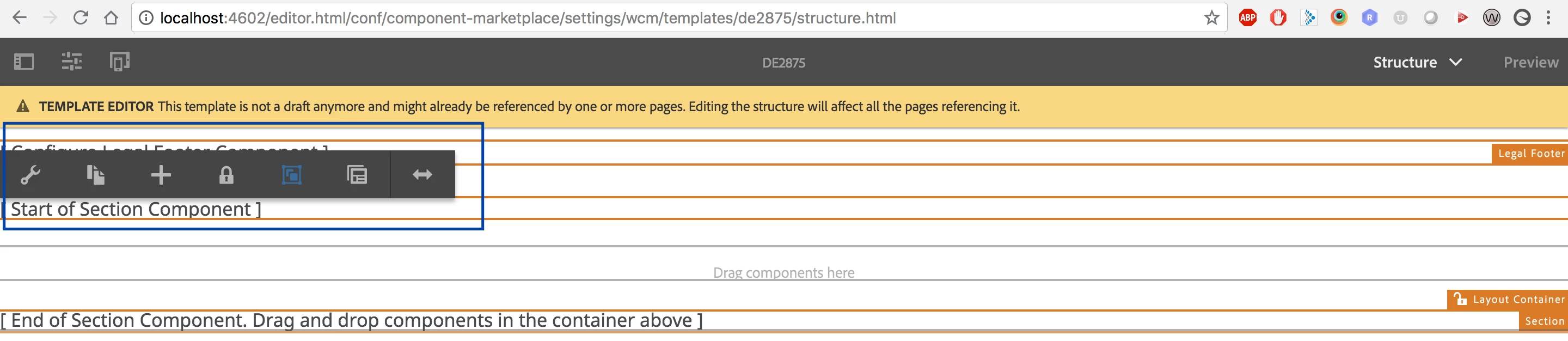
If we do not have any referencing content within structure components via data-sly-resource using the @ resourceType option we are seeing the trash icon like shown below.

Thanks,

Narayana.

This post is no longer active and is closed to new replies. Need help? Start a new post to ask your question.
Best answer by chirran414

I found one article about it, after following those steps (after adding the section component and if I authored it I am able to see the trash icon/ delete button) I am able to remove that component from editable template.
adobe - Not able to remove components in Editable Template AEM - Stack Overflow

Hi  smacdonald2008​ can you confirm is this the correct way to follow it ?

13 replies

smacdonald2008
Level 10
September 13, 2018

That 6.4 article should be backwards compatible for 6.3.

smacdonald2008
Level 10
September 13, 2018

Here is a video i just created to clear this up:

Also for more information on Editable Templates - watch this Guided Journey (You can also find this GJ in Experience League):

Scott's Digital Community: Guided Journey for Experience Manager on Editable Templates

Hope this helps...

New Member
November 5, 2022

I had the same problem. The Stackoverflow solution indeed helped. https://stackoverflow.com/questions/50447249/not-able-to-remove-components-in-editable-template-aem

For me, I had to go into the editable template and switch from Structure to Initial Content, in order to add content to the component. Then I was able to delete it. 

Adobe should consider improving the experience of using a component with data-sly-resource using the @ resourceType option.