unable to integrate AEM with Launch using Adobe I/O having static templates | Community
Skip to main content
May 27, 2020
Solved

unable to integrate AEM with Launch using Adobe I/O having static templates

  • May 27, 2020
  • 4 replies
  • 5877 views

Hi,


I am trying to integrate AEM 6.5 with  Adobe Launch using Adobe I/O

Referring :- https://docs.adobe.com/content/help/en/experience-manager-learn/sites/integrations/adobe-launch-integration-tutorial-understand.html


But i am unable to map Adobe Launch cloud service with my project as we have static templates and our project is not under conf.


Is it the case that we can only using header approach for integrating launch with static templates in AEM?

By any chance can we integrate Adobe Launch using Adobe IO while being on static templates.?
@neerajpandey24 @kautuk_sahni 


This post is no longer active and is closed to new replies. Need help? Start a new post to ask your question.
Best answer by leoberliant

Yes, it's possible to complete:

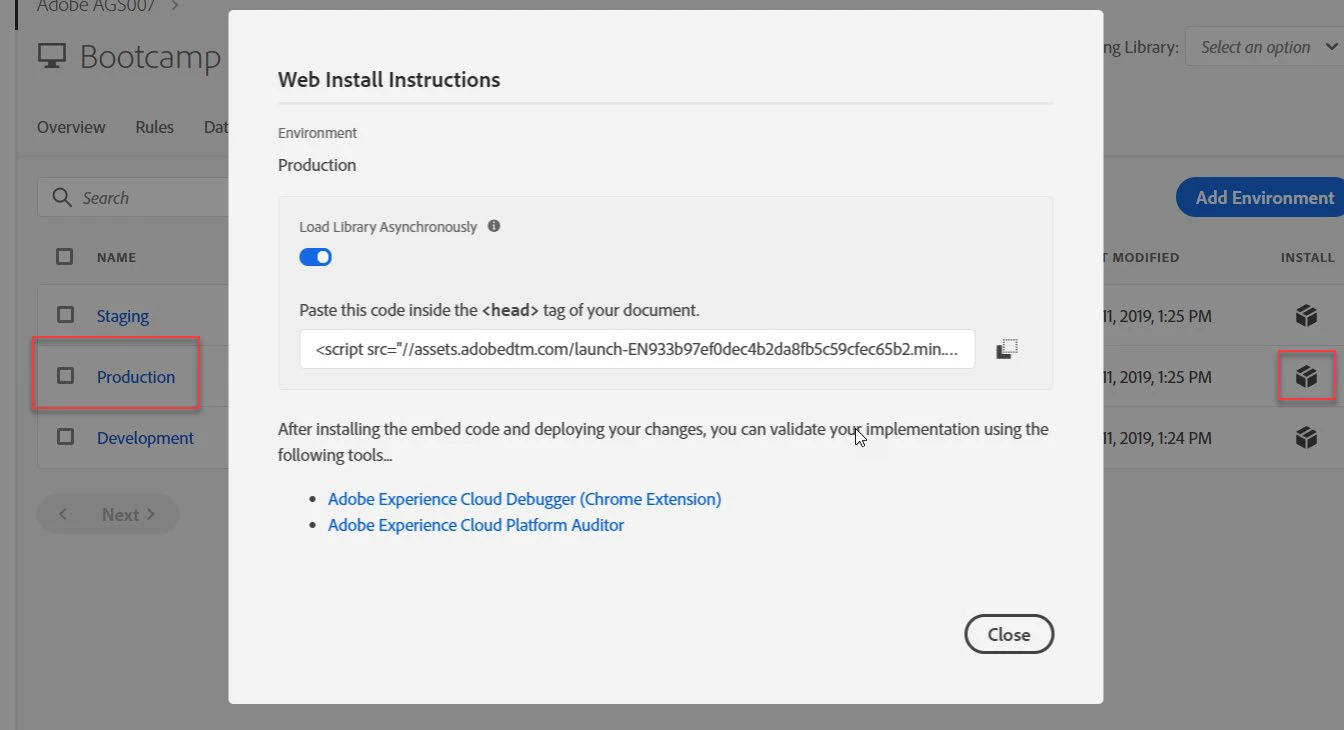
1. From the Launch property, you've been working in, click the Environments nav element

2. Click the Install icon for the Production environment to trigger the Web Install Instructions dialog box:


3. Click the Copy icon to copy the embed code to the clipboard.

4. Add the Launch header code to a page template. For example, for the We.Retail site:

a. browse to /apps/weretail/components/structure

b. place the Launch embed code that you just copied to the bottom of the customheaderlibs.html file:


4 replies

leoberliantAdobe EmployeeAccepted solution
Adobe Employee
May 27, 2020

Yes, it's possible to complete:

1. From the Launch property, you've been working in, click the Environments nav element

2. Click the Install icon for the Production environment to trigger the Web Install Instructions dialog box:


3. Click the Copy icon to copy the embed code to the clipboard.

4. Add the Launch header code to a page template. For example, for the We.Retail site:

a. browse to /apps/weretail/components/structure

b. place the Launch embed code that you just copied to the bottom of the customheaderlibs.html file:


Level 2
March 15, 2021
How is this answer is solution of the problem? This is still adding launch script in the header and not using adobe I/O.
Adobe Employee
May 27, 2020

When you say "unable to map Adobe Launch cloud service with my project" can you clarify what happens? From the relevant steps in the following document which one is not working as expected:


https://helpx.adobe.com/experience-manager/using/aem_launch_adobeio_integration.html#MapanAdobeLaunchintegrationtoasiteinAEM

raghavc
Level 4
May 27, 2020

The solution suggested by @leoberliant  would work , only draw back is the launch script will hard coded in page component, So if you support multiple sites which uses different launch properties you will have to handle it in the code instead of config. You can try the below to ensure the config is loaded from the config


If you static page component does not use core/foundation page component and if you do not see the cloud config option, then you will have to update the page component dialog to include cloud config option 

<configuration jcr:primaryType="nt:unstructured" jcr:title="Configuration" sling:resourceType="granite/ui/components/coral/foundation/form/fieldset"> <items jcr:primaryType="nt:unstructured"> <cqConf jcr:primaryType="nt:unstructured" sling:resourceType="cq/cloudconfig/components/admin/configpathbrowser" emptyText="Select Configuration Path" fieldLabel="Cloud Configuration"> <granite:data jcr:primaryType="nt:unstructured" cq-msm-lockable="cq:conf"/> </cqConf> </items> </configuration>


Then include the header and footer component present under /libs/cq/cloudconfig/components/scripttags into your page components head(before any clientlib) and footer(end of the page) section


May 28, 2020
Thanks, I am able to resolve the issue now. The configuration section under advanced tab was missing from my page properties. After adding i was able to select the cloud configuration and the other issue was we were using the core component v1 for page and teh below scripts are missing in the core component page v1. so after using core page v2 it works for me.
May 28, 2020

Thanks team the issue is resolved now.

There were two issues.

1. Configuration section under advanced tab was missing in my code.

2. We were using core/v1/page but that didn't contain the below scripts.

<sly data-sly-resource="${'cloudconfig-header' @ resourceType='cq/cloudconfig/components/scripttags/header'}"></sly>

<sly data-sly-resource="${'cloudconfig-footer' @ resourceType='cq/cloudconfig/components/scripttags/footer'}"></sly>

After adding this it works for me.

Level 2
March 15, 2021
Thanks. This resolved the issue.
