UberJar upgrade issues - AEM 6.5 (SP - 6.5.12) | Community
Skip to main content
Level 2
April 29, 2024
Solved

UberJar upgrade issues - AEM 6.5 (SP - 6.5.12)

  • April 29, 2024
  • 4 replies
  • 1137 views

Hi all,


I am having issues upgrading to UberJar version from 6.4.0 to 6.5.12. Please allow me to explain the context behind this upgrade.


Part 1


I am trying to achieve clearing cache on the dispatchers through an event handler that would look for 'Activate' events and perform 'Invalidate' Distribution request supported from Sling Content Distribution methods (SCD)



During this process, I found out while creating an object of the SimpleDistributionRequest class requires member Invalidate from enum DistributionRequestType. This member is not present in the UberJar version 6.4.0.
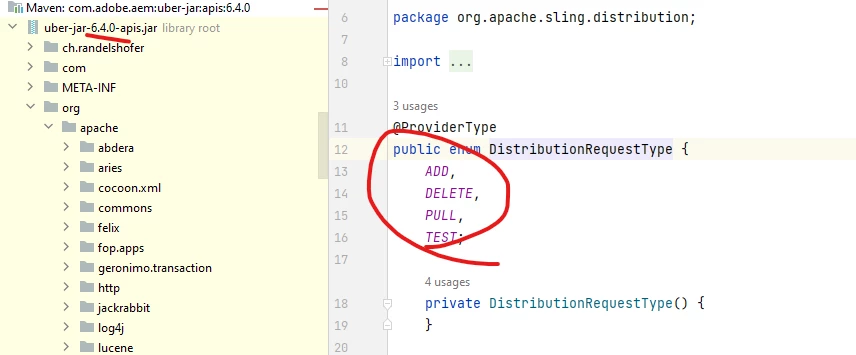


 Part 2


Did some research and found out the UberJar version needs to match the AEM version as well.


I made changes to project POM file to 6.5.12 which is according to version installed for me. Below is the first set of errors that cropped up on the build.
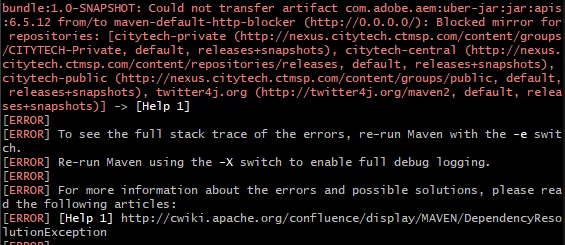


On some more research, found that after some version, maven had blocked use of resources from http URLs for security reasons. They have explained the same in their release notes below. My version is 3.8.5.

Maven – Release Notes – Maven 3.8.1 (apache.org) 


Followed instructions mentioned in the above notes and created a mirror with blocked as false in users/m.2/settings.xml file. Posting a link below to understand even more about how I found to counter this.


docker - Maven - Could not transfer artifact caused by Blocked mirror for repositories - Stack Overflow


Changes that I made in the m.2 settings file,
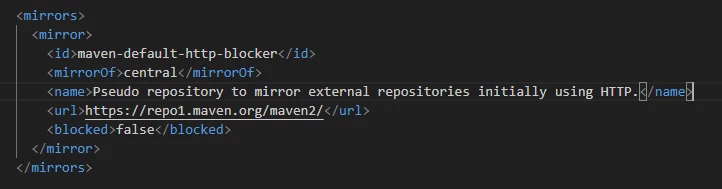


Got the secure maven repository URL from their site.


Post which I got the below errors,
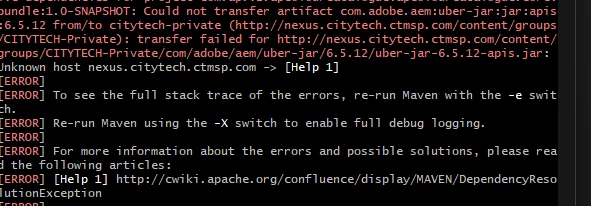


Turns out these (Nexus and others) repositories are mentioned right where I created a mirror block in my settings file. Did some research and sources mentioned to remove those. Also, when accessing these links on a browser it says cannot reach. Removed them and got something else,



I am deep into this but stuck here. Apologies for the huge post but I just wanted to put up all that I found/tried to solve this. Thanks for reading this, any help is highly appreciated!!


Regards,

Kashyap

This post is no longer active and is closed to new replies. Need help? Start a new post to ask your question.
Best answer by DPrakashRaj

It seems acs-commons version 4.0.0 is not compatible with aem Uber jar 6.5.12 you are using. Try updating the acs-commons version as well

4 replies

DPrakashRaj
Community Advisor
DPrakashRajCommunity AdvisorAccepted solution
Community Advisor
April 29, 2024

It seems acs-commons version 4.0.0 is not compatible with aem Uber jar 6.5.12 you are using. Try updating the acs-commons version as well

aanchal-sikka
Community Advisor
Community Advisor
April 29, 2024

@kashyap691 


Please try by using profile adobe-public in you maven command.Example: mvn clean install -PautoInstallPackage,adobe-public


Aanchal Sikka
HrishikeshKagne
Community Advisor
Community Advisor
May 4, 2024

Hi @kashyap691 ,

Upgrading UberJar in AEM 6.5 (Service Pack 6.5.12) can involve several considerations to ensure a smooth transition and minimize issues. Here are some common challenges and strategies to address them:

  1. Compatibility with Existing Code: Ensure that any custom code or third-party dependencies are compatible with the new UberJar version. Review release notes and documentation for any changes that might affect your implementation.

  2. Configuration Changes: Check for any changes to configuration properties or default settings in the new UberJar version. Update your configurations accordingly to maintain compatibility and functionality.

  3. Testing: Thoroughly test your AEM instance after upgrading the UberJar to identify any issues or regressions. This includes functional testing of core features, as well as testing any customizations or integrations.

  4. Dependency Updates: If upgrading the UberJar involves updating underlying dependencies (e.g., Oak, Felix), ensure that all dependencies are compatible with your application and meet any version requirements.

  5. Backup and Rollback Plan: Before upgrading, take a full backup of your AEM instance and content repository. This allows you to rollback in case of any critical issues or unexpected behavior during the upgrade process.

  6. Incremental Upgrade: Consider performing incremental upgrades by first upgrading to intermediate versions before reaching the target version. This can help identify and address issues in smaller steps.

  7. Community and Support: Utilize community resources, forums, and Adobe support channels for assistance and guidance during the upgrade process. Other users may have encountered similar issues and can offer insights or solutions.

  8. Documentation Review: Review the upgrade documentation provided by Adobe for any specific instructions or considerations relevant to your upgrade scenario. This may include migration guides, compatibility matrices, and best practices.

By following these strategies and addressing potential challenges proactively, you can minimize issues and ensure a successful upgrade of UberJar in your AEM 6.5 instance.

Hrishikesh Kagane
kautuk_sahni
Community Manager
Community Manager
May 16, 2024

@kashyap691 Did you find the suggestions from users helpful? Please let us know if more information is required. Otherwise, please mark the answer as correct for posterity. If you have found out solution yourself, please share it with the community.

Kautuk Sahni