


Tuesday Tech Bytes – AEM Week 05 - Asset Management using aio-cli and HTTP API

Overview
Generally, we upload assets to Adobe Experience Manager (AEM) using the user interface, but sometimes there is a need to upload assets in bulk or modify a few properties of assets using the HTTP API. This guide provides detailed instructions for managing assets in AEM, including uploading, modifying, and organizing asset folders with the aio-aem npm package and HTTP API requests.
Upload assets to AEM using aio-cli plugin
-
Install aio-aem npm package in local system.
Refer the doc for the same.
https://github.com/adobe/aio-cli-plugin-aem -
Navigate to the directory where the assets are stored and execute the following command.
aio-aem aem:upload -h http://aem-host-name/ -c username:password -t /content/dam/myFolder -d test-folder
It will create a folder ‘test-folder’ and upload entire ‘test-folder’ from local system.
When we re-run the command, it won't create a new folder with the same name as the folder already exist in AEM. But, it will update all assets.
As a result, a html file will be generated and we can see the file upload status.
Below screenshot illustrates a sample html with the status of files.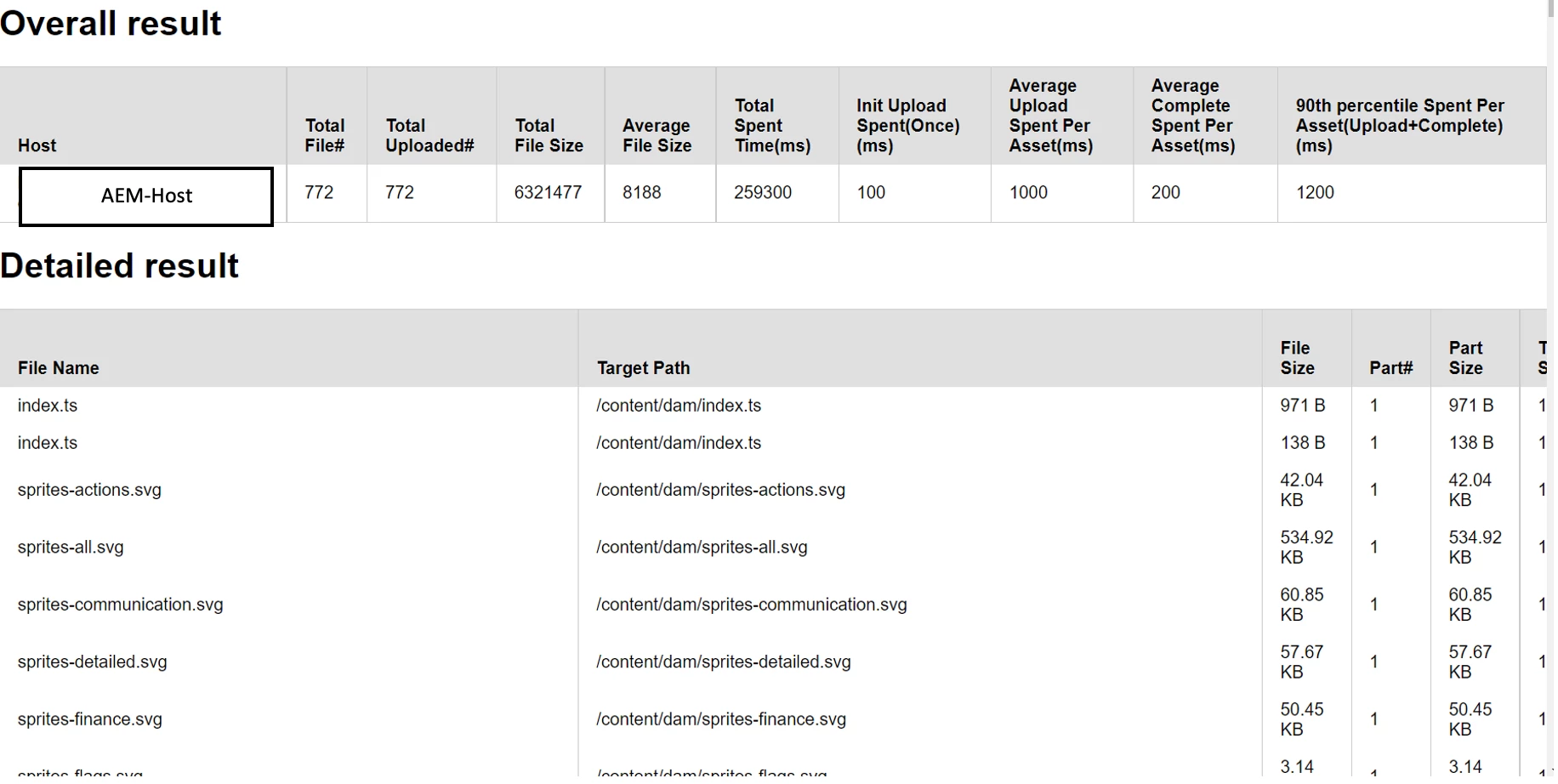
Use HTTP API to handle assets in AEM
There are few HTTP APIs which have been exposed to manage these assets in AEM.
- Get asset list as JSON
URL: GET {{AEM HOST NAME}}/api/assets/assetName.json
Authorization: Basic
The JSON code block below outlines the request, headers, and relevant details needed to make this call through Postman.{ "name": "Get a list", "request": { "auth": { "type": "basic", "basic": { "password": "admin", "username": "admin" } }, "method": "MOVE", "header": [ { "key": "X-Destination", "value": "/api/assets/myFolder/abc", "type": "default" }, { "key": "X-Overwrite", "value": "T", "type": "default" } ], "url": "http://localhost:4502/api/assets/myFolder/testFolder1" }, "response": [] } - Create a folder in Asset structure
URL: POST {{ENVIRONMENT}}/ /api/assets/myFolder/testFolder1
Authorization: Basic
Header: Content-Type : application/json
The JSON code block below outlines the request, headers, and relevant details needed to make this call through Postman.{ "name": "Create Folder", "request": { "auth": { "type": "basic", "basic": { "password": "admin", "username": "admin" } }, "method": "POST", "header": [ { "key": "Content-Type", "value": "application/json", "type": "default" } ], "body": { "mode": "raw", "raw": "{\"class\":\"assetFolder\",\"properties\":{\"title\":\"testFolder1\"}}" }, "url": "http://localhost:4502/api/assets/myFolder/testFolder1" }, "response": [] } - Update asset
URL: PUT {{ENVIRONMENT}} /api/assets/myFolder/testFolder1/icon.png
Authorization: Basic
Header : Content-Type: image/png
The JSON code block below outlines the request, headers, and relevant details needed to make this call through Postman.{ "name": "Update asset", "request": { "auth": { "type": "basic", "basic": { "password": "admin", "username": "admin" } }, "method": "PUT", "header": [ { "key": "Content-Type", "value": "application/json", "type": "default" } ], "body": { "mode": "raw", "raw": "{\"class\":\"asset\", \"properties\":{\"dc:title\":\"My Asset\"}}" }, "url": "http://localhost:4502/api/assets/myFolder/testFolder1/icon.png" }, "response": [] } - Update asset metadata
URL: PUT {{ENVIRONMENT}}//api/assets/myFolder/testFolder1/icon.png
Authorization: Basic
Header: Content-Type: application/json
The JSON code block below outlines the request, headers, and relevant details needed to make this call through Postman.{ "name": "Update asset metadata", "request": { "auth": { "type": "basic", "basic": { "password": "admin", "username": "admin" } }, "method": "PUT", "header": [ { "key": "Content-Type", "value": "application/json", "type": "default" } ], "body": { "mode": "raw", "raw": "{\"class\":\"asset\", \"properties\":{\"dc:title\":\"My Asset1\"}}" }, "url": "http://localhost:4502/api/assets/myFolder/testFolder1/icon.png" }, "response": [] } - Create Asset Renditions
URL: POST {{ENVIRONMENT}}/api/assets/myFolder/testFolder1/icon.png/renditions/web-rendition
Authorization: basic
The JSON code block below outlines the request, headers, and relevant details needed to make this call through Postman.{ "name": "Create Asset Renditions", "request": { "auth": { "type": "basic", "basic": { "password": "admin", "username": "admin" } }, "method": "POST", "header": [ { "key": "Content-Type", "value": "image/png", "type": "default" } ], "body": { "mode": "file", "file": { "src": "/Users/routreja/Downloads/icon.png" } }, "url": "http://localhost:4502/api/assets/myFolder/testFolder1/icon.png/renditions/web-rendition" }, "response": [] } - Move a folder/asset
URL: MOVE {{ENVIRONMENT}} /api/assets/myFolder/testFolder1
Authorization: Basic
Header: X-Destination: /api/assets/myFolder-destination/myAsset.png
The JSON code block below outlines the request, headers, and relevant details needed to make this call through Postman.{ "name": "Move a folder/asset", "request": { "auth": { "type": "basic", "basic": { "password": "admin", "username": "admin" } }, "method": "MOVE", "header": [ { "key": "X-Destination", "value": "/api/assets/myFolder/abc", "type": "default" }, { "key": "X-Overwrite", "value": "T", "type": "default" } ], "url": "http://localhost:4502/api/assets/myFolder/testFolder1" }, "response": [] } - Delete asset / folder
URL: DELETE {{ENVIRONMENT}}/api/assets/myFolder
Authorization: Basic
The JSON code block below outlines the request, headers, and relevant details needed to make this call through Postman.{ "name": "Delete a folder/asset", "request": { "auth": { "type": "basic", "basic": { "password": "admin", "username": "admin" } }, "method": "DELETE", "header": [], "url": "http://localhost:4502/api/assets/myFolder/testFolder2" }, "response": [] }
Co-author: @shashi_mulugu
Reference URLs:
https://github.com/adobe/aio-cli-plugin-aem