


Tuesday Tech Bytes – AEM Week 03: Integrating AEM with Oracle Using MyBatis Spring Boot Framework

MyBatis, a popular Java persistence framework, simplifies database access for developers. It achieves this by mapping Java objects to SQL statements, significantly reducing the manual data mapping required. MyBatis supports XML configuration files and annotations, allowing developers to manage their database interactions per their needs.
Integrating Adobe Experience Manager (AEM) with MyBatis can be achieved by configuring AEM to utilize MyBatis for executing database operations. The integration process typically involves:
- Setting up data source configurations.
- Defining MyBatis mappers.
- Establish appropriate service layers within AEM to interact with MyBatis to perform database operations.
Integrating MyBatis with Adobe Experience Manager (AEM) involves several steps and architectural components. Here's a high-level overview of how you might structure the integration:
- AEM Components and Services: AEM handles the presentation layer and user interactions. It includes components that render content and services that manage business logic.
- MyBatis for Persistence: MyBatis handles the persistence layer, managing database operations such as CRUD operations for user or business data.
- Communication Layer: This layer facilitates communication between AEM and MyBatis, typically through RESTful services or direct service calls within the Java application.
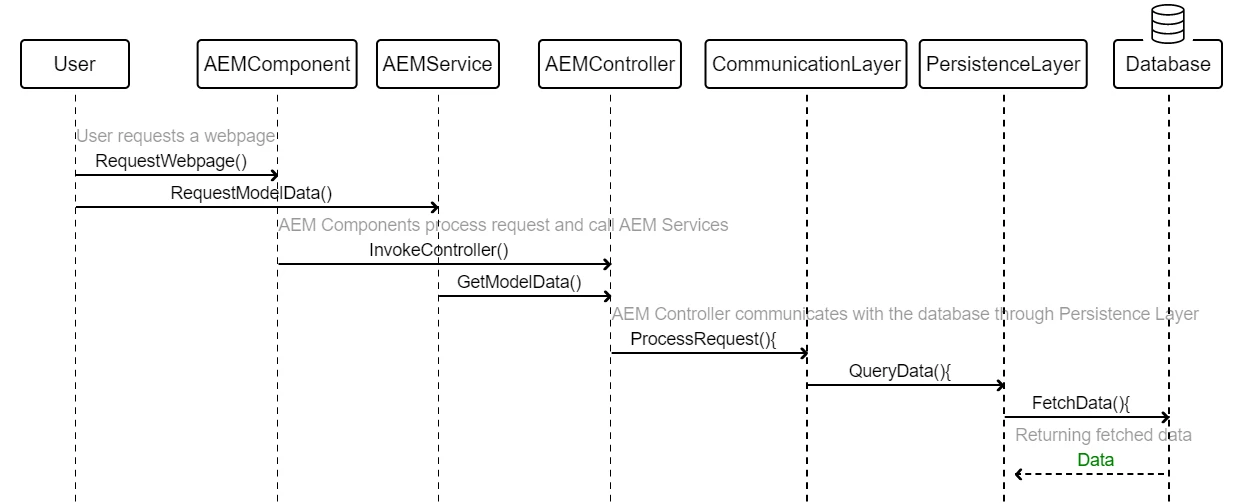
This integration empowers AEM with MyBatis's capabilities, enabling seamless database interactions. It offers a robust solution for managing and accessing data within the AEM environment, promising improved efficiency and performance.
My Batis integration with AEM
Before integrating MyBatis with AEM, you must set it up in your Java environment. This preparation is critical to ensuring a seamless integration process. Integrating MyBatis into the system allows AEM to interact seamlessly with the database, thus enhancing its potential for managing and accessing data within the AEM environment. Here are the detailed steps to get you started.
Step 1: Demarcate Data Models
To begin, create Java classes that accurately represent your data structures (entities). These classes will serve as the foundation for interacting with your data.
Employee.Java ( Model Class )
public class Employee{
    private int id;
    private String username;
    private String password;
    private String email;
    // Getters and Setters
    public int getId() {
        return id;
    }
    public void setId(int id) {
        this.id = id;
    }
    public String getUsername() {
        return username;
    }
    public void setUsername(String username) {
        this.username = username;
    }
    public String getPassword() {
        return password;
    }
    public void setPassword(String password) {
        this.password = password;
    }
    public String getEmail() {
        return email;
    }
    public void setEmail(String email) {
        this.email = email;
    }
}
SQL Table Definition
CREATE TABLE employee(
    id INT PRIMARY KEY AUTO_INCREMENT,
    username VARCHAR(50) NOT NULL,
    password VARCHAR(50) NOT NULL,
    email VARCHAR(100)
);
Step 2:
The next step in constructing SQL mappings involves composing and associating SQL queries with your Java methods, achieved through MyBatis XML configuration or annotations. This crucial step is pivotal in linking your Java application and the database.
EmployeeMapper.xml (MyBatis Mapper)
<?xml version="1.0" encoding="UTF-8" ?>
<!DOCTYPE mapper
  PUBLIC "-//mybatis.org//DTD Mapper 3.0//EN"
  "http://mybatis.org/dtd/mybatis-3-mapper.dtd">
<mapper namespace="com.example.EmployeeMapper">
    <resultMap id="EmployeeResultMap" type="Employee">
        <id property="id" column="id"/>
        <result property="username" column="username"/>
        <result property="password" column="password"/>
        <result property="email" column="email"/>
    </resultMap>
    <select id="selectEmployee" parameterType="int" resultMap="EmployeeResultMap">
        SELECT * FROM employee WHERE id = #{id}
    </select>
    <insert id="insertEmployee" parameterType="Employee">
        INSERT INTO employee(username, password, email) VALUES (#{username}, #{password}, #{email})
    </insert>
    <update id="updateEmployee" parameterType="Employee">
        UPDATE employee SET username = #{username}, password = #{password}, email = #{email} WHERE id = #{id}
    </update>
    <delete id="deleteEmployee" parameterType="int">
        DELETE FROM employee WHERE id = #{id}
    </delete>
</mapper>
EmployeeMapper.xml (MyBatis Mapper)
public interface EmployeeMapper {
    Employee selectEmployee(int id);
    void insertEmployee(Employee employee);
    void updateEmployee(Employee employee);
    void deleteEmployee(int id);
}
Step 3: Use in AEM Components:
Finally, develop AEM components or services that utilize MyBatis for data access. These components will interact with your MyBatis DAOs to perform database operations. This could involve creating AEM components that use the MyBatis DAOs to fetch and manage data from the database.
userprofile.html (HTL Template)
/apps/myproject/components/content/employeeprofile
    - employeeprofile.html
    - employeeprofile.jsp (if using JSP)
    - employeeprofile.xml (if using HTL)
    - _cq_dialog/.content.xml
------------------------------------------------------------------------------------------
<div class="employee-profile">
    <h2>${properties.username}</h2>
    <p>Email: ${properties.email}</p>
</div>
Step 4: DataSource Configuration:
Next, configure the Data Source for MyBatis in AEM. You can define this in the OSGi configuration or use AEM's Data Source pool. Look for the service.
{
  "datasource.name": "oracleDataSource",
  "url": "jdbc:oracle:thin:@//hostname:port/service_name",
  "driverClassName": "oracle.jdbc.OracleDriver",
  "username": "oracleUser",
  "password": "oraclePassword",
  "validationQuery": "SELECT 1 FROM DUAL",
  "maxActive": 10,
  "maxIdle": 5
}
Best Practices and Considerations
Transaction Management: It is a critical aspect of the integration process. It's essential to ensure proper coordination between AEM and MyBatis transactions. AEM has its transaction management mechanisms, such as ResourceResolver transactions, which should be synchronized with the transactions handled by MyBatis. This ensures the integrity and consistency of your data.
Security: Implementing best security practices is crucial. For example, using parameterized queries can help prevent SQL injection, enhancing the system's overall security-
Testing: Before deploying in a production environment, conducting comprehensive testing of the integration in a development environment is essential. This will help identify and address potential issues or bugs before impacting the live system.