Trying to pull in JSON from URL and return to Component to loop through | Community
Skip to main content
Level 2
September 8, 2021
Solved

Trying to pull in JSON from URL and return to Component to loop through

  • September 8, 2021
  • 4 replies
  • 2856 views

Hello!


I've been working through an issue on our site and unsure what I am doing wrong in my Java. What we need to do is return the JSON from a url and then loop through those to display within a component. I have created a Service to grab those and then brought in my service to retrieve the data, but I seemingly get a Resource error when trying to test it? Here is my service and screenshots of the models and the htl. Please let me know if you can help me identify this issue!!

This post is no longer active and is closed to new replies. Need help? Start a new post to ask your question.
Best answer by Fanindra_Surat

Hi @socialtaylor - Glad that we figured out that the issue is with bundle.


If your version of bundle is not updated, then check if the code package is successfully installed in crx/packmgr. If yes, then try to re-install the package and look for any possible errors in the logs.

Additionally, you can deploy the bundle alone manually via /system/console/bundles page.


On the versioning

===================

For local development, you can always have -SNAPSHOT version, and AEM will override the -SNAPSHOT jar each time you deploy.

For deployment to higher environments - If you are using Cloud Manager, it will take care of creating a valid version number for each build based on timestamp as per below screenshot and you don't need to manage the version in pom.
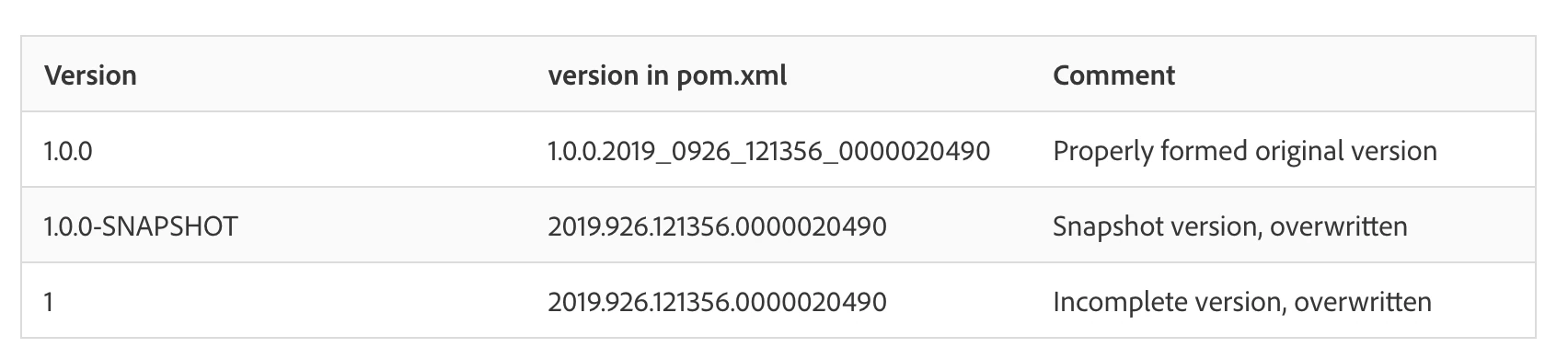
version in pom.xml - will be generated by Cloud Manger, without any action from your end.


If you still want to manage versioning of your builds, you can opt for maven release plugin and below are some useful links.

http://maven.apache.org/maven-release/maven-release-plugin/

https://www.initialyze.com/blog/2020/04/cutting-releases-for-your-aem-projects-using-maven/

https://github.com/Adobe-Marketing-Cloud/aem-sample-we-retail-commons/blob/master/pom.xml


Thanks,

Fani

4 replies

Pawan-Gupta
Level 8
September 8, 2021

Hello,


The log file describe the error coming from file layoutloanofficers_html.java at line 39


Now, to find the file go to /crx-quickstart/launchpad/felix and search for your class file layoutloanofficers_html.java (sightly java file) using below shell command


find . -name "layoutloanofficers_html.java"


then start debugging from there.


hope it will help!!

Level 2
September 8, 2021

Hey @pawan-gupta !


Whenever I go to that url, I see Resource not found?

Pawan-Gupta
Level 8
September 8, 2021

Hello,


its AEM installed folder structure which you should access from your server (not as url) and then run shell or similar command mentioned above.


Thanks!!

Kiran_Vedantam
Community Advisor
Community Advisor
September 8, 2021

Hi @socialtaylor,


In the Model, try @Inject instead of @OSGiService for the services to get injected.


Hope this helps!


Thanks,

Kiran Vedantam.

Level 2
September 8, 2021

Tried giving this a go and it seems to still be giving me the same error. Not sure if it has to do with the sling model or the htl at this point.

Fanindra_Surat
Community Advisor
Community Advisor
September 8, 2021

Hi @socialtaylor - Can you confirm if your bundle containing the Model is deployed and active?

Level 2
September 9, 2021

Hey @fanindra_surat !


I believer you are onto the correct issue. When I went to my bundles in the AEM console, I do not see either my service nor my model there, as you can see in my screenshot below.


Earlier as I was working on this, it made my update my package-info.java from '1.0' to '1.1.0' for both of those after I removed '-SNAPSHOT' from the version of all of my POM.xml files to start proper versioning.  How do I go about telling it to bump those up from 1.0.0 to 1.1.0? And, was that the correct way to go about versioning in my POM.xml files? I don't know a lot about setting up projects in AEM, but we were told removing the '-SNAPSHOTS' were needed for our builds when publishing to the cloud haha.


Thank you so much for your help!!!

Taylor

Fanindra_Surat
Community Advisor
Fanindra_SuratCommunity AdvisorAccepted solution
Community Advisor
September 9, 2021

Hi @socialtaylor - Glad that we figured out that the issue is with bundle.


If your version of bundle is not updated, then check if the code package is successfully installed in crx/packmgr. If yes, then try to re-install the package and look for any possible errors in the logs.

Additionally, you can deploy the bundle alone manually via /system/console/bundles page.


On the versioning

===================

For local development, you can always have -SNAPSHOT version, and AEM will override the -SNAPSHOT jar each time you deploy.

For deployment to higher environments - If you are using Cloud Manager, it will take care of creating a valid version number for each build based on timestamp as per below screenshot and you don't need to manage the version in pom.

version in pom.xml - will be generated by Cloud Manger, without any action from your end.


If you still want to manage versioning of your builds, you can opt for maven release plugin and below are some useful links.

http://maven.apache.org/maven-release/maven-release-plugin/

https://www.initialyze.com/blog/2020/04/cutting-releases-for-your-aem-projects-using-maven/

https://github.com/Adobe-Marketing-Cloud/aem-sample-we-retail-commons/blob/master/pom.xml


Thanks,

Fani

Ravi_Pampana
Community Advisor
Community Advisor
September 8, 2021

Hi,


Can you check whether your model folder is added in pom.xml under 

Sling-Model-Packages ?