Trouble in changing a Deprecated User Service Mapping | Community
Skip to main content
June 5, 2024
Solved

Trouble in changing a Deprecated User Service Mapping

  • June 5, 2024
  • 3 replies
  • 2330 views

In my project, at localhost:4502/system/console/configMgr, I have an entry: Apache Sling Service User Mapper Service Amendment

There, among the many Mappings that I have, is one that has this value: gs4tr-globallink-adaptors-aem.core:gl-service=gl-service
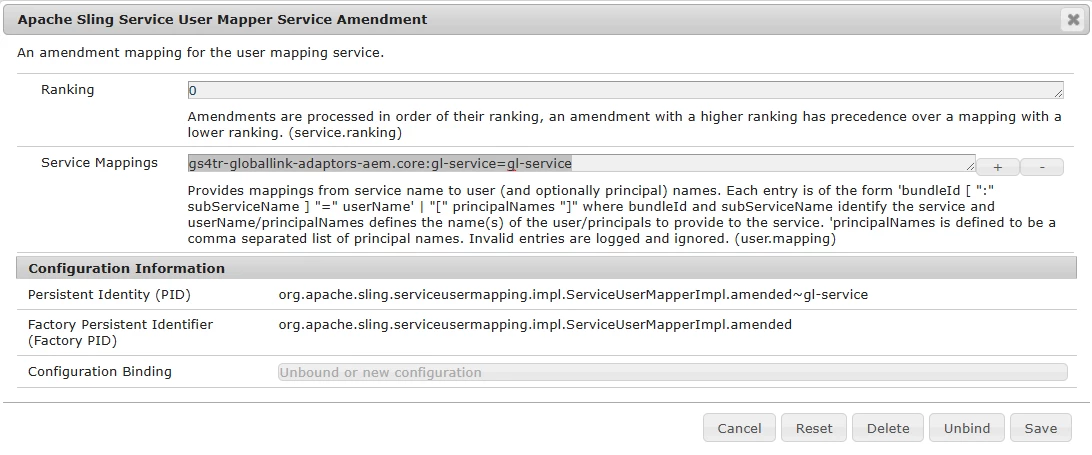


I got a warning that it is deprecated and, instead, it should be: gs4tr-globallink-adaptors-aem.core:gl-service=[gl-service] 

I tried to create a config folder in the script:
path: \ui.config\src\main\content\jcr_root\apps\project\osgiconfig\config\org.apache.sling.serviceusermapping.impl.ServiceUserMapperImpl.ammended~gl-service.cfg.json

code: 

{
  "user.mapping": [
    "gs4tr-globallink-adaptors-aem.core:gl-service=[gl-service]"
  ]
}
Instead, it created a new variable:

and the deprecated mapping remained there.

Did someone had this issue or has any idea about a possible solution?

This post is no longer active and is closed to new replies. Need help? Start a new post to ask your question.
Best answer by Nupur_Jain

Hi @mihailfi 


You have used the correct way to create configuration for user mapping, the only issue with your configuration is the spelling mistake in your service pid that is


You have used an extra 'm' letter in amended word in your configuration \ui.config\src\main\content\jcr_root\apps\project\osgiconfig\config\org.apache.sling.serviceusermapping.impl.ServiceUserMapperImpl.ammended~gl-service.cfg.json


Try correcting the pid and your configuration will work.


Hope it helps!

Thanks

Nupur

3 replies

HrishikeshKagne
Community Advisor
Community Advisor
June 5, 2024

Hi @mihailfi ,

It looks like you are trying to create a new configuration file for the Service User Mapper Service Amendment. However, the existing deprecated mapping is still present because it is defined in a different configuration file.

To update the existing mapping, you will need to edit the configuration file that contains the deprecated mapping. You can do this by following these steps:

1. Go to the Apache Sling Service User Mapper Service Amendment configuration page at localhost:4502/system/console/configMgr/org.apache.sling.serviceusermapping.impl.ServiceUserMapperImpl.amended

2. Find the mapping that you want to update (gs4tr-globallink-adaptors-aem.core:gl-service=gl-service) and click on the "pencil" icon to edit it.

3. Update the mapping value to gs4tr-globallink-adaptors-aem.core:gl-service=[gl-service] and click "Save".

4. Verify that the updated mapping is now present in the configuration.

Note that if you want to remove the deprecated mapping entirely, you can simply delete it from the configuration file.

Hrishikesh Kagane
aanchal-sikka
Community Advisor
Community Advisor
June 5, 2024

@mihailfi 

Please assure that

  • you have updated the existing config in code-base with new value and it is covered in filters.xml
  • Assure the config picked up by OSGi console is the one you are modifying. It might be getting picked up from another location.
    • If you cannot get rid of or edit the existing configuration, create the new config under a runmode with matches your instance the best. Example: if existing config is in config.author, you can create under config.author.dev (it would have more preferrance) 
Aanchal Sikka
Nupur_Jain
Adobe Employee
Nupur_JainAdobe EmployeeAccepted solution
Adobe Employee
June 11, 2024

Hi @mihailfi 


You have used the correct way to create configuration for user mapping, the only issue with your configuration is the spelling mistake in your service pid that is


You have used an extra 'm' letter in amended word in your configuration \ui.config\src\main\content\jcr_root\apps\project\osgiconfig\config\org.apache.sling.serviceusermapping.impl.ServiceUserMapperImpl.ammended~gl-service.cfg.json


Try correcting the pid and your configuration will work.


Hope it helps!

Thanks

Nupur