Traverse through nodes and consume data into Sling Model | Community
Skip to main content
Level 4
June 27, 2023
Solved

Traverse through nodes and consume data into Sling Model

  • June 27, 2023
  • 1 reply
  • 1126 views

I have an asset in /content/dam/myproject/<assetFile> the hierarchy being :
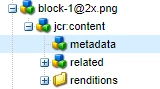
I will get the path of the image from dialog and I have injected the same in the sling model.

@586265 private String imagePath

 My ultimate aim is to traverse to the metadata node and get a certain property from there. 

Can someone please help me with the Java code for that? Also please let me know how I will get that data into frontend via HTL.

Thanks!

This post is no longer active and is closed to new replies. Need help? Start a new post to ask your question.
Best answer by EstebanBustamante

Hi, you can just adapt the resource (your image block.png) to an Asset object and then get the AssetMetaData object

You can use something like this:


@Model(adaptables = { SlingHttpServletRequest.class, Resource.class }, defaultInjectionStrategy = DefaultInjectionStrategy.OPTIONAL, resourceType = "myproject/components/content/image") @Exporter(name = "jackson", extensions = "json", options = { @ExporterOption(name = "MapperFeature.SORT_PROPERTIES_ALPHABETICALLY", value = "true") }) public class ImageModel { private static Logger LOG = LoggerFactory.getLogger(ImageModel.class); @SlingObject private SlingHttpServletRequest request; private String imageMetaData; /** * Returns the property tiff:ImageWidth from the metadata */ public String getImageMetaData() { String url = request.getRequestURI(); //You can get this path dynamically from HTL or resolve by other means, for now is just hardcoded Resource resource = request.getResourceResolver().getResource("/content/dam/my-project/image/image.png"); Asset asset = resource.adaptTo(Asset.class); String width = asset.getMetadataValue("tiff:ImageWidth"); return this.imageMetaData; } }


And then use it in the HTL like this:


<!--/* Invoke the model you have created and access the method where you have obtained the information */--> <div data-sly-use.model="com.my.models.package.ImageModel"> <p>${model.imageMetaData @ context='html'}</p> </div>


You can learn more here:
https://redquark.org/aem/day-07-sling-models/

http://www.aemcq5tutorials.com/tutorials/sling-model-sightly-aem/ 


1 reply

EstebanBustamante
Community Advisor and Adobe Champion
EstebanBustamanteCommunity Advisor and Adobe ChampionAccepted solution
Community Advisor and Adobe Champion
June 27, 2023

Hi, you can just adapt the resource (your image block.png) to an Asset object and then get the AssetMetaData object

You can use something like this:


@Model(adaptables = { SlingHttpServletRequest.class, Resource.class }, defaultInjectionStrategy = DefaultInjectionStrategy.OPTIONAL, resourceType = "myproject/components/content/image") @Exporter(name = "jackson", extensions = "json", options = { @ExporterOption(name = "MapperFeature.SORT_PROPERTIES_ALPHABETICALLY", value = "true") }) public class ImageModel { private static Logger LOG = LoggerFactory.getLogger(ImageModel.class); @SlingObject private SlingHttpServletRequest request; private String imageMetaData; /** * Returns the property tiff:ImageWidth from the metadata */ public String getImageMetaData() { String url = request.getRequestURI(); //You can get this path dynamically from HTL or resolve by other means, for now is just hardcoded Resource resource = request.getResourceResolver().getResource("/content/dam/my-project/image/image.png"); Asset asset = resource.adaptTo(Asset.class); String width = asset.getMetadataValue("tiff:ImageWidth"); return this.imageMetaData; } }


And then use it in the HTL like this:


<!--/* Invoke the model you have created and access the method where you have obtained the information */--> <div data-sly-use.model="com.my.models.package.ImageModel"> <p>${model.imageMetaData @ context='html'}</p> </div>


You can learn more here:
https://redquark.org/aem/day-07-sling-models/

http://www.aemcq5tutorials.com/tutorials/sling-model-sightly-aem/ 


Esteban Bustamante
Level 4
June 27, 2023

Hi @estebanbustamante , can you please let me know why we are using the exporter annotation? I don't want to export the content to json or any other form, then what is the sue of @Exporter annotation.

Level 4
June 27, 2023

@estebanbustamante  -  Also I'm getting an error like the following when I'm using the above snippet. But the error goes away when I remove the following in HTL.

@ context='html'