Touch UI: Cropping of images within components | Community
Skip to main content
Level 2
September 15, 2022
Solved

Touch UI: Cropping of images within components

  • September 15, 2022
  • 2 replies
  • 1317 views

We are using Classic UI and currently implementing the Touch UI dialogs additionally for our existing components.


Our image component or other components, which contain an image, also allow the author to do a cropping only within the component. This allows the author to use an image from DAM and crop it only within the component. The cropping data is stored in the component on the page and the rendering takes care about that.


The Classic UI html5smartimage xtype allows to crop, rotate images in a component dialog:
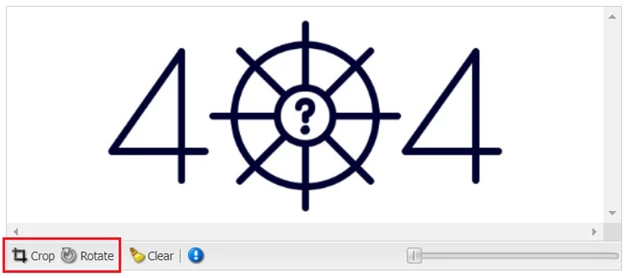


For Touch UI dialogs we do not see a solution for cropping images in components on pages and would like to get ideas how to get this solved.


According to the official documentation html5smartimage xtype is replaced by cq/gui/components/authoring/dialog/fileupload resource type:

 

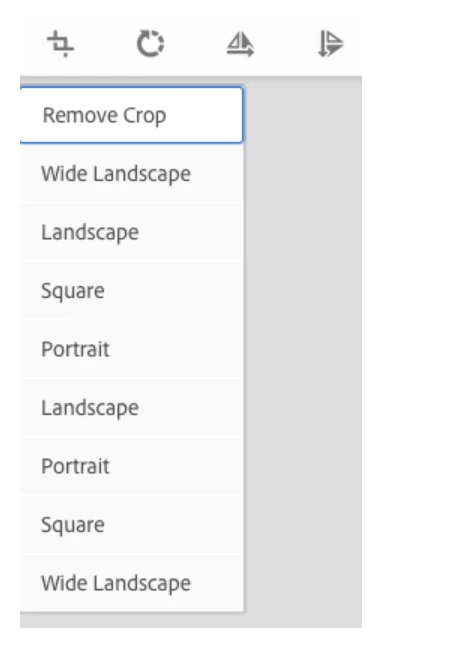
But image editing in this way doesn't allow to crop the image within a component on a page. Also, inplace editor that should contain cropping functionality is missing.

Is there a way to customize the Touch UI dialog so that cropping can be done within component dialog? Or is there a way to render an inplace editor for custom components that are not inherited from /apps/core/wcm/components/image/v1/image?

Is there a general approach how to add cropping functionality to the Touch UI fileupload resource type?


Thank you for some input 😄
This post is no longer active and is closed to new replies. Need help? Start a new post to ask your question.
Best answer by ksh_ingole7

Hi @timo_hh 


You can have a look at Core Component Image V2 . The V2 component has options to :

Kindly refer to the documentation here  : https://experienceleague.adobe.com/docs/experience-manager-core-components/using/components/v2-components/image.html?lang=en


For inline editing, in the Image Component,  the author can crop,flip,zoom and rotate the images.

Step1: Create a cq:inplaceEditing node (of type cq:inplaceEditingConfig) as the child node of cq:EditConfig node (of type cq:editConfig) and

add the following properties in the same node.

editorType

string

image

active

boolean

true


Step2: In the html file of the component, use the class “cq-dd-image” to render the inplace editing plugins.For example:


<div class="cq-dd-image ">

               <img src="${image}" alt="${properties.imageAltText}"  />

</div>


In short, the html should have this (cq-dd-image) class to render the image with inline editing plugins.


The js file /libs/cq/gui/components/authoring/editors/clientlibs/core/inlineediting
/js/ImageEditor.js gets loaded while opening the dialog,find for the class and render the image for inline editing.

2 replies

ksh_ingole7
Community Advisor
ksh_ingole7Community AdvisorAccepted solution
Community Advisor
September 15, 2022

Hi @timo_hh 


You can have a look at Core Component Image V2 . The V2 component has options to :

Kindly refer to the documentation here  : https://experienceleague.adobe.com/docs/experience-manager-core-components/using/components/v2-components/image.html?lang=en


For inline editing, in the Image Component,  the author can crop,flip,zoom and rotate the images.

Step1: Create a cq:inplaceEditing node (of type cq:inplaceEditingConfig) as the child node of cq:EditConfig node (of type cq:editConfig) and

add the following properties in the same node.

editorType

string

image

active

boolean

true


Step2: In the html file of the component, use the class “cq-dd-image” to render the inplace editing plugins.For example:


<div class="cq-dd-image ">

               <img src="${image}" alt="${properties.imageAltText}"  />

</div>


In short, the html should have this (cq-dd-image) class to render the image with inline editing plugins.


The js file /libs/cq/gui/components/authoring/editors/clientlibs/core/inlineediting
/js/ImageEditor.js gets loaded while opening the dialog,find for the class and render the image for inline editing.

arunpatidar
Community Advisor
Community Advisor
September 15, 2022
September 20, 2022

Is there any solutions for cases when there are several images in custom component? How should cq:editConfig look like?

arunpatidar
Community Advisor
Community Advisor
September 20, 2022

Hi,

I am not sure if you can define multiple crop configuration for a single component. You have to compose your custom component using different image component instances.

Arun Patidar