To get list of published pages from a specific workflow | Community
Skip to main content
Level 2
May 21, 2025
Solved

To get list of published pages from a specific workflow

  • May 21, 2025
  • 3 replies
  • 519 views

Requirement is to get list of pages published in last week only from a specific workflow  only . 


To get list of all completed workflows , I am referring JSP code present here -- /libs/cq/workflow/admin/console/components/datasource/workflowinstancedatasource/workflowinstancedatasource.jsp . "resource" (used at line 43 ) is getting injected here by Sling script engine during rendering but how can we get this "resource" in a Sling Job consumer service class ?
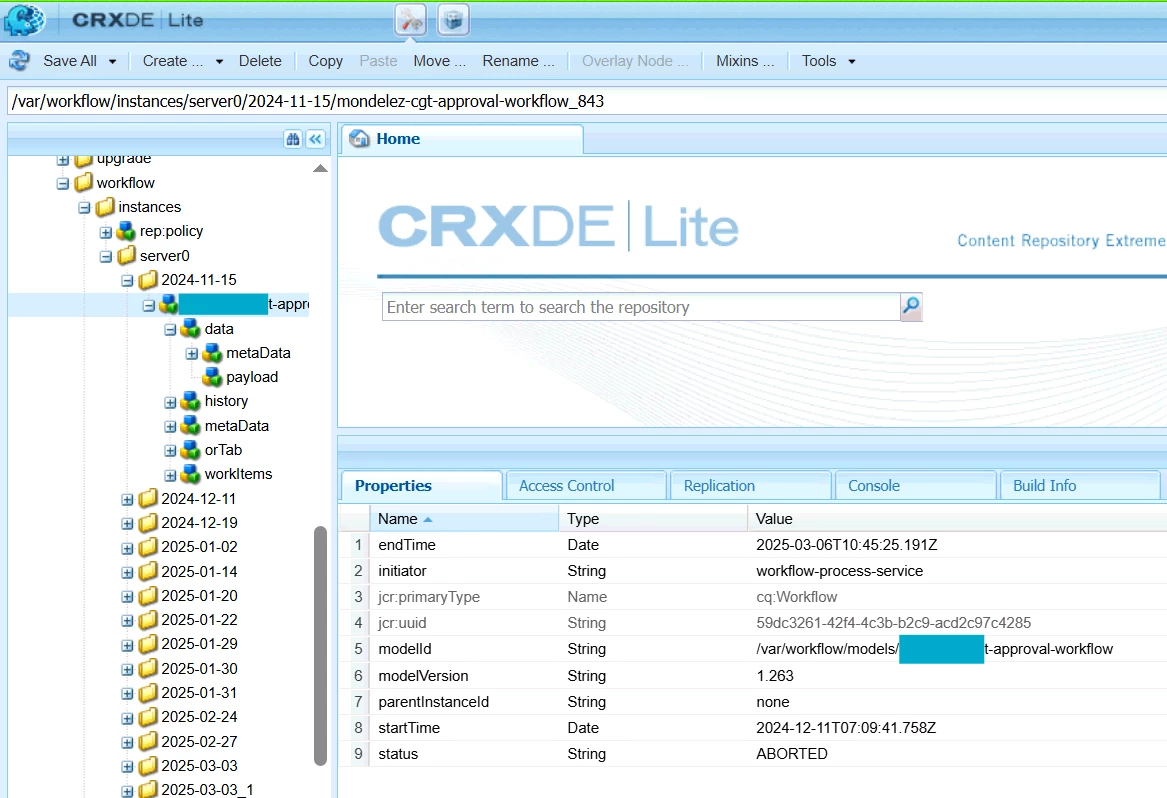
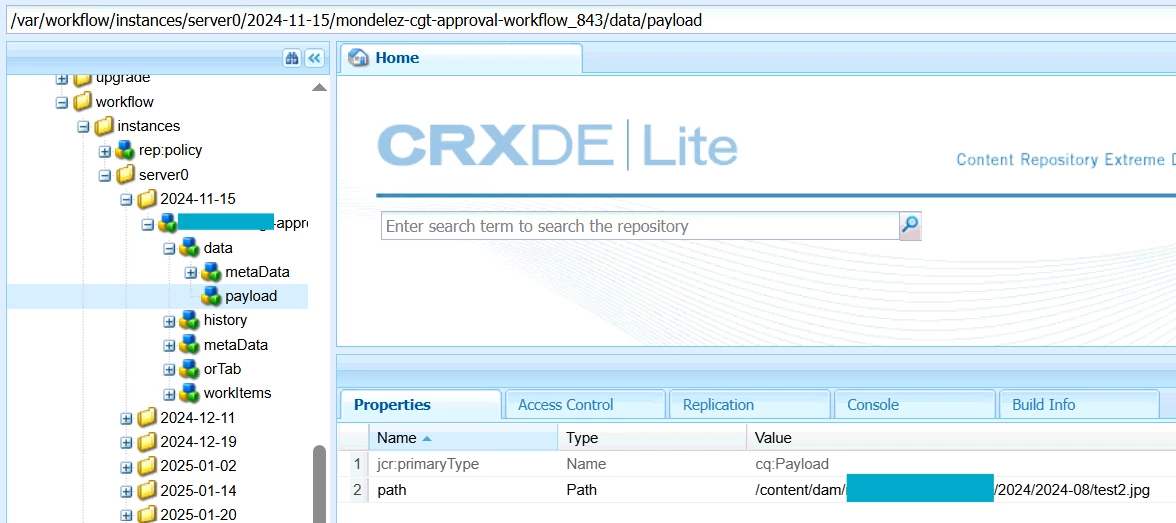


Best answer by aanchal-sikka

@newbie34 


You can query "/var/workflow/instances" to look for Workflow Instances for a model.


The payload information would be available in its data/payload node. Which would be page path in your case


3 replies

SantoshSai
Community Advisor
Community Advisor
May 21, 2025

Hi @newbie34,

In a Sling Job Consumer service, you’re working in an OSGi background thread, not a script or servlet. Therefore:

  • There's no current HTTP request (SlingHttpServletRequest)

  • There's no SlingBindings, so no automatic resource injection

  • You must explicitly resolve a resource using the ResourceResolver API

You can Manually get the resource using a ResourceResolver

If you know the path to the resource (e.g., /var/workflow/instances/...), you can adapt it manually in your Sling Job like this:

Example Code in a Sling Job Consumer:

@Component(service = JobConsumer.class, immediate = true,
           property = { JobConsumer.PROPERTY_TOPICS + "=your/job/topic" })
public class WorkflowPageTrackerJob implements JobConsumer {

    @Reference
    private ResourceResolverFactory resolverFactory;

    @Override
    public JobResult process(Job job) {
        Map<String, Object> authInfo = new HashMap<>();
        authInfo.put(ResourceResolverFactory.SUBSERVICE, "your-subservice-name");

        try (ResourceResolver resolver = resolverFactory.getServiceResourceResolver(authInfo)) {

            String workflowPath = "/var/workflow/instances/server0/2024-05-21/model_123456"; // example
            Resource resource = resolver.getResource(workflowPath);

            if (resource != null) {
                // Access workflow metadata
                ValueMap properties = resource.getValueMap();
                String state = properties.get("state", String.class);
                // etc.
            }

        } catch (LoginException e) {
            // handle
        }

        return JobResult.OK;
    }
}

Steps you must take:

  1. Create a System User and map it in user.mapping in your org.apache.sling.serviceusermapping.impl.ServiceUserMapperImpl.amended config.

  2. Use the ResourceResolverFactory.getServiceResourceResolver() to get a safe session.

  3. Access the workflow resource like /var/workflow/instances/...

  4. Extract and filter based on state = COMPLETED, model ID, or payload path.

Optional: Use WorkflowSession if Needed

If you need more than just reading the resource (e.g., interacting with the workflow API), you can also adapt WorkflowSession:

WorkflowSession wfSession = workflowService.getWorkflowSession(session);
List<Workflow> workflows = wfSession.getAllWorkflows(WorkflowState.COMPLETED);

 Hope that helps!

Santosh Sai
aanchal-sikka
Community Advisor
aanchal-sikkaCommunity AdvisorAccepted solution
Community Advisor
May 22, 2025

@newbie34 


You can query "/var/workflow/instances" to look for Workflow Instances for a model.


The payload information would be available in its data/payload node. Which would be page path in your case


Aanchal Sikka
AmitVishwakarma
Community Advisor
Community Advisor
May 22, 2025

Hi @newbie34 ,

Use a Sling Job Consumer – this runs in the background and doesn't need an HTTP request.

Read workflow data from /var/workflow/instances

Filter the workflows:

  - Only those with status = COMPLETED

  - Only those that used your target workflow model (e.g., /var/workflow/models/publish-page-workflow)

  - Only payloads that start with /content/ (these are pages)

  - Only those that were completed in the last 7 days


1. Create a System User

In CRXDE: create workflow-tracker-service-user under /home/users/system/your-project

Give it read access to /var/workflow/instances

2. Map the Service User

In OSGi config (ServiceUserMapper):

your.project.bundle:workflow-tracker-service-user=workflow-tracker-service-user

Java Code Example (Sling Job Consumer)

@Component(service = JobConsumer.class, property = { JobConsumer.PROPERTY_TOPICS + "=custom/workflow/page-tracker" }) public class WorkflowPageTrackerJob implements JobConsumer { @Reference private ResourceResolverFactory resolverFactory; @Reference private WorkflowService workflowService; private static final String TARGET_MODEL = "/var/workflow/models/publish-page-workflow"; @Override public JobResult process(Job job) { Map<String, Object> authInfo = new HashMap<>(); authInfo.put(ResourceResolverFactory.SUBSERVICE, "workflow-tracker-service-user"); try (ResourceResolver resolver = resolverFactory.getServiceResourceResolver(authInfo)) { Session session = resolver.adaptTo(Session.class); WorkflowSession wfSession = workflowService.getWorkflowSession(session); Calendar sevenDaysAgo = Calendar.getInstance(); sevenDaysAgo.add(Calendar.DAY_OF_YEAR, -7); List<String> pages = new ArrayList<>(); for (Workflow wf : wfSession.getAllWorkflows(WorkflowState.COMPLETED)) { if (TARGET_MODEL.equals(wf.getWorkflowModel().getId())) { Calendar end = wf.getWorkflowData().getMetaDataMap().get("endTime", Calendar.class); if (end != null && end.after(sevenDaysAgo)) { String payload = wf.getWorkflowData().getPayload().toString(); if (payload.startsWith("/content/")) { pages.add(payload); } } } } pages.forEach(System.out::println); // print the list } catch (Exception e) { e.printStackTrace(); return JobResult.FAILED; } return JobResult.OK; } }


Regards,
Amit