Template Not appearing while doing "Create Page" | Community
Skip to main content
October 16, 2015
Solved

Template Not appearing while doing "Create Page"

  • October 16, 2015
  • 6 replies
  • 17638 views

Hi,

       I have created a simple template as discussed in Enterprise TV- Adobe marketing cloud site. https://outv.omniture.com/?v=xmYWNkNDrzOQ1RhcZfYwSMkMXfKzLuF8

While creating a first page the template is appearing in the first as the order of the template is 1. But when i try to create a child page under the newly created page, the template is not at all appearing. Let me know what could be the reason.


regards

This post is no longer active and is closed to new replies. Need help? Start a new post to ask your question.
Best answer by leeasling

Take a look at the allowedPaths, allowedParents and allowedChildren properties of the cq:template node.  It's possible those are set in such a way that it's filtering out the template you'd like to use.

https://docs.adobe.com/docs/en/cq/5-6-1/developing/templates.html#Properties and Child Nodes of a Template

6 replies

leeaslingAccepted solution
Level 8
October 16, 2015

Take a look at the allowedPaths, allowedParents and allowedChildren properties of the cq:template node.  It's possible those are set in such a way that it's filtering out the template you'd like to use.

https://docs.adobe.com/docs/en/cq/5-6-1/developing/templates.html#Properties and Child Nodes of a Template

smacdonald2008
Level 10
October 16, 2015

Follow this community article: 

https://helpx.adobe.com/experience-manager/using/first-osgi.html

If you do not see the template props properly - the template will not show up. 

kradhakrishna
Level 2
October 16, 2015

What is allowedPaths property set to?

  if you want to display your template for all pages under websites usually it would  like  /content(/.*)?

October 16, 2015

Hi,

     I deleted the old one, and created a new template it is working now. I think as you mentioned i wouldn't have entered the proper allowedPaths value. Thanks for your suggestion.

regards

Sriram.

akashs51893872
Level 3
June 21, 2018

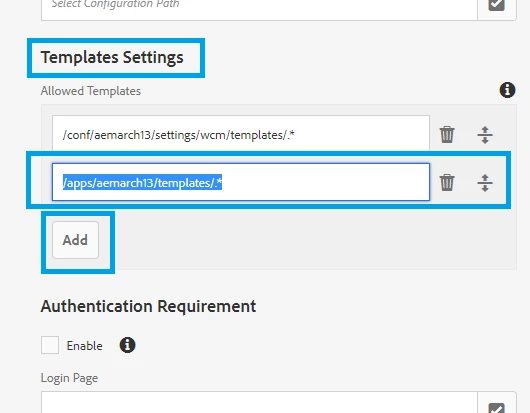
I am working with AEM ARCH 13 project and wasn't able to see templates from my templates folder in ui.apps.  After some research, this is what worked for me:

STEP 1: Select the website and click on the Properties menu:

STEP 2: On the next page, click on the Advance menu:

STEP 3: Scroll down to Template Settings and click on Add.  Update the new text field with the path to your templates folder (or to the templates you would like to see on the Create Page)

Good Luck...

April 8, 2021
Thanks. Worked for me as well
November 6, 2019

Thanks akashs51893872​ ,  this must be the correct answer  . Adding allowed properties also didn,t show the templates for me

August 10, 2021

hi @krishnakumarp19 , how did you make it work?