teaser styles is not coming fine after adding less file. | Community
Skip to main content
Level 4
December 24, 2018
Solved

teaser styles is not coming fine after adding less file.

  • December 24, 2018
  • 3 replies
  • 2475 views

Dear All,

One of my requirement for adding the styles to the teaser is as below. The teaser background color should be blue , as shown in below figure.

For this I have created the hometeaser.less file with the below contents.

/* MCK teaser home */

.cmp-teaser--home {   

.cmp-teaser{

        .cmp-teaser__title {

       background-color: #054C70;

        }

        .cmp-teaser__description {

            font-family: @font-family-serif;

        }

    }

}

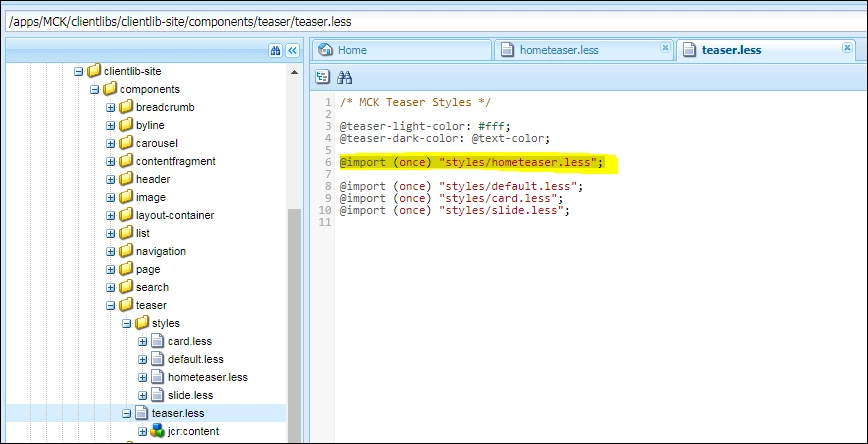
I have added this hometeaser.less file to my teaser.less file , as shown below
Then I have added the policy and style in my editable template , as shown below.

But After that also , background color is not coming , as shown below. Can you please help me on this.

This post is no longer active and is closed to new replies. Need help? Start a new post to ask your question.
Best answer by Gaurav-Behl

Are you not able to see the style-brush or the style option "HomeTeaser" itself or otherwise the changes are not visible after applying the style option?

Use developer toolbar to validate the generated DOM structure. It should be something similar to mentioned below as Style System follows the descendant selector convention:

<div class="cmp-teaser--home">  // wrapper class

     <div class="cmp-teaser">   // component specific class

          <div class="cmp-teaser__title">..... </div>

          <div class="cmp-teaser__description">..... </div>

     </div>

</div>

Validate that the generated css has classes ".cmp-teaser--home .cmp-teaser .cmp-teaser__title {...}" and ".cmp-teaser--home .cmp-teaser .cmp-teaser__description {...}"

For displaying background color use:

/* MCK teaser home */

.cmp-teaser--home {  

.cmp-teaser{

     background: color_code_in_HEX;

        .cmp-teaser__title {

       background-color: #054C70;

        }

        .cmp-teaser__description {

            font-family: @font-family-serif;

        }

    }

}

References:

3 replies

Gaurav-Behl
Gaurav-BehlAccepted solution
Level 10
December 25, 2018

Are you not able to see the style-brush or the style option "HomeTeaser" itself or otherwise the changes are not visible after applying the style option?

Use developer toolbar to validate the generated DOM structure. It should be something similar to mentioned below as Style System follows the descendant selector convention:

<div class="cmp-teaser--home">  // wrapper class

     <div class="cmp-teaser">   // component specific class

          <div class="cmp-teaser__title">..... </div>

          <div class="cmp-teaser__description">..... </div>

     </div>

</div>

Validate that the generated css has classes ".cmp-teaser--home .cmp-teaser .cmp-teaser__title {...}" and ".cmp-teaser--home .cmp-teaser .cmp-teaser__description {...}"

For displaying background color use:

/* MCK teaser home */

.cmp-teaser--home {  

.cmp-teaser{

     background: color_code_in_HEX;

        .cmp-teaser__title {

       background-color: #054C70;

        }

        .cmp-teaser__description {

            font-family: @font-family-serif;

        }

    }

}

References:

Lokesh_Shivalingaiah
Level 10
December 25, 2018

What is the html of that component looks like once you apply that style ?

Level 4
December 26, 2018

After I put background: color_code_in_HEX; after.cmp-teaser , it is coming fine. .cmp-teaser{     background: color_code_in_HEX;