Stackoverflow Error in editor.html in AEM 6.5.4 | Community
Skip to main content
January 16, 2024
Solved

Stackoverflow Error in editor.html in AEM 6.5.4

  • January 16, 2024
  • 5 replies
  • 1606 views
Hello, we seem to be getting an error when opening a page in the Touch UI console (editor.html). We repeatedly see a Stackoverflow Error like the one below: 16.01.2024 10:15:57.012 *ERROR* [172.26.11.165 [1705396556443] GET /editor.html/content/main/com/customer.html HTTP/1.1] com.day.cq.wcm.core.impl.WCMDeveloperModeFilter Error during include of SlingRequestPathInfo: path='/libs/settings/cq/search/facets/form/formasset/jcr:content', selectorString='content', extension='html', suffix='/content/main/com/customer.html' org.apache.sling.api.scripting.ScriptEvaluationException: javax.servlet.ServletException: java.lang.StackOverflowError at org.apache.sling.scripting.core.impl.DefaultSlingScript.call(DefaultSlingScript.java:416) [org.apache.sling.scripting.core:2.0.56] at org.apache.sling.scripting.core.impl.DefaultSlingScript.eval(DefaultSlingScript.java:184) [org.apache.sling.scripting.core:2.0.56] at org.apache.sling.scripting.core.impl.DefaultSlingScript.service(DefaultSlingScript.java:491) [org.apache.sling.scripting.core:2.0.56] at org.apache.sling.engine.impl.request.RequestData.service(RequestData.java:552) [org.apache.sling.engine:2.6.20] at org.apache.sling.engine.impl.filter.SlingComponentFilterChain.render(SlingComponentFilterChain.java:44) [org.apache.sling.engine:2.6.20] at org.apache.sling.engine.impl.filter.AbstractSlingFilterChain.doFilter(AbstractSlingFilterChain.java:82) [org.apache.sling.engine:2.6.20] at com.day.cq.wcm.core.impl.WCMDeveloperModeFilter.doFilterWithErrorHandling(WCMDeveloperModeFilter.java:164) [com.day.cq.wcm.cq-wcm-core:5.12.118] at com.day.cq.wcm.core.impl.WCMDeveloperModeFilter.doFilter(WCMDeveloperModeFilter.java:135) [com.day.cq.wcm.cq-wcm-core:5.12.118] at org.apache.sling.engine.impl.filter.AbstractSlingFilterChain.doFilter(AbstractSlingFilterChain.java:72) [org.apache.sling.engine:2.6.20] at com.day.cq.wcm.core.impl.WCMDebugFilter.doFilter(WCMDebugFilter.java:138) [com.day.cq.wcm.cq-wcm-core:5.12.118] at org.apache.sling.engine.impl.filter.AbstractSlingFilterChain.doFilter(AbstractSlingFilterChain.java:72) [org.apache.sling.engine:2.6.20] at org.apache.sling.engine.impl.filter.AbstractSlingFilterChain.doFilter(AbstractSlingFilterChain.java:78) [org.apache.sling.engine:2.6.20] at com.day.cq.wcm.core.impl.WCMComponentFilter.filterRootInclude(WCMComponentFilter.java:375) [com.day.cq.wcm.cq-wcm-core:5.12.118] at com.day.cq.wcm.core.impl.WCMComponentFilter.doFilter(WCMComponentFilter.java:190) [com.day.cq.wcm.cq-wcm-core:5.12.118] at org.apache.sling.engine.impl.filter.AbstractSlingFilterChain.doFilter(AbstractSlingFilterChain.java:72) [org.apache.sling.engine:2.6.20] at com.day.cq.wcm.core.impl.page.PageLockFilter.doFilter(PageLockFilter.java:91) [com.day.cq.wcm.cq-wcm-core:5.12.118] at org.apache.sling.engine.impl.filter.AbstractSlingFilterChain.doFilter(AbstractSlingFilterChain.java:72) [org.apache.sling.engine:2.6.20] at com.day.cq.personalization.impl.TargetComponentFilter.doFilter(TargetComponentFilter.java:94) [com.day.cq.cq-personalization:5.12.38] at org.apache.sling.engine.impl.filter.AbstractSlingFilterChain.doFilter(AbstractSlingFilterChain.java:72) [org.apache.sling.engine:2.6.20] at com.adobe.granite.csrf.impl.CSRFFilter.doFilter(CSRFFilter.java:217) [com.adobe.granite.csrf:1.0.20.CQ650-B0002] at org.apache.sling.engine.impl.filter.AbstractSlingFilterChain.doFilter(AbstractSlingFilterChain.java:72) [org.apache.sling.engine:2.6.20] at org.apache.sling.engine.impl.SlingRequestProcessorImpl.processComponent(SlingRequestProcessorImpl.java:282) [org.apache.sling.engine:2.6.20] ... 646 common frames omitted This occurs in every page, and the error is thrown multiple times for multiple includes of paths that seem to be always under /libs/settings/cq/search/facets. com.day.cq.wcm.core.impl.WCMDeveloperModeFilter Error during include of SlingRequestPathInfo: path='/libs/settings/cq/search/facets/form/adaptivedocumentasset/jcr:content/items/tags' On occasion, the page remains stuck and completely white. We even did restore a previous backup of when the issue was not occurring, but the issue keeps presenting itself. We also increased the available memory on the machine. The pages loads fine when not in Touch UI, so both rendered as on publish and rendered in Classic UI. This occurs in AEM 6.5.4 on premise, only on the author instance (of course, being editor.html). Can you provide support or insight on this? Have you ever experienced something similar or can you offer tips on how to debug and solve the issue? Many many thanks, help is really appreciated. Have a nice day, N.

This post is no longer active and is closed to new replies. Need help? Start a new post to ask your question.
Best answer by Sudheer_Sundalam

@nalluri ,

Try this,

Go to OSGI Configuration Manager and search for "Apache Sling GET Servlet" osgi configuration and edit it.

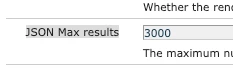
Change the value of "JSON Max results" property to something like "3000" and save the configuration. 


Reload the problem page and check again.


Hope this helps!


5 replies

EstebanBustamante
Community Advisor and Adobe Champion
January 16, 2024

Do you have any customization of the touch UI consoles in place? Can you also check if there are any bundles stopped? Did you recently upgrade AEM with some SP? Are the core components available in your instance? The error occurs when the application stack continues to grow until it reaches the maximum limit. Some of the most common causes of a java.lang.StackOverflowError are:

  1. Deep or infinite recursion
  2. Cyclic relationships between classes 
Esteban Bustamante
Sudheer_Sundalam
Community Advisor
Sudheer_SundalamCommunity AdvisorAccepted solution
Community Advisor
January 16, 2024

@nalluri ,

Try this,

Go to OSGI Configuration Manager and search for "Apache Sling GET Servlet" osgi configuration and edit it.

Change the value of "JSON Max results" property to something like "3000" and save the configuration. 


Reload the problem page and check again.


Hope this helps!


nalluriAuthor
January 23, 2024

Thank you @sudheer_sundalam for your tip, this has been instrumental in solving the problem.

I would greatly appreciate if you could also spread some awareness as to how you came to this intuition and what might have been the underlying issue that the change in the configuration solved or mitigated.

It would help loads in understanding the root of the matter, and the implications of the change.

Again, your help was and is greatly appreciated.

Sudheer_Sundalam
Community Advisor
Community Advisor
January 23, 2024

@nalluri , I am glad my suggestion helped in resolving your issue. Honestly, this issue happened to me in my current and previous projects and the solution is based out of my experience using AEM.


Underlaying root cause: As per my understanding, Apache Sling GET Servlet is the main servlet which handles all the GET requests made to the AEM primarily. Of course, other Referrer filter and rest of the configurations also process the request but Apache Sling GET Servlet plays a significant role in processing all the GET requests.


In the Apache Sling GET Servlet, the OOTB configuration to the maximum number of resources that should be returned when doing a node.5.json or node.infinity.json (_jcr_content.0.json) in case of pages is set to 200 as default value.


On any page, when you keep adding more components, the # JSON objects built to render the page goes up and reaches the limit of 200. I think that might lead to stackoverflow issue but I am not sure though. Increasing the value of json.maximumresults property in the GET Servlet configuration helps to create a JSON with higher number of JSON objects and return the JSON back to the browser for component rendering.


This observation based on my analysis.


Thanks,

Sudheer Sundalam.

pulkitvashisth
Community Advisor
Community Advisor
January 16, 2024

Hi @nalluri 

The error message you’re seeing is related to the WCMDeveloperModeFilter and it’s having trouble including a SlingRequestPathInfo. This could be due to a variety of reasons, but here are a few specific things you could try:

  1. Check the Path: The error message indicates that the issue is with the path /libs/settings/cq/search/facets/form/formasset/jcr:content. Check if this path exists in your repository and if the user has the necessary permissions to access it, reference: https://experienceleaguecommunities.adobe.com/t5/adobe-experience-manager/com-day-cq-wcm-core-impl-components-componentcacheimpl-requested/m-p/302113.

  2. Review Customizations: If you’ve made any customizations to the AEM instance, especially in the Touch UI, review those changes. Make sure these customizations are not causing the issue.

  3. As @estebanbustamante  pointed out , check for Infinite Loops or Recursion: The stack overflow error is often caused by the same. Review your code for any recursive functions or loops that might not have a proper termination condition. reference : https://stackoverflow.com/questions/59762196/how-to-solve-error-during-include-of-component-in-adobe-experience-manager

  4. Check Component Registration: If you have created any custom components, make sure they are properly registered and there are no issues with them.

kautuk_sahni
Community Manager
Community Manager
January 18, 2024

@nalluri Did you find the suggestions from users helpful? Please let us know if more information is required. Otherwise, please mark the answer as correct for posterity. If you have found out solution yourself, please share it with the community.

Kautuk Sahni
nalluriAuthor
January 23, 2024

Let me begin by saying, these were all valid suggestions and thank you all for the insights.


While we do have some minor customization for the Touch UI, it is mostly on the JS side and nothing so impactful - we believe - that could have caused this.

Following @sudheer_sundalam invaluable suggestion appears to have solved the issue.

Raising JSON Max results to a higher value has made the error go away, thus marking the answer as Correct.