Shortcut way to edit dropdown's content | Community
Skip to main content
Level 2
September 2, 2021
Solved

Shortcut way to edit dropdown's content

  • September 2, 2021
  • 3 replies
  • 2038 views

Hi all,


I am trying to update the below dropdown's list. Since there are a lot of items, it takes time to add the items by using '+' icon button and remove by using '-' icon button as well. Is there any shortcut way to upload in one shot?
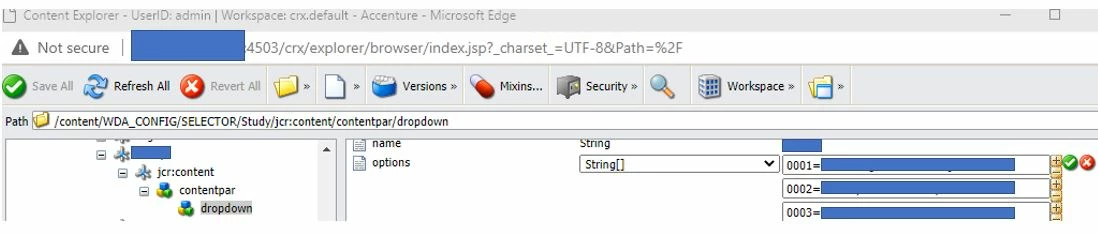
 

Thanks.

This post is no longer active and is closed to new replies. Need help? Start a new post to ask your question.
Best answer by burhanuddinj

Hi @snow123 ,

You can use Datatsource in this case. Create a json file with key-values required in dropdown and keep it in dam or /etc or any other preferred location. Create a datasource which will read the json file and populate the values in dropdown. At the end of the day you just have to update the json file and datasource will update the dropdown automatically. Kindly refer to the below links to create a datasource

http://www.sgaemsolutions.com/2019/01/dynamically-populate-drop-down-values.html


Hope this helps.

Thanks

3 replies

Asutosh_Jena_
Community Advisor
Community Advisor
September 2, 2021

Hi @snow123 


At the end of the day these contents are the XML files. So you can create an XML with all the options and then push it using VLT or as part of the code along with updating the filter.xml to ensure only these contents are pushed to your local instance.


Once these nodes are available on local instance, make a package with the filter path and then deploy it into whichver server you want.


Hope this helps!

Thanks!

Snow123Author
Level 2
September 2, 2021

May I know how to upload these xml file?

Asutosh_Jena_
Community Advisor
Community Advisor
September 2, 2021

Hi @snow123 


You can add these files in your local code base under ui.content section with appropriate folder structure and then deploy the code to local. See the sample file structure below:


MayurSatav
Community Advisor and Adobe Champion
September 3, 2021

Hi @snow123 ,


You can use Generic Lists concept which is easy to use and easy to maintain.

https://adobe-consulting-services.github.io/acs-aem-commons/features/generic-lists/index.html


burhanuddinj
burhanuddinjAccepted solution
Level 2
September 4, 2021

Hi @snow123 ,

You can use Datatsource in this case. Create a json file with key-values required in dropdown and keep it in dam or /etc or any other preferred location. Create a datasource which will read the json file and populate the values in dropdown. At the end of the day you just have to update the json file and datasource will update the dropdown automatically. Kindly refer to the below links to create a datasource

http://www.sgaemsolutions.com/2019/01/dynamically-populate-drop-down-values.html


Hope this helps.

Thanks

kautuk_sahni
Community Manager
Community Manager
September 6, 2021

@burhanuddinj Good to have great AEM SME inside the AEM community. Keep assisting others. 

Kautuk Sahni