Scheduler is not Visible in Sling Scheduler console: Scheduler is not working | Community
Skip to main content
Level 2
January 7, 2023
Solved

Scheduler is not Visible in Sling Scheduler console: Scheduler is not working
  • January 7, 2023
  • 5 replies
  • 2999 views

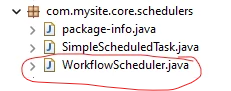
The circled one is my scheduler.


But below when i see, i only see the default scheduler.

 

Any Help would be Highly appreciated.

Currently I'm using AEM 6.5.13.


This post is no longer active and is closed to new replies. Need help? Start a new post to ask your question.
Best answer by lukasz-m

You have to use ResourceResolverFactory to get ResourceResolver object. It is not possible to get ResourceResolver object via @3214626 in OSGi component/service

@ Reference private ResourceResolverFactory resourceResolverFactory

 Please also confirm if above finding was the root cause, as I pointed out.

5 replies

Mani_kumar_
Community Advisor
Community Advisor
January 7, 2023

Could you please check the cron expression, if you have wrong expression you cannot see that in scheduler console

Also check if all the Reference services are up and running

Refer this sample example for end to end scheduler code

https://aem.redquark.org/2018/10/day-13-schedulers-in-aem.html?m=1

SureshDhulipudi
Community Advisor
Community Advisor
January 8, 2023

Can you please provide your scheduler source code

avi_infyAuthor
Level 2
January 9, 2023

Sure, I'm providing the screenshot of my sample code.


Here is my configuration class:


Level 3
January 9, 2023

Please check your scheduler with

1.  cron expression is correct or not or add default one for testing

2. please status in Felix console active or not.

3.  Check dependent services are active or satisfied state.

4.  Put some logs to validate initialization.

avi_infyAuthor
Level 2
January 9, 2023

1.  cron expression is correct or not or add default one for testing : Checked this, this one is correct, I'm Using cron expression from cronmakker.in

2. please status in Felix console active or not. : My Bundle is in active state

3.  Check dependent services are active or satisfied state.: Everything looks fine over here.

4.  Put some logs to validate initialization. : Check still, not able to get any thing in log.

avi_infyAuthor
Level 2
January 9, 2023

@lukasz-m @arunpatidar Can you please help me, I have attached the screenshot of my sample code in Below comments.

arunpatidar
Community Advisor
Community Advisor
January 9, 2023
avi_infyAuthor
Level 2
January 9, 2023

Tried this as well, but it did'nt worked

The thing is when i place my logic of void run, under void run() of your of code which you have provided. The scheduler disappear in Sling scheduler console.

lukasz-m
Community Advisor
Community Advisor
January 9, 2023

Hi @avi_infy,

The problem is that line:


@Reference private Resource resource;


Your OSGi component most likely did not start is not satisfied, because it was not possible to get above reference. You can confirm component status under /system/console/components.

Unfortunately you can not get resource in above way. You will need ResourceResolver and path to resource. You can get ResourceResolver via ResourceResolverFactory.

Please remove above line from you code - this will allow you to confirm that this is a root cause.

avi_infyAuthor
Level 2
January 9, 2023

Can I use 

@ Reference
private ResourceResolver resourceResolver; directly, or i have to only get it through ResourceResolverFactory?


lukasz-m
Community Advisor
lukasz-mCommunity AdvisorAccepted solution
Community Advisor
January 9, 2023

You have to use ResourceResolverFactory to get ResourceResolver object. It is not possible to get ResourceResolver object via @3214626 in OSGi component/service

@ Reference private ResourceResolverFactory resourceResolverFactory

 Please also confirm if above finding was the root cause, as I pointed out.