RTE inside multifield is not showing up in authoring dialog box
Hi,
I'm working on AEM cloud project (6.5) and facing 2 issues with coral 3 multifield.
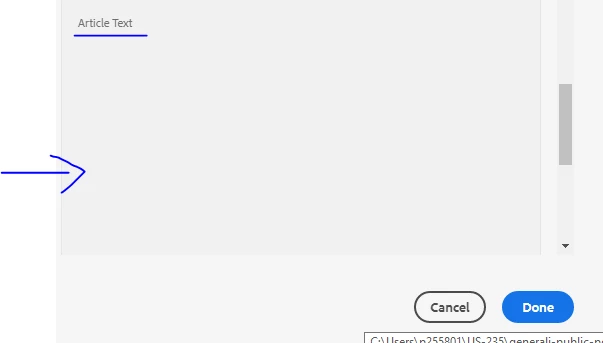
1)RTE in side coral-3 multifield (granite/ui/components/coral/foundation/form/multifield) it is not appearing in authoring dialog box.
2)Drag and drop functionality for image is also not working inside multifield.
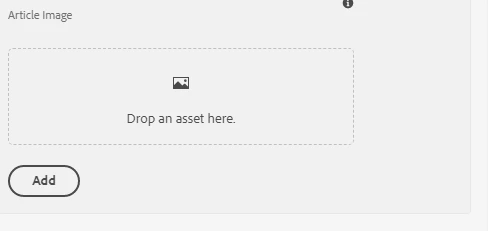
Note:- I tried using coral-3 fileupload resourceType (granite/ui/components/coral/foundation/form/fileupload) for image fields but still drag and drop functionality was not working.
Can someone help me with this issue? why it is not working?
Below is my cq:dialog.
<teaserIcons
jcr:primaryType="nt:unstructured"
sling:resourceType="granite/ui/components/coral/foundation/form/multifield"
composite="{Boolean}true"
fieldLabel="Articles">
<field
jcr:primaryType="nt:unstructured"
sling:resourceType="granite/ui/components/coral/foundation/container"
name="./articles">
<items jcr:primaryType="nt:unstructured">
<iconname
jcr:primaryType="nt:unstructured"
sling:resourceType="granite/ui/components/coral/foundation/form/textfield"
fieldDescription="Provide the name of icon"
fieldLabel="Icon Name"
name="./iconName"
required="{Boolean}true"/>
<teaserIcon
jcr:primaryType="nt:unstructured"
sling:resourceType="cq/gui/components/authoring/dialog/fileupload"
allowUpload="{Boolean}[false]"
fieldDescription="Select article icon."
fieldLabel="Article Icon"
fileNameParameter="./articleIcon"
fileReferenceParameter="./teaserIcon"
mimeTypes="[image/png,image/jpeg,image/jpg]"
name="./articleIcon"
uploadUrl="[${suffix.path}]"/>
<text
jcr:primaryType="nt:unstructured"
sling:resourceType="cq/gui/components/authoring/dialog/richtext"
fieldLabel="Article Text"
name="./articleText"
useFixedInlineToolbar="{Boolean}true">
<rtePlugins jcr:primaryType="nt:unstructured">
<format
jcr:primaryType="nt:unstructured"
features="bold,italic"/>
<justify
jcr:primaryType="nt:unstructured"
features="-"/>
<links
jcr:primaryType="nt:unstructured"
features="modifylink,unlink"/>
<lists
jcr:primaryType="nt:unstructured"
features="*"/>
<misctools
jcr:primaryType="nt:unstructured"
features="sourceedit">
<specialCharsConfig jcr:primaryType="nt:unstructured">
<chars jcr:primaryType="nt:unstructured">
<default_copyright
jcr:primaryType="nt:unstructured"
entity="&copy;"
name="copyright"/>
<default_euro
jcr:primaryType="nt:unstructured"
entity="&euro;"
name="euro"/>
<default_registered
jcr:primaryType="nt:unstructured"
entity="&reg;"
name="registered"/>
<default_trademark
jcr:primaryType="nt:unstructured"
entity="&trade;"
name="trademark"/>
</chars>
</specialCharsConfig>
</misctools>
<paraformat
jcr:primaryType="nt:unstructured"
features="*">
<formats jcr:primaryType="nt:unstructured">
<default_p
jcr:primaryType="nt:unstructured"
description="Paragraph"
tag="p"/>
<default_h1
jcr:primaryType="nt:unstructured"
description="Heading 1"
tag="h1"/>
<default_h2
jcr:primaryType="nt:unstructured"
description="Heading 2"
tag="h2"/>
<default_h3
jcr:primaryType="nt:unstructured"
description="Heading 3"
tag="h3"/>
<default_h4
jcr:primaryType="nt:unstructured"
description="Heading 4"
tag="h4"/>
<default_h5
jcr:primaryType="nt:unstructured"
description="Heading 5"
tag="h5"/>
<default_h6
jcr:primaryType="nt:unstructured"
description="Heading 6"
tag="h6"/>
<default_blockquote
jcr:primaryType="nt:unstructured"
description="Quote"
tag="blockquote"/>
<default_pre
jcr:primaryType="nt:unstructured"
description="Preformatted"
tag="pre"/>
</formats>
</paraformat>
<table
jcr:primaryType="nt:unstructured"
features="-">
<hiddenHeaderConfig
jcr:primaryType="nt:unstructured"
hiddenHeaderClassName="cq-wcm-foundation-aria-visuallyhidden"
hiddenHeaderEditingCSS="cq-RichText-hiddenHeader--editing"/>
</table>
<tracklinks
jcr:primaryType="nt:unstructured"
features="*"/>
</rtePlugins>
<uiSettings jcr:primaryType="nt:unstructured">
<cui jcr:primaryType="nt:unstructured">
<inline
jcr:primaryType="nt:unstructured"
toolbar="[format#bold,format#italic,format#underline,#justify,#lists,links#modifylink,links#unlink,#paraformat,misctools#sourceedit]">
<popovers jcr:primaryType="nt:unstructured">
<justify
jcr:primaryType="nt:unstructured"
items="[justify#justifyleft,justify#justifycenter,justify#justifyright,justify#justifyjustify]"
ref="justify"/>
<lists
jcr:primaryType="nt:unstructured"
items="[lists#unordered,lists#ordered,lists#outdent,lists#indent]"
ref="lists"/>
<paraformat
jcr:primaryType="nt:unstructured"
items="paraformat:getFormats:paraformat-pulldown"
ref="paraformat"/>
</popovers>
</inline>
<tableEditOptions
jcr:primaryType="nt:unstructured"
toolbar="[table#insertcolumn-before,table#insertcolumn-after,table#removecolumn,-,table#insertrow-before,table#insertrow-after,table#removerow,-,table#mergecells-right,table#mergecells-down,table#mergecells,table#splitcell-horizontal,table#splitcell-vertical,-,table#selectrow,table#selectcolumn,-,table#ensureparagraph,-,table#modifytableandcell,table#removetable,-,undo#undo,undo#redo,-,table#exitTableEditing,-]"/>
</cui>
</uiSettings>
</text>
<teaserImage
jcr:primaryType="nt:unstructured"
sling:resourceType="cq/gui/components/authoring/dialog/fileupload"
allowUpload="{Boolean}[false]"
fieldDescription="Select article Image"
fieldLabel="Article Image"
fileNameParameter="./articleImage"
fileReferenceParameter="./teaserImage"
mimeTypes="[image/png,image/jpeg,image/jpg]"
name="./articleImage"
uploadUrl="[${suffix.path}]"/>
</items>
</field>
</teaserIcons>