Replace image field in the Universal Editor | Community
Skip to main content
March 25, 2025
Solved

Replace image field in the Universal Editor

  • March 25, 2025
  • 1 reply
  • 618 views

Hello, I want to replace or substitute a UE field with a React component through extensions.

 

The field is the one that says *Image which I want to replace.

In my extensions project I have the following code.
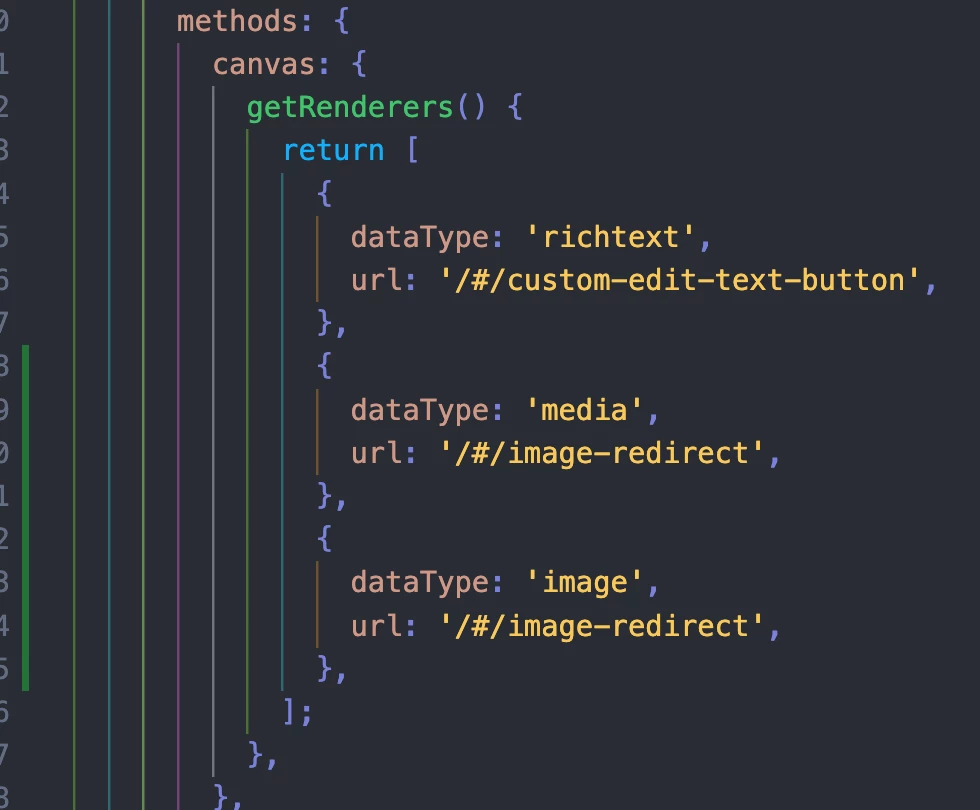
I've tried different data types like Image, image, media, and multi, but I haven't been able to replace that field.

Could you tell me which data type is right for it?


Best answer by FelixDe

Hi Ricardo,


To be able to provide an alternative field renderer in Universal Editor, the field "component" property in the "component-models.json" must match the "dataType" property in the "getRenderers" call. With the code above all field with "component": "image", "media" and "richtext" should get the alternative render.


What is the definition of your field in "component-models.json"?


Thanks.

1 reply

FelixDeAdobe EmployeeAccepted solution
Adobe Employee
March 26, 2025

Hi Ricardo,


To be able to provide an alternative field renderer in Universal Editor, the field "component" property in the "component-models.json" must match the "dataType" property in the "getRenderers" call. With the code above all field with "component": "image", "media" and "richtext" should get the alternative render.


What is the definition of your field in "component-models.json"?


Thanks.

March 28, 2025

we have a component-definition.json and we have this data


 and in de model from aem is this:


Adobe Employee
April 3, 2025

Thank you for confirming. I see that you are using a Headless setup and currently the extensibility API is not ready to be able to pin point a particular field in Headless context. A fix is currently being worked on and while we don't have an estimated date for delivery/release.


In the Headless context, Universal Editor is using the information returned by the `/details` call to decide the type of the field. The extension will then match this value to the what you put in the `dataType`. If you were to do that then the Extension custom field would then be rendered over all field of that type.