Regarding the Translation | Community
Skip to main content
Level 2
April 30, 2025
Solved

Regarding the Translation

  • April 30, 2025
  • 1 reply
  • 332 views

See we are using AEM translator http://localhost:4502/libs/cq/i18n/translator.html which has UI like this
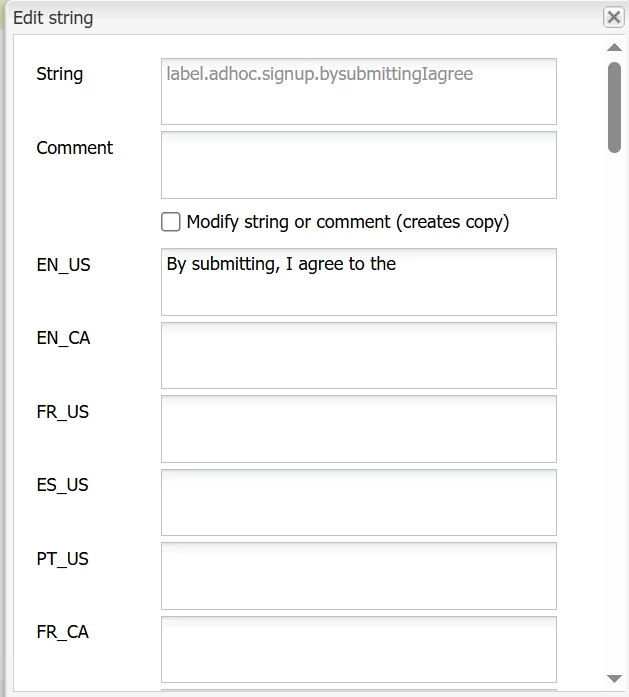
Now we support entire EUROPE region for 56  locale so before submitting to translation.com i have to add the english content to all these 56 locale manually. It's such a hectic work to do as an AEM Developer. 
So can you guys help me with this.

1 -> Can we automate this process 

2 -> Do we have any better way to do it .

Just need you help in this.

The condition is very critical like ei have excel sheet which have close to 800 keys which i need to add to AEM using this translator UI.

1 key i have to add 56 times. So jus imagine it with 800 keys. 


Guys need a solution on this...

@arunpatidar @1905403 

Best answer by ShivamKumar

Hi @sanketja1 ,


You can follow below steps:- 


1. Convert your Excel to CSV or JSON, where each row contains:

  • A unique translation key (e.g., pensions.title)
  • English text
  • each of the 56 locales

2. Write a Sling Servlet that:

  • Reads the uploaded CSV/JSON file and Iterates over each row and locale
  • For each key + locale, creates or updates a node under:

          /apps/<your-project>/i18n/<locale>/<keyName>
3. This servlet will programmatically create or update the i18n dictionary nodes in AEM JCR using the JCR API or ResourceResolver.

Hope this helps.

1 reply

ShivamKumarAccepted solution
Level 4
April 30, 2025

Hi @sanketja1 ,


You can follow below steps:- 


1. Convert your Excel to CSV or JSON, where each row contains:

  • A unique translation key (e.g., pensions.title)
  • English text
  • each of the 56 locales

2. Write a Sling Servlet that:

  • Reads the uploaded CSV/JSON file and Iterates over each row and locale
  • For each key + locale, creates or updates a node under:

          /apps/<your-project>/i18n/<locale>/<keyName>
3. This servlet will programmatically create or update the i18n dictionary nodes in AEM JCR using the JCR API or ResourceResolver.

Hope this helps.