New
Published Status Visualization
| Request for Feature Enhancement (RFE) Summary: | Published Status Visualization with colours |
| Use-case: | People with access to an AEM author should be able to be quick in recognizing a node as “never published”, “published”, “unpublished”, “modified” and/or “locked”. This should be true in each of the view modes, “Card View”, “Column View” and “List View”. |
| Current/Experienced Behavior: | a) In Column View, there user has no possibility to get a quick view of the published states. The status of a single file can be verified only when clicking it. b) in Card View a user can see the published status but also does not easily detect whether a node is published or unpublished – although the cards can vary in size in case they need to show more meta data. c) In “List View” a user gets the only possibility to get a pretty quick view of the matter, although – as said earlier – the different icons look pretty alike. |
| Improved/Expected Behavior: | If the three view modes would be enriched with colours a user would immediately see what status a node is in. I would imagine such colours: red = unpublished, green = published, blue = modified, grey = locked, no colour = never published. Please see the attached “paintings” for an idea I had how this could look like. |
| Environment Details (AEM version/service pack, any other specifics if applicable): | Any AEM version which offers TouchUI. |
| Customer-name/Organization name: | Credit Suisse AG |
| Screenshot (if applicable): | 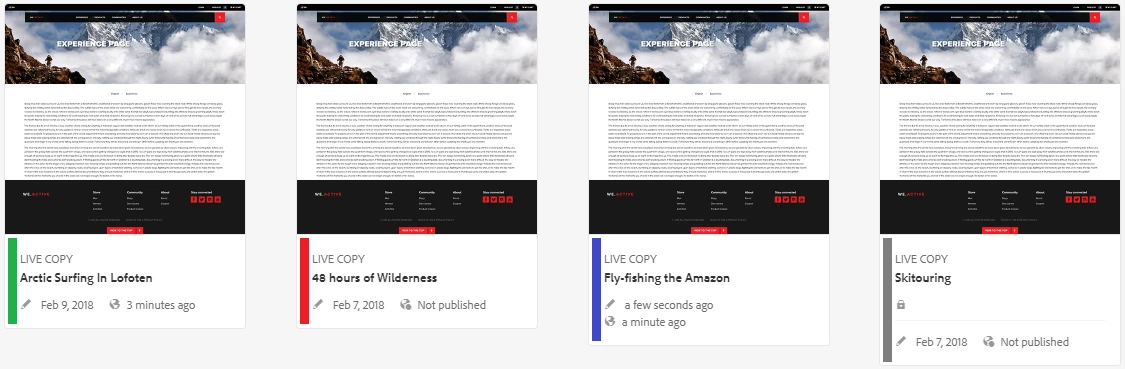 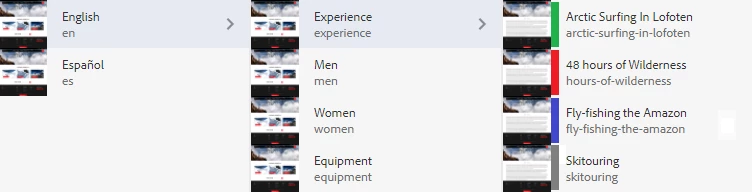 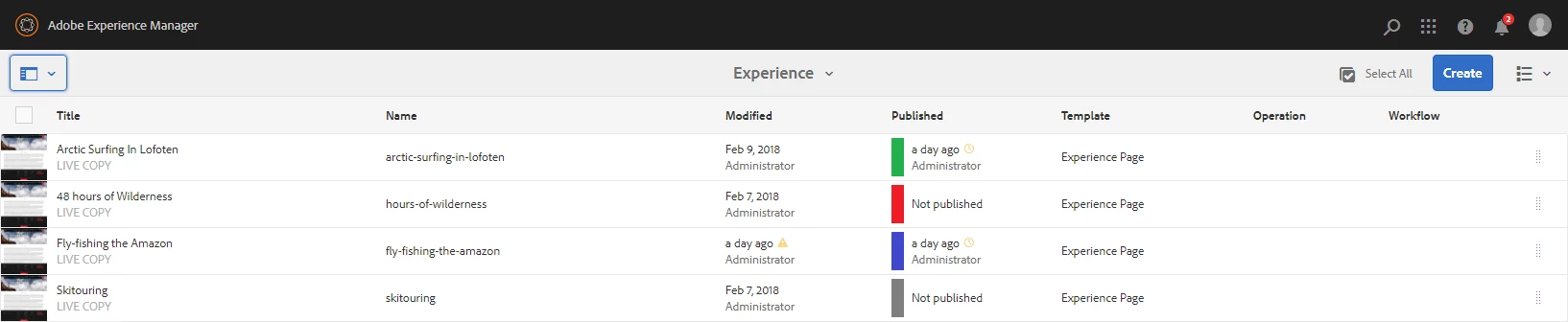
|
| Code package (if applicable): |