Apr 8, 2022 3:20 PM UTC
New

Published Status Visualization

Request for Feature Enhancement (RFE) Summary: Published Status Visualization with colours
Use-case: People with access to an AEM author should be able to be quick in recognizing a node as “never published”, “published”, “unpublished”, “modified” and/or “locked”. This should be true in each of the view modes, “Card View”, “Column View” and “List View”.
Current/Experienced Behavior: a) In Column View, there user has no possibility to get a quick view of the published states. The status of a single file can be verified only when clicking it. b) in Card View a user can see the published status but also does not easily detect whether a node is published or unpublished – although the cards can vary in size in case they need to show more meta data. c) In “List View” a user gets the only possibility to get a pretty quick view of the matter, although – as said earlier – the different icons look pretty alike.
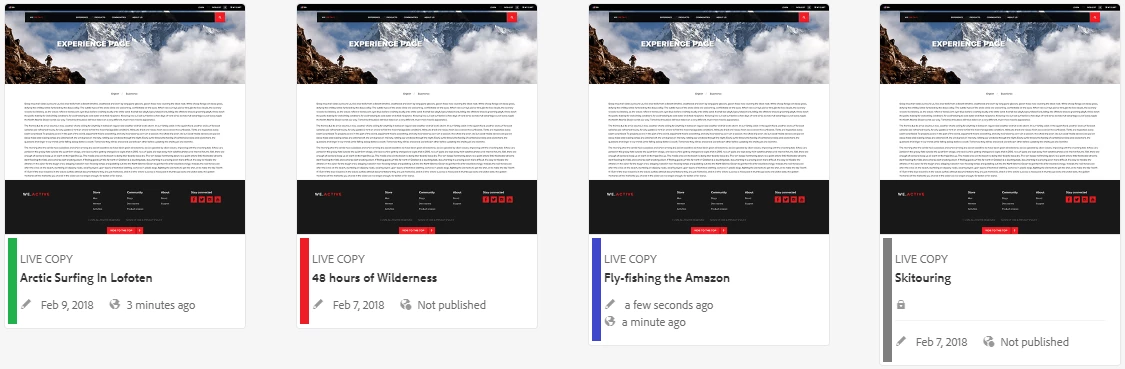
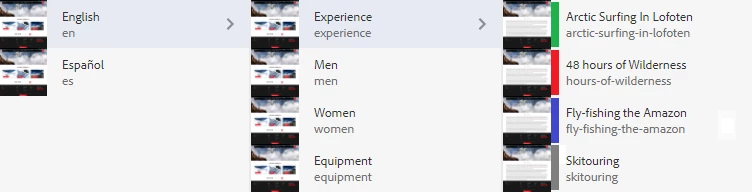
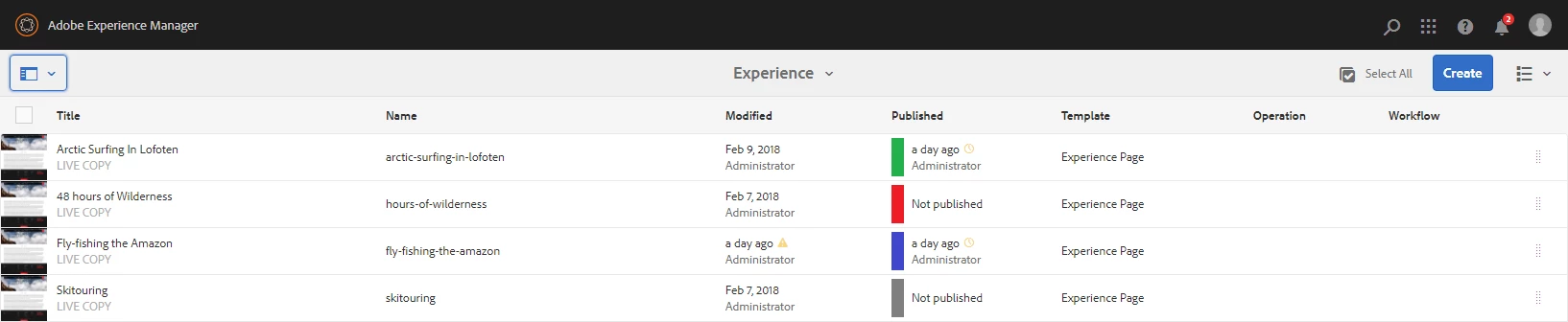
Improved/Expected Behavior: If the three view modes would be enriched with colours a user would immediately see what status a node is in. I would imagine such colours: red = unpublished, green = published, blue = modified, grey = locked, no colour = never published. Please see the attached “paintings” for an idea I had how this could look like.
Environment Details (AEM version/service pack, any other specifics if applicable): Any AEM version which offers TouchUI.
Customer-name/Organization name: Credit Suisse AG
Screenshot (if applicable):


Code package (if applicable):  

11 replies

arunpatidar
Community Advisor
Community Advisor
Apr 8, 2022 4:05 PM UTC

@th0ma5 

This is a good idea, probably I can try implementing this as PoC.


furthermore , the option can be added to user preference

Translate
Arun Patidar
mlmg
Level 2
May 11, 2022 7:19 PM UTC

as an author and manager of other authors, i love this idea.

Translate
arunpatidar
Community Advisor
Community Advisor
Jul 14, 2022 5:51 PM UTC

I tried implementing this, and results looks like 


Translate
Arun Patidar
TH0MA5Author
Jul 15, 2022 6:23 AM UTC

This looks absolutely great!

Translate
TH0MA5Author
Jul 15, 2022 6:31 AM UTC

I would love to get your implementation and to use it too. Do you plan to release it via a feature pack, a service pack or any other method?

Translate
arunpatidar
Community Advisor
Community Advisor
Jul 15, 2022 7:01 AM UTC

I did this as POC only for column view.

I will post a blog about this implementation soon. The implementation is quite simple.


But if you want to try it early in local, package is at https://github.com/arunpatidar02/aem63app-repo/blob/master/packages/sitepage-status-color-1.zip , this is tested only in AEMaaCS, so may not work in other AEM or probably break something else in other version of AEM.


Translate
Arun Patidar
TH0MA5Author
Jul 15, 2022 7:13 AM UTC

Fine for me to await your blog, looking forward to it. Thanks!

Translate
arunpatidar
Community Advisor
Community Advisor
Jul 15, 2022 11:48 AM UTC
mlmg
Level 2
Jul 15, 2022 2:16 PM UTC

i am stoked about this too! glad i have been following this thread!  😀

Translate
TH0MA5Author
Jul 15, 2022 2:34 PM UTC

Tried that out on my local installation with AEM 6.5.13 - we're (still) on on-premise environments - but wasn't successful - as you could imagine anyway. Neither manually - even created full-path-overlays as another test - nor by installing your package.

The error message says "... line: 245 in ... /apps/custom/columnitem/columnitem.jsp The method getThumbnailProvider(Node) in the type ThumbnailProviderManager is not applicable for the arguments (Resource)..."

Translate