Publish button doesn't work under "Manage Publication" | Community
Skip to main content
Level 2
October 11, 2022

Publish button doesn't work under "Manage Publication"

  • October 11, 2022
  • 5 replies
  • 2433 views

Hi:


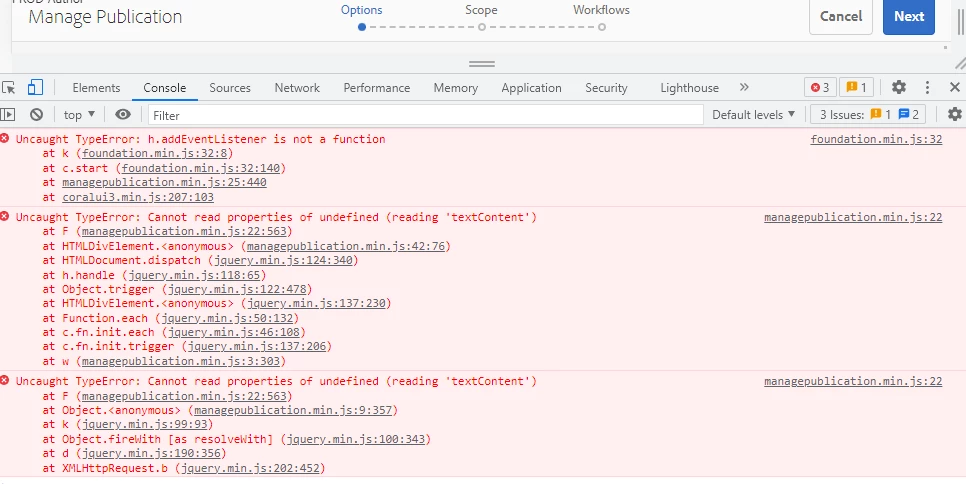
I have a very strange issue with the "Manage Publication" feature in AEM 6.5.8.  Workflows appear to be set up, though I don't see any actual workflows assigned.  When I click on a page to publish and select "Manage Publication,"  the browser immediately generates three JavaScript errors (screenshot below).

I can click "Next," select the page, then proceed to "Workflows."  When I click "Publish," the publish button greys out, but the page just sits there and does nothing.  No further JavaScript errors occur.

This prevents me from publishing the page using any Chromium-based browser.  However, if I try it in Firefox, I still get the three JS errors, but when I click "Publish," it behaves as expected, publishing the page.

I'm not sure why these JS errors are firing in our production environment.  They don't occur in our dev and staging environments.  I also don't see a "workflows" step on dev and stage.

Any ideas?


This post is no longer active and is closed to new replies. Need help? Start a new post to ask your question.

5 replies

Mayank_Gandhi
Adobe Employee
Adobe Employee
October 11, 2022

@emmceetee can you check error log as well while using chrome? Did the publish wf even got triggered?

emmceeteeAuthor
Level 2
October 11, 2022

Hi Mayank:


Thanks for the reply. I checked the log and it appears clean; however, it doesn't publish.  

What's strange is that it only occurs when I'm accessing the author instance using the external domain URL.  If I use the IP address, publishing works fine.

Mayank_Gandhi
Adobe Employee
Adobe Employee
October 11, 2022

@emmceetee on-prem or managed services?

Jagadeesh_Prakash
Community Advisor
Community Advisor
October 11, 2022

Hi @emmceetee 


Can you check in your source if below JS is loading 

<script src="https:////cdnjs.cloudflare.com/ajax/libs/jquery/2.1.3/jquery.min.js" charset="utf-8"></script>


milind_bachani
Adobe Employee
Adobe Employee
October 11, 2022

Hi @emmceetee ,


Couple of things , that can help :

1. To answer your " I also don't see a "workflows" step on dev and stage." 
You see workflow tab, because the user being used to publish the page does not have the replicate rights, which would not be the case on dev/ stage.

2. The workflow which you are using for activation, does that have a synced copy in "/var" ?
3. Was there any recent upgrade, which led you to such issue ?
4. Check if "/libs/cq/gui/content/common/managepublicationwizard" has an overlay in /apps ?

----

Reproduce on local :

1. To test/ replicate this scenario on local , create a new user who does NOT have permission to replicate content.

2. Try replicating a page using manage replication with the user created in #1.

3. Check if you still see the console errors.

Note : Also, try doing same with sample content on 6.5.8 vanilla instance to check the behaviour.

----
I don't have 6.5.8 vanilla instance with me, I tried the same on Cloud SDK & 6.5.13 vanilla - seem to work fine, which points me to issue with custom code.

Thanks,

Milind

emmceeteeAuthor
Level 2
October 11, 2022

Hi Milind:


Thanks for the reply.  I have full administrator rights.  I would assume with full administrator rights, I would also have full replication rights.  Is that not correct?

There was no recent upgrade.  

I just discovered that the problem only manifests when I'm using the external domain URL instead of the IP address for the author instance.  Nothing shows up in the logs.  Very strange.

Magicr
Level 6
October 11, 2022

This error was fixed in ServicePack 11 or 12.

emmceeteeAuthor
Level 2
October 11, 2022

Thanks, Magicr.  Do you know if it's the same issue?  Is there a release note that references this problem somewhere?  Thanks again.

Magicr
Level 6
October 11, 2022

There is no release information. I know that because with SP8 the option for publish to particular time did not work when you have selected multiple pages. Only "quick publish" worked fine. When I opend the console from browser these error messages appeared. During checks for compability with curent project I noticed the error is gone in SP11 or 12.

Siva_Sogalapalli
Community Advisor
Community Advisor
October 11, 2022

@emmceetee 

Looks like it was an issue with older version of AEM, please check this and see if that resolves your issue.

https://stackoverflow.com/questions/50165065/on-aem-publish-option-do-not-work-in-chrome-and-firefox-on-windows-8-10 

emmceeteeAuthor
Level 2
October 11, 2022

Thanks - I saw that one in my research but it wasn't matching my scenario. 


In my scenario, it allows me to publish:

1. If I use the IP address instead of the external domain URL.
2. If I use Firefox (regardless of IP or domain URL)

All Chromium browsers failed in #1 above.