Karl515
Level 5
January 31, 2019
Solved

Problem with deploying mvn archetype to localhost.

  • January 31, 2019
  • 11 replies
  • 5306 views

Hello there!

I have this problem that when I install using eclipse, it only installs to my .m2 repository instead of localhost:4502. What could be the cause of this?

-already make sure the base POM file is pointing to localhost:4502

Now I'm having thoughts it's because if the setting.xml that WKND tut let me put in .m2. but if I delete the setting.xml. I'm getting an error.

How can I let eclipse to install in localhost:4502? Thanks!
This post is no longer active and is closed to new replies. Need help? Start a new post to ask your question.
Best answer by Gaurav-Behl

For Java EE (aka Eclipse) to produce the same results do this -

1) Right click on the project folder that you want to build

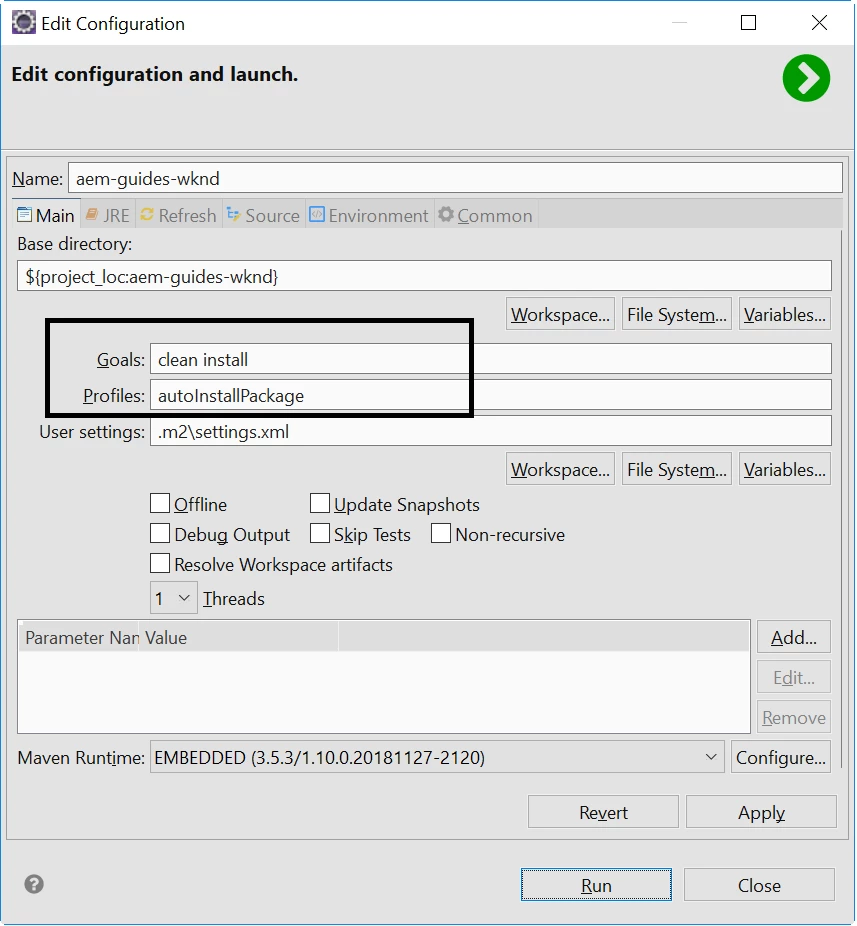
2) Click on Run as > Maven Build...

3) Mention the goals & profile that you want to execute:  clean install -PautoInstallPackage

4) Hit Run and check the results

11 replies

Karl515
Karl515Author
Level 5
February 1, 2019

Thanks! works like charm. It still says Installed on .m2 repository but it reflects to my localhost too!

P.S. I also did got some errors so this is my build Profile:

if your getting POM errors, just add adobe-public. cheers and thanks!